Dashboard
Interface Design

Where functionality and art come together to help organizations grow and thrive.

Well-designed and intuitive dashboard design enhances productivity in almost every area of life, allowing users to quickly make sense of complex data and make informed decisions that lead to more positive outcomes. With visually appealing and user-friendly interfaces, dashboards empower individuals and organizations to effectively monitor, analyze, and optimize their performance across their most critical areas, such as marketing, profitability, and human resources.

Dashboard
Basics

Data is not sexy, but data visualization is a social phenomena that is changing the way make decisions and how business across the world better understand themselves and their competition.

When most people hear the word dashboard, they think of something in their car. However, in the digital world the dashboard has become king, and for good reason.

A data dashboard is an information management tool that visually tracks, analyzes and displays key performance indicators (KPI), metrics and key data points to monitor the health of a business, department or specific process.

The key function or asset of a dashboard takes place behind the scenes. A intuitive dashboard interface design connects to your files, attachments, services and API’s; while on the surface, displaying your data in the form of tables, line charts, bar charts and gauges for easy, digestible data comprehension.

Most people appreciate a level of animation in a user experience as long as it enhances the user experience.

In the world of dashboard design, animation plays the critical role of providing further explanation of the data and giving the user customized ways to drill down on the information. A good example of this is when a user is able to grab a data point and move it across a timeline to see how the data has changed over time.

Engaging dashboards rely heavily on design that is simple and well suited for ample amounts of information. Finding the nexus between showing the most critical and useful information and not causing information overload requires a veteran staff of UI designers and working very closely with the client to understand their needs on all levels.

Automatize - Dashboard Interface
Health App - Dashboard Design

Dashboard
Functionality

Data is the all-for-one, one-for-all resource that everyone has access to, but it’s the real-time data that stands above the rest when it comes making positive changes.

Health Application (EHR) Dashboard

A data dashboard is the most efficient way to track multiple data sources in real-time, because it provides a central location for users to monitor and analyze performance.

Real-time monitoring and automation tools reduce the hours of analyzing spreadsheets or countless pages of old school printed reports or patient files, which has plagued the healthcare industry for eons.

Analytics, trends, occurrences, and the processing and compiling of data can all be done through dashboards via different application processing interfaces (APIs), freeing up exorbitant amounts of time and staff energy.

Dashboards
in Business

The business of dashboards is the business of understanding. How do dashboards solve everyday business challenges? If your are a busy manager, let me introduce you to your new best friend.

An understanding or overview of your company's performance is moments away. As a concept, performance dashboards have been around for many years and reports indicate that they have been widely adopted by businesses.

Data can be visualized on a dashboard in thousands of ways, such as tables, line charts, bar charts, maps, bubbles and and many others. All of these visuals help users track the health of their business against benchmarks and goals, which is now a critical process for any business. Dashboard design companies focus on creating dashboards that allow data to be easily displayed, understood, and acted upon. It the action part that we are all seeking, creating visuals that create insight and inspire immediate and effective action.

Depending on how you decide to design your dashboard, even straightforward numerical data can be visually informative by utilizing intuitive symbols, such as a red triangle facing downward to indicate a drop in revenue or a green triangle facing up to indicate an increase in website traffic.

For example, a survey by The Data Warehousing Institute reported that about half of the 473 business intelligence professionals were using dashboards and that a further 17% of the respondents were in the process of developing a dashboard solution in their organizations (Eckerson). Also, a more recent survey by Gartner Inc. found that dashboards have been rapidly replacing reporting and ad-hoc analysis in Western organizations.

Dashboards in business

Dashboard
Intelligence

Intelligence can be taught, well, kinda. Interested in finding out how data dashboards are used in business intelligence and analytics?

According to Wikipedia: “Analytics is the discovery, interpretation, and communication of meaningful patterns in data. Especially valuable in areas rich with recorded information, analytics relies on the simultaneous application of statistics, computer programming and operations research to quantify performance. Analytics often favors data visualization to communicate insight.”

An analytics dashboard is a data visualization tool that allows all users to understand analytics without having to do one single calculation or spend any time learning about what is presented. Even for non-technical users, dashboards allow them to participate and understand the analytics by compiling data and visualizing trends and occurrences. Data dashboards don’t rely on interpretation, they provide a completely objective view of performance metrics and serve as an effective foundation for immediate business decisions and planning. Dashboard interface design is a service focused on building tools used to display data visualizations that are immediately useful.

Why should your business visualize data on a dashboard?

Changes to any aspect of a business, whether it be in marketing, sales, support, or finance, has an impact on the business as a whole. KPI dashboards give an immediate and precise look at how different departments success or failures are impacting the company as a whole.

People have been monitoring their businesses without dashboards for ages, but data dashboards make it a heck of a lot easier that can stop you from wasting time and money. With dashboards, users are able to dig into a level of performance understanding that provides an articulate and insightful view of the KPIs of any organizations. Whether your businesses data is stored on a web service, attachment or API, a dashboard pulls this information and allows you to monitor all your data in one central location. Additionally, dashboards are capable of correlating data from different sources in a single visualization. By monitoring multiple KPIs and metrics on one central dashboard, users can make adjustments to their business practices in real-time.

Health Monitor - Dashboard Design
Patient Overview - Dashboard Design
Automatize - Dashboard Interface
The Grid NFT - Dashboard Design
Leaderboard Dark UI
Widget Customization

Modular Simplicity

Key characteristics that mark this style of dashboard design are grid-based layouts, good use of whitespace, and more reliance on typography and simple, minimalistic graphics. In a dashboard, this design style works superbly well because it puts emphasis on the content and sees that the story is communicated in a clear and concise manner.

Iconography Labeling

Iconography labeling

Icons are a designer's preferred element when it comes to showing navigation.

A small graphic can convey a lot more than an entire line of text. However, the trend is shifting more towards labeled icons for navigation, a small icon followed by a one or two word description. This ensures that new users are not left guessing the meaning of those icons or symbols.

Iconography labeling is a fundamental aspect of user interface design, focusing on the judicious use of icons and their accompanying textual labels to enhance user experience.

Effective iconography labeling in design not only makes the interface aesthetically pleasing but also ensures accessibility and inclusivity.

Interface Color Schemes

A careful selection and coordination of colors creates a harmonious and visually pleasing user experience.

Color is often used in design to communicate with users, helping them achieve their goals and understand navigational options.

Properly executed interface color schemes not only enhance the visual appeal of a digital product but also play a pivotal role in facilitating navigation, conveying information, and ensuring a user-friendly and inclusive experience.

Interface Color Scheme

Content
Sensitive
Navigation

Content sensitive navigation came with the rise of dynamic user interfaces and is a great way to declutter your design. Basically, you need to ask yourself a simple question: which navigation elements should be on screen all the time and what can be shown only in certain situations or during particular actions?

For example, Pinterest shows action buttons only when you hover on a pin. Carefully target buttons and gadgets that can be hidden until the user performs a certain action, such as hovering on a link, turning a dropdown arrow, selecting a tab, etc.

The best interface designs have a clear purpose and are specifically engineered for a specific audience. What level of information are you attempting to convey?

Will the dashboard provide background data or will it be powerful enough to actually formulate conclusions? In addition to knowing what you’re trying to say, it’s important to know who you’re saying it to. Does your audience know this subject matter extremely well or will it be new to them?

What kind of cues will they need to easily digest the information without having to struggle? Do you need a mobile dashboard design? Thinking about these questions before you head into the design phase can help you create a successful dashboard.

And does your audience understand basic dashboard design interaction tools, or will they need a certain level of training in order to make the best use of the tool that has been built for them?

Before you envision fancy graphics and color schemes, remember that no matter how much you love a layout approach, the content of your dashboard needs to compel the kind of interface that is created and not the other way around.

This means that the first thing you must do when looking at an outline or dataset is to intimately understand the content and the underlying needs for this content. Data visualization is powerful because it brings plain data to life.

This is especially true of the relationships among the points in your dataset. If you’re using dates, is there a pattern in the frequency? For a list of items, is everything in the list independent and equal? Or are there sub groups that have their own relationships.

No matter your data type, always look for outliers. Real life is messy — and so is raw data. Not everything will fit neatly into a simple bar chart or perfect bell curve, but considering the data types and what types of functionality that may accentuate this data will ultimately dictate the UI itself.

Medical Dashboard
AI-Powered Traffic Dashboard - Reporting for Disputed Accident

Design Systems

Design system essentials: streamlining creativity and consistency

A Fuselab design system includes a collection of reusable components, patterns, and guidelines that ensure consistency and efficiency in the design and development process of digital products. We are absolutely passionate about creating pixel perfect design systems where every function is elaborately documented. Development teams love working with us because of the level of detail in our design systems, and the amount of documentation we include.

Final
Thoughts

An informational data dashboard gives you control
Handshake Connections

An informational data dashboard gives you control.

Whether it’s a personal finance dashboard that makes you conscious of your spending trends or an enterprise marketing dashboard that helps you keep track of your marketing budgets, both heighten your awareness of a situation, giving you the sense of control, which, let’s face it, is something we all crave. If you are running a dashboard interface design agency and want to be successful, we highly recommend making your UX research as exhaustive as possible. The only way to build something that will last is to put in the time needed to build your product upon a solid foundation.

Embracing Control

We love to be in control. Imagine a situation where you are unaware of what’s happening around you. Very soon your panic button is switched on and you want to know what’s going on and what you can and can’t control. From an evolutionary standpoint, if we are in control of our environment we have a better chance of survival. Our subconscious mind prepares us for all kinds of danger (fight or flight) based on our perceived level of control, and regardless of our awareness of this fact, we experience these emotions on a fairly consistent basis.

Digital Dashboards

In our experience, we have found that there is no other industry more aptly positioned to take advantage of the digital dashboard than the medical community. As this is an industry where the amount of data available can be suffocating, and yet being able to make use of this data can be the difference between life and death, literally! Healthcare also pulls on our heartstrings as designers, as many of us never imagined when we began that our work might actually help people live healthier and longer lives.

Enhancing Hospital Dashboards

Dashboard systems in hospitals need a user interface (UI) that can centrally manage and retrieve various information related to patients in a single screen, support the decision-making of medical professionals in real- time by integrating scattered medical information systems and core workflows, enhance the competence and decision-making ability of medical professionals, and reduce the probability of misdiagnosis. See our work examples below.

Health Monitor - Main Dashboard
Health Monitor - Patient Profile

Fuselab Creative
Dashboard
Development
Examples

Our work featured here is just a small sampling of the interface and digital dashboard work we have developed for our clients over the past year.

Data Monitor Healthcare

To monitor disease prevalence across the world and according specific demographics and timeframes.

Problem

Citeline, an Informa company, asked Fuselab to help create a human-centered UX for a critical application in the pharmaceutical industry. The Datamonitor system needed to create a path for researchers to determine where there is the largest need for their products, and the ability to track the success of existing treatments for specific diseases across the world.

Solution

Fuselab created an interactive web application that allowed users, within very few clicks to see relevant data across the world and then to compare that data by going back in history and into the future using a custom AI predictive analytics system. The simple map-based system provided an intuitive interface that needed almost no explanation or training.

Outcome

The final platform debut took place at an annual meeting where pharmaceutical staff from across the spectrum of companies got to try out the new system and provide feedback. Since that time use of the new tool as increased 100% over the old platform and Informa has received a considerable increase in visitor’s their health monitor webpage.

Referral MD

After developing over 400 unique page views, countless data visualizations, a GIS-based map, hospital management and patient scheduler, and a highly sophisticated medical records system, what you are left with is one incredibly powerful EHR system called ReferraMD, designed by Fuselab.

Problem

ReferralMD was in need of rethinking the design of it’s software UX/UI as well as its public website. This would require hundreds of interface designs for the software system alone.

Solution

Fuselab Creative developed an entirely new corporate brand identity and detailed style guide that was used to create a simple, yet extremely efficient user flow for doctors and medical professionals to better manage their patient referrals, all from one dashboard of information.

Outcome

ReferralMD is now one of the fastest growing physician relationship management systems in the country and has been formally endorsed by Cedar Sinai Medical Group.

Store Product

Part supply chain management system, automated inventory and ordering system, this grocery store management tool allows users to immediately see product levels, trends, and whole store inventories in seconds.

Mixed Reality /
Dashboard

Although the adoption has been somewhat slow, augmented reality is going to make big changes to the way we drive and navigate.

Problem

If you drive a lot or actually drive for a living, you are probably using your phone to navigate while also checking the weather and possibly chatting with friends. In other words, there are too many distractions taking your eyes off the road.

Solution

Our design for Mixed Reality virtual technology creates a “heads up” environment, coupled with voice navigation that changes the driving and navigation experience while also offering a much safer and enjoyable experience for drivers everywhere.

Outcome

The platform is still in the beta testing phase for car manufacturers considering adding these options to their vehicles, however, the feedback received thus far has been extremely positive. We hope to see Mixed Reality dashboards on the road soon!

X4D software
application

X4D as a software application is a very feature-rich and complicated system.

Problem

X4D had four very specific problems:

  • It’s a very complex system with many multi-layered views.
  • The system is not visually uniform.
  • Need a web interface/platform in addition to the software.
  • Need to bypass web limitations when dealing with nested levels of data.

Solution

The dashboard-based software we designed provides several unique, user-friendly views, including a general project overview, a comprehensive scheduler for tracking the status of individual milestones and regulatory permit approvals, as well as any critical deviations from the initial plan along with supervisor approvals.

Outcome

The very first block provides high-level information about the general project properties such as: project dates, planned project time and the number of planned tasks that have to be carried out. The dashboards have been divided into three blocks.
As the user goes deeper into the platform, they are able to get more granular in the data the can engage with.

Automatize

Redesign the user interface for supply chain software company, currently managing the entire fleet of Shell oil trucks across the state of Texas.

Problem

The heart of the problem with the exisiting Automatize system was that it was actually the commingling of ten different systems, and very few of them were able to communicate with each, or provide and kind of reliable analytics.

Solution

Fuselab created an “all-in-one” dashboard that allows fleet managers and front line staff real-time access to trip details and predictive data, while also implementing a live map for visually tracking of all trucks within the system and over 100 datapoints for each, including live video.

Outcome

Automatize now has one of the most modern and effective telematics systems in the world. They are now not only servicing one the largest energy companies in the world, they are on the verge of signing several other similar organizations working in the Gulf of Mexico.

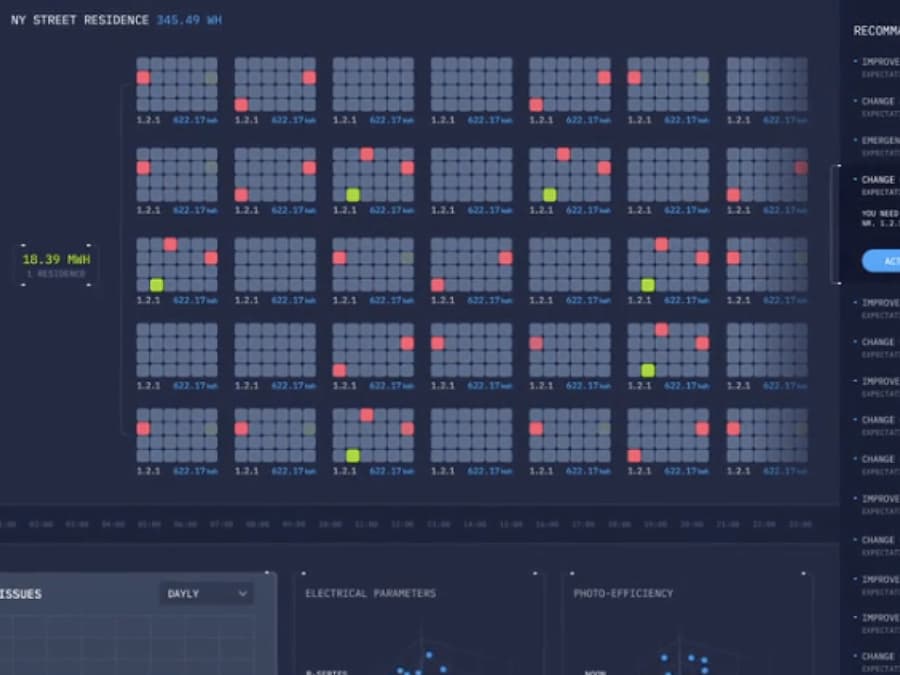
SunSniffer

Monitor solar panel performance in real-time.

Problem

SunSniffer understood that many solar power providers suffered from a lot of the same management, efficiency, and production issues across the world. They needed a centralized monitoring and power distribution system that could manage large panel arrays from one central dashboard.

Solution

The primary goal for the dashboard we created UX/UI design for was to design something that would be able to communicate issues across an entire solar power grid within seconds. Next, it needed to allow for customization by the engineer so that they would be able to change panels orientation to maximize power outputs and collection efficiency.

Outcome

Solar panel power production management requires constant oversight and manipulation. With our dashboard functionality, we created a system for staff that allows them to maximize the output of solar power and to closely monitor the efficiency and safety of individual panels through critical data collection and the ability to filter that data.

SunSniffer interface 1 SunSniffer interface 2

Conclusion

In conclusion, intelligent interface and digital dashboard design is now recognized as one for the most critical aspects of the entire software and web app landscape.

Possibly more than any other form of design, dashboard interface design relies on human-centered design expertise to be successful. Overall, the impact of digital dashboard design in the future will revolve around improved data visualization, real-time analytics, personalization, integration, mobility, collaboration, and user-centricity. These advancements will empower individuals and organizations to harness the power of data more effectively, leading to better decision-making, increased productivity, and enhanced insights.


Frequently Asked
Questions

Fuselab Creative has been creating user-friendly and visually appealing digital interfaces for over a decade, and we still feel like we've only touched the surface of our potential.

What types of dashboards do you design (e.g. analytical, operational, executive / KPI, HR, Health, Digital Twin, Next GenUI Dashboards)?

We design analytical, operational, and executive/KPI dashboards across multiple industries, including healthcare (EHR systems, patient monitoring), transportation and logistics (GPS, fleet management), financial services, supply chain management, and AI/ML platforms. Our portfolio includes specialized solutions like disease monitoring dashboards for pharmaceutical research, solar panel performance tracking, and augmented reality heads-up displays for automotive navigation. We’ve created dashboards for healthcare applications, travel booking systems, real-time telematics, and machine learning model management.

What is your process for gathering requirements and understanding which metrics are most important to your business?

Our dashboard development begins with an in-depth discovery process where we gather client requirements, goals, and business objectives to establish a solid foundation. We often employ a Lean UX approach that designs dashboards based on user and business objectives, strategizing around different paths to success. We conduct initial consultations to understand your goals, brand values, and target audience in detail, then develop user personas and map critical touchpoints throughout their journey. We utilize existing user data and innovative research methods to establish a list of user-specific pain points and desired outcomes that directly inform which metrics matter most.

Will the dashboard design be responsive and adaptive for different devices (desktop, tablet, mobile)?

Yes, we design for both responsive and adaptive experiences depending on the project requirements. While responsive design stacks and elongates content, we often implement adaptive design, which creates specific designs for specific devices and device sizes to fix common usability issues. This approach ensures the experience feels intentionally designed rather than squeezed and stretched across different screen dimensions.

Do you provide wireframes, mockups, and interactive prototypes?

Yes, we provide all three as part of our comprehensive design process. We design wireframes defining the dashboard’s structural framework, then create high-fidelity mockups emphasizing ease of navigation and cohesive visual design. We develop interactive “clickable” prototypes that mimic the final product without code development, saving time and money while allowing for user testing and stakeholder feedback before development begins.

How many design iterations or revisions are included in your package?

We follow an iterative design approach that embraces experimentation and continuous refinement throughout the project. Our Lean UX methodology means we iterate through designs to enhance UX and functionality based on testing and feedback, ensuring alignment with both user needs and business objectives. We offer a satisfaction guarantee where if you’re not satisfied after the first two weeks, you can walk away owing us nothing.

Can you integrate the dashboard UI design with our existing data sources, databases, or backend systems?

Yes, we create solid backend architecture for data processing and integrate identified data sources into the dashboard system. Our team compiles a list of main data sources and identifies the most effective methods for data collection and integration strategies. We ensure that the collected data is compatible with the dashboard’s objectives and that integrated components interact and operate correctly, with thorough API testing if calculations happen behind the scenes.

Do you conduct user-testing or usability testing for dashboards before final delivery?

Yes, user testing is a critical part of our process—we bring in real users to interact with prototypes and collect their feedback on usability and functionality. We conduct rigorous testing, including functionality, performance, security, and usability testing, to identify and address any issues or inconsistencies. Our philosophy on testing is simple: test, re-test, and test again to ensure the dashboard functions as expected across devices and browsers.

How do you handle data security and privacy when designing dashboards that may show sensitive information?

We prioritize data security throughout our development process with secure backend architectures and comprehensive security testing. For healthcare dashboards, we understand regulatory requirements and design with HIPAA compliance and data privacy in mind. We conduct multiple integration checks and quality assurance assessments focusing on performance, security, and data handling to minimize vulnerabilities before launch.

What deliverables do we receive at the end?

You receive a comprehensive design system including reusable components, patterns, and detailed guidelines for consistency and efficiency. Our deliverables include pixel-perfect designs with elaborate documentation, wireframes, high-fidelity mockups, interactive prototypes, and—if development is included—fully functional code. Development teams particularly value our thorough documentation and the level of detail we provide, which enables seamless handoff and future scalability.

What is the typical timeline for a medium-complexity dashboard?

Timelines vary based on project scope, but we begin by planning a detailed schedule and list of deliverables following our discovery process and requirements gathering. We acknowledge that planning is aspirational and reality requires changes, so we maintain flexibility while keeping projects on track. Our Lean UX approach and iterative process help us work efficiently, with testing and refinement happening throughout rather than causing delays at the end.

Can the dashboard UI support different user roles or permissions (e.g. admins, managers, regular users) with customizable views?

Yes, our dashboards support personalized filtering and role-based views that allow users to gain unique insights specific to their particular role within an organization. This customization enables unlimited decision-making power as different users can continuously discover new stratifications of data relevant to their needs. We design with content-sensitive navigation that shows elements only in certain situations or during particular actions based on user roles.

What post-launch support do you offer (updates, maintenance, adding new metrics)?

We provide ongoing support to address any issues that arise during or after the final product launch. Designing and developing a dashboard that remains relevant requires the ability to adapt and evolve to continuously meet new challenges, incorporate new functionalities, and make changes without losing overall performance. Our design systems enable you to scale and add features independently, though we remain available for constant data reviews, regular updating, and adding or removing metrics based on changing business priorities.

How do you ensure the dashboard remains scalable in case our data volume or user base grows significantly?

Our design systems provide a flexible framework that accommodates new features, layouts, and interactions seamlessly as you scale. We build backend architecture that can handle growing data processing needs and ensure integrated components can scale without performance degradation. Our approach to design system development helps clients future-proof their products, creating a maintenance tool that makes eventual changes, updates, and content additions easy to implement, even as the user base and data volume expand.

What type of interfaces can be built in this new era (CLI, real-time interfaces, automated interfaces, MCP-based interfaces)?

We design real-time interfaces for live vehicle monitoring, predictive analytics systems that pull from multiple APIs simultaneously, and automated interfaces for inventory management and supply chain systems. Our work includes augmented reality interfaces like heads-up displays for automotive navigation, voice-activated systems, and AI/ML-powered interfaces that automatically adapt to user needs. We’re continuously experimenting with emerging interface paradigms, including multimodal interactions and intelligent agents that can understand context and anticipate user requirements.

How is Fuselab different than other companies for dashboard deliverables (framework to build dashboards, ongoing experimentation with new ways to present data, our own data viz library, prompt engineering system to deploy quick dashboard prototypes)?

We deliver comprehensive design systems that serve as frameworks for building and scaling dashboards, complete with reusable components and our own custom data visualization libraries. Our design experimentation process ensures we’re constantly testing new ways to present data, incorporating user-centric insights and data-driven decision-making rather than relying on standard templates. We provide real-time transparency by giving clients access to every platform we use—they can watch designs develop, see project scheduling, and communicate at any moment. Our satisfaction guarantee, exhaustive UX research approach, and pixel-perfect documentation set us apart, enabling your team to iterate independently after handoff.