Generative AI in design: where it helps design teams in 2026
Generative AI in design is very good at one thing: drafts. A team can get forty concept directions, a dozen headline options, or a full set of banner sizes in the time it used to take to brief the work. Some will be perfect, and some will be completely off target for various reasons, but this is why human oversight is still super important.
It is much weaker at finished work a company can own. In the US, material generated entirely by AI can’t be protected by copyright. So the assets a brand depends on for years – its illustrations, characters, key visuals, and copy – still need real human authorship.
This guide covers where generative AI for design saves time, what designers still rebuild by hand, and what the US Copyright Office position means for the assets you ship.
What generative AI in design covers
Generative AI in design means using models that create new images, text, video, or layouts from a prompt or a reference. In creative work, that usually includes:
- Concept sketches, moodboards and style explorations
- Illustration, photography-style imagery and textures
- Headlines, taglines and product copy
- Campaign assets in many sizes and variants
- Early logo and brand mark ideas
This article is about those visuals, copy, and creative assets. Using AI to generate product screens is a different job with different checks, which we cover in our guide to AI-generated UI design.
Designing products that have generative AI inside them is a third topic again. That is about how users read, correct and trust model output, and it lives in our article on solving generative AI interface limitations.
Across all the creative uses above, the output is a starting point. How much of it a company can actually own is the question the rest of this guide answers.
Where generative AI helps design teams
Generative AI for design is strongest at the start of a project, when speed and range matter more than polish. Here is where it earns its place:
- Exploring directions. A designer can test ten visual styles before lunch and bring the strongest three to a review.
- Moodboards and references. Instead of hunting for stock images that almost fit, the team generates references for the exact mood it wants.
- Variations. Once a direction is chosen, AI produces color, crop and composition variants quickly.
- First drafts of copy. Headline and tagline options give the writer something to react to.
- Production chores. Extending backgrounds, removing objects and resizing assets for every channel.
The tools behind this work fall into a few groups:
- Image generators that create pictures from a text prompt or a reference image
- AI features inside design and photo apps, such as filling, extending or removing parts of an image
- Text models for headlines, taglines and first drafts of copy
- Video generators for short clips, motion tests and storyboards
- Variant tools in design platforms that resize and adapt one layout for many channels
Notice what all of this has in common. Each tool feeds a decision a person still makes. The output is raw material, not the thing that ships.
Generative AI in design, asset by asset
The gap between a good draft and an asset a company can own is different for each type of work. This table shows where it sits:
One clarification, so the last row isn’t read too broadly. “Own” here means copyright: a logo can still be registered as a trademark, because trademark rights come from using a mark to identify your business, which is a separate question from who authored it.
The pattern across the table is the argument of this article. The closer an asset sits to the core of the brand, the less of the AI output survives, and the more the company needs to show a person made it.
What the US Copyright Office says about AI-generated work
In January 2025, the US Copyright Office published Part 2 of its report on copyright and artificial intelligence, which deals with copyrightability. Its main conclusions are short enough to list:
- Purely AI-generated material is not protected, nor is material where a person had too little control over the expressive elements.
- Prompts alone are not enough. Rewriting prompts or picking the best output does not change that.
- Using AI as a tool is fine when it assists a person rather than replacing their creativity.
- Human contributions are protected: a person’s own expression visible in the output, creative selection and arrangement, and creative changes.
- Every case is judged on its facts. No fixed share of human work settles the question.
The Office’s earlier decision on the comic book Zarya of the Dawn shows how this works in practice. The registration covered the human-written text and the way the author selected and arranged the elements. It did not cover the AI-generated images themselves.
The courts agree
In Thaler v. Perlmutter, the D.C. Circuit upheld the Office’s refusal to register an image created by an AI system. In March 2026, the Supreme Court declined to hear the appeal. Another case, Allen v. Perlmutter, is testing how much prompting could count as authorship, so the exact line may still move.
When registering a work, applicants must also disclose AI-generated material beyond the minimal and describe the human contribution. For design teams, that means keeping a record of who made what.
This is a summary for design teams, not legal advice. For a specific asset, talk to an IP lawyer.
What this means for brand assets
Copyright is what lets a company stop others from copying its creative work. If a key visual or brand illustration is purely AI-generated, a competitor could copy it, and the company would have little ground to object.
That risk is small for a social post that runs for a week. It is large for anything a brand will reuse for years:
– Illustration systems and icon sets
– Characters and mascots
– Key visuals and hero imagery for a campaign
– Packaging artwork
– Signature copy, such as taglines and brand stories
For logos, a trademark protects the mark as a brand identifier, but the artwork is easier to defend when a designer has drawn it. Most brand teams want both protections.
Rebuilding by hand also helps with a second problem. Generated output can drift toward existing work and look generic, or too close to someone else’s. A designer drawing the final version is also checking that it is distinct.
Generative AI for marketing visuals
Marketing visuals are where generative AI in design does the most day-to-day work. Campaigns need volume: many sizes, many channels, and many audience variants, all on short timelines.
Where it helps
Most of the value comes after a design is approved. AI can turn one approved layout into a full set of ad and social variants, extend or crop images for new formats, and build backgrounds, scenes, and textures around a product. It is also useful for local versions of a campaign, swapping in different settings or seasons, and for fast test concepts before your team commits to a photo shoot.
Where it fails
- Product accuracy. Generated images change logos, labels, proportions, and small details. In marketing, that is a false claim about the product.
- Text in images. Lettering is often misspelled or distorted.
- Consistency. Characters, faces, and styles shift from one image to the next, which breaks a campaign that needs to look like one family.
- Brand style. Without close guidance, output slides toward a generic “AI look” that many audiences now recognize.
How to split the work
A practical rule for marketing teams: let AI generate the short-lived variants, and keep people authoring the parts that carry the brand. The hero visual, the layout system, the typography, and the core message should be human-made. Resizing, background extensions, and channel variants can be AI-assisted, as long as a designer reviews each one before it ships.
That way, the campaign moves fast, and the part a competitor would want to copy is the part the company can protect.
One campaign, from prompt to an asset you own
Here is how the split looks on a typical launch campaign that needs a hero illustration, a tagline and assets for a dozen channels.
1. Exploration
The designer writes the brief and sketches two rough ideas. AI then generates a wide range of styles around them: flat, textured, 3D, editorial. The team reviews them on one board and picks a direction in a single meeting instead of three.
2. The hero illustration
The chosen direction is a generated image, so it is not yet an asset the company owns. The illustrator redraws it: new character, new composition, a palette from the brand system. The AI image stays in the project file as a reference, not as the artwork.
3. The tagline
AI drafts thirty options. The writer uses them to see which angles feel tired, then writes the final line. That line, and the edits that shaped it, are human work.
4. Channel variants
With the hero locked, AI extends backgrounds and recomposes the scene for each format. A designer checks every variant for cropped products, broken text and style drift before it goes out.
5. The record
The project file notes what was generated, what was drawn and who approved each piece. If the campaign art is ever registered or challenged, the team can show where the human authorship is.
The result: AI saved most of the exploration and production time. The parts that carry the brand are the parts a person made.
Generative AI for designers: how to get drafts worth keeping
Good drafts come from the way a designer works with the tool, not from luck. These habits make output more useful, and they keep the designer’s own work visible in the result:
– Start from your own sketch. Feeding a tool your drawing or layout as the reference keeps your composition in the output. Your expression is the part the Copyright Office says can be protected.
– Write prompts like a brief. Name the subject, mood, light, framing and what to avoid. Vague prompts return the generic look you will end up rebuilding.
– Generate wide, then narrow. Ask for many options early, compare them side by side, and only refine the two or three that fit the direction.
– Fix by hand what the tool keeps getting wrong. Hands, text, logos and product details are faster to redraw than to re-prompt twenty times.
– Apply the brand system yourself. Palette, type and spacing should come from your brand files, not from the model’s guess.
– Save prompts and versions. A short log of inputs and edits shows how the piece was made.
Each of these habits moves more of the final piece into the designer’s hands. That makes the work better and the asset easier to own.
How we keep human authorship in the work
Generative AI for designers works best inside a process that makes the human contribution clear. Here is how we run it.
A person sets the direction. The concept, brief, and first sketches come from the designer before anyone writes a prompt. AI then explores, widening the range of options rather than picking the answer.
From there, the work returns to the designer. Key elements are redrawn or substantially reworked by hand, especially anything tied to the brand, and the final arrangement of layout, type, color, and composition stays a human decision.
Two checks close the process. We keep a record in the source files that shows which parts were generated and which were made or changed by a person, which supports any later copyright registration. Then a brand review checks every asset for accuracy, consistency, and resemblance to existing work before it ships.
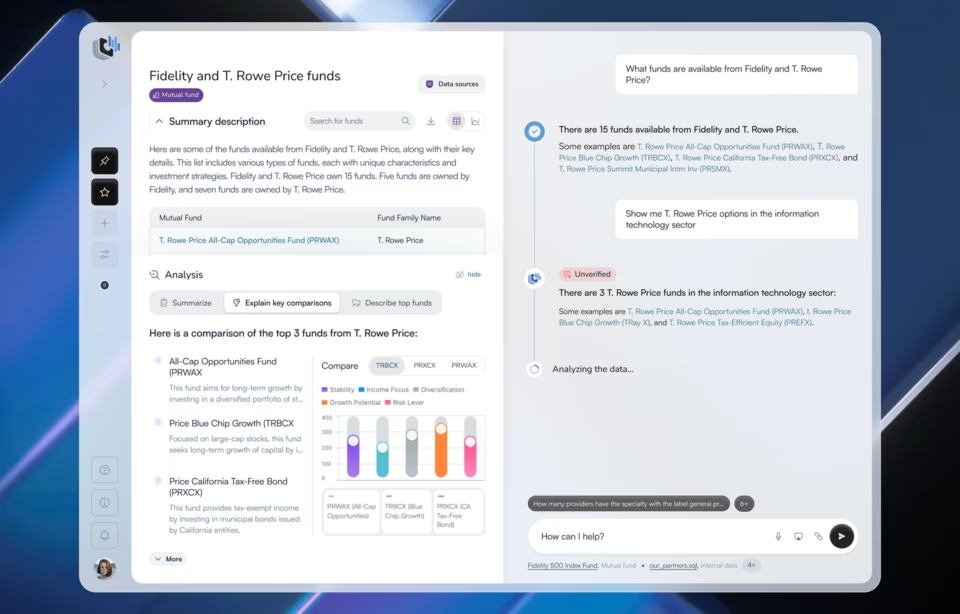
We apply the same principle when generative AI is part of the product itself, which is a different use from creative production. On Stardog Voicebox, an AI workspace that lets financial analysts query data in plain language, the model writes the answers. The design system, layouts, and 3D illustration around those answers were made by our designers. The model generates, and people author the brand that carries it.
The risks of shipping generative output raw
Shipping AI output without a designer’s rework saves a few hours, but it can cost much more later. The biggest risk is ownership: purely generated assets can’t be protected by copyright, so others are free to reuse them. Output can also resemble existing work closely enough to cause a dispute or an awkward public comparison, and a generated product image or line of copy can show or say something that simply isn’t true.
The slower risks are easier to miss. Assets that look like everyone else’s weaken brand recognition over time, and without notes on who made what, a team can’t show its human contribution when it matters.
Every one of these risks shrinks the same way: a designer reworks the output, and the team records that work.
Five questions before an asset ships
- Will we reuse this for more than one campaign? If yes, a person should author it.
- Which parts did a person draw, write, or meaningfully change? If the answer is “none,” treat it as a draft.
- Does it show the product, the facts, and any text correctly?
- Does it look like anything we have seen before? Run a quick reverse image search on key visuals.
- Is the record saved? Source files should show what was generated and what was made by the team.
Conclusion
Generative AI in design has earned a place in every creative team. It makes exploration faster, gives writers and designers more to react to, and takes the repetitive work out of campaign production.
But it produces drafts, not assets a company can own. Under the current US position, the parts of a brand that need to last, from logos to key visuals to signature copy, still need a person’s hand in them, and a record that shows it. Teams that plan for that from the first sketch get both the speed and the ownership.
If you want to bring generative AI into your creative process without losing control of your brand, our generative AI design team can help.
Frequently asked questions
What is generative AI in design?
Generative AI in design is the use of AI models that create new images, copy, video or layouts from prompts or references. Design teams use it to explore concepts, build moodboards, draft copy and produce campaign variants. The output works best as a starting point that designers refine, not as finished work.
Can you copyright AI-generated designs?
Not if they are purely AI-generated. The US Copyright Office says material generated entirely by AI is not protected, and prompts alone don’t count as authorship. Designs can be protected for the parts a person created, such as their own artwork, creative changes to the output, or the selection and arrangement of elements.
Can an AI-generated logo be trademarked?
Trademark and copyright are separate. Trademark rights come from using a mark to identify your business, so an AI-assisted logo can still be registered as a trademark. Copyright in the artwork itself is a different question, and a purely AI-generated logo would not have it. Many brands redraw the final mark by hand to get both.
How much human input makes an AI-assisted design copyrightable?
There is no fixed amount. The Copyright Office judges each work on its facts. Your own drawing or writing that appears in the final piece counts, as do creative edits to the output and the creative selection and arrangement of elements. Choosing between outputs or rewriting prompts does not count on its own.
Is generative AI good for marketing visuals?
It is very good for volume work such as ad variants, resized formats, backgrounds and test concepts. It is weaker at product accuracy, text in images and consistency across a campaign. A good split is human-made hero visuals and layouts, with AI-assisted variants that a designer reviews before they ship.
Will generative AI replace designers?
No. Generative AI for designers speeds up exploration and production, but it does not set direction, judge what fits a brand or check whether an image is accurate. Because purely generated work can’t be owned, companies also need designers to author the assets that matter most.
Do you have to disclose AI use when registering a copyright?
In the US, yes, when the work includes more than a minimal amount of AI-generated material. The Copyright Office asks applicants to identify that material and describe the human author’s contribution. Keeping source files that show who made what makes this much easier.