Image recognition in machine learning: how it works in 2026
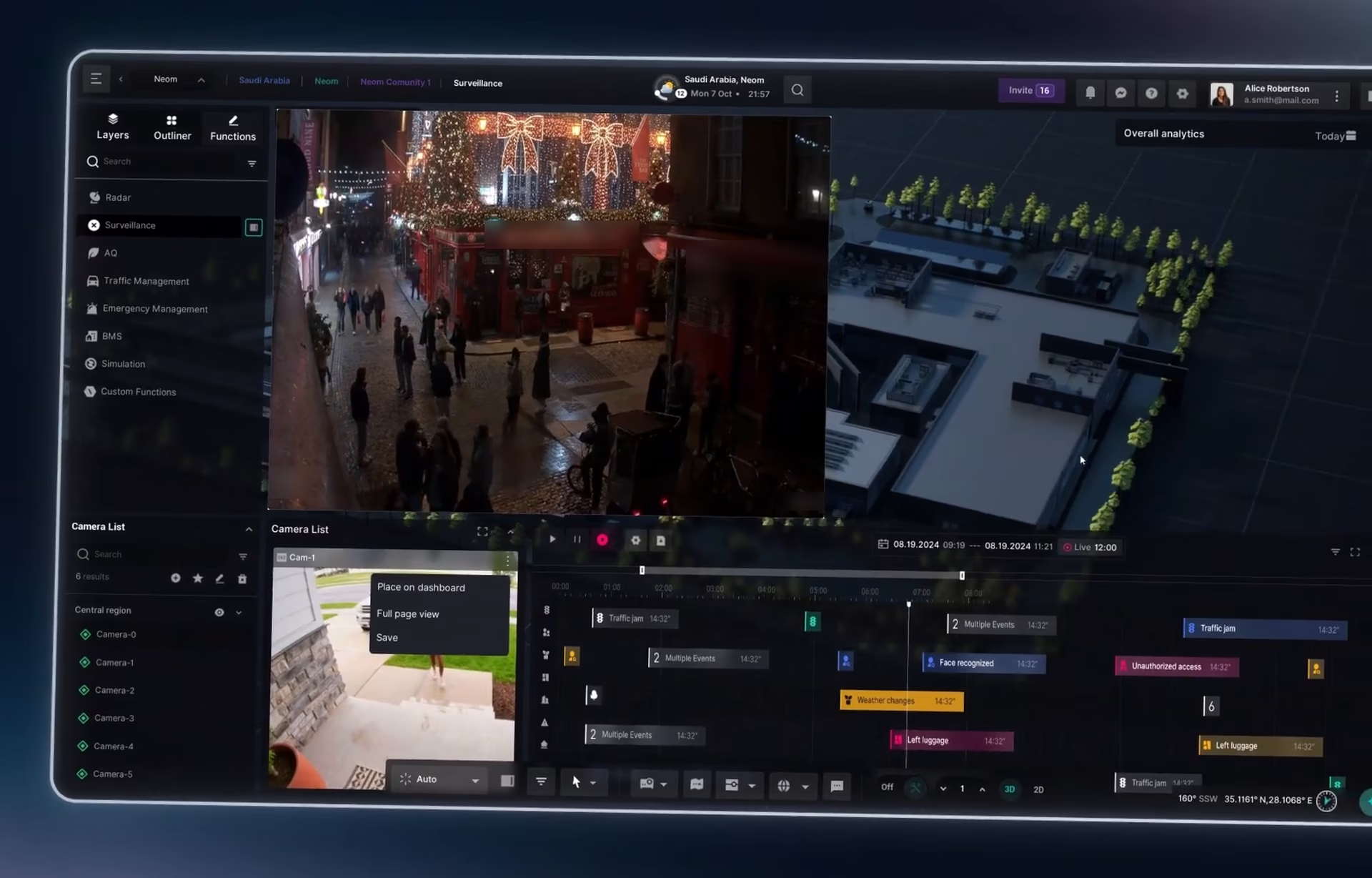
Image recognition in machine learning never returns a fact. It returns a guess with a confidence score attached: “person, 0.82” or “scratch on part, 0.41.” Everything useful happens after that number appears.
Someone has to decide whether to act on the guess automatically, have a person check it, or ignore it. In most products, the interface makes that decision. So the interface decides whether image recognition is useful at all. We know this is both awesome and a little scary to trust; we understand, but keep reading.
This guide explains how image recognition works, which algorithms do the work, and what the screen must show once the model has made its guess.
What image recognition in machine learning is
Image recognition in machine learning uses trained models to identify what is in an image or video frame: objects, people, text, defects, or scenes. It is one part of computer vision, the wider field of teaching machines to interpret visual data.
The term covers several related tasks. Each one answers a different question, and each produces a different kind of output for the interface to show:
Notice the last column. None of these tasks returns a yes or no. Every output is a score that someone, or some rule, has to interpret.
Image recognition algorithms you will hear about
Image recognition algorithms have improved a lot in the last ten years, but product teams usually work with four main types.
The first is convolutional neural networks, or CNNs (not to be confused with CNN, the news channel). They have been the standard choice for years. They scan the image with small filters in layers, picking up edges and textures first, then shapes, then whole objects.
The second is object detectors. These models find several objects in one image and draw a box around each one. Some are built for speed, which suits live video, while others are built for accuracy, which suits still images.
The third is vision transformers, a newer type of model. They cut an image into small patches and learn how those patches relate to each other. Many systems today combine them with CNN layers.
The fourth is embedding models, used for faces and image search. Instead of returning a label, they turn each image into a list of numbers. The closer two lists are, the more similar the images, and that gives a similarity score.
For the people using the product, the algorithm matters less than you might think. All four types end the same way: a guess, a score, and a decision someone still has to make.
What the model hands you: a guess and a score
A confidence score looks like a probability. A score of 0.92 reads as “92% sure.” In practice, it often is not.
Research presented at ICML found that modern neural networks are poorly calibrated. In plain terms, their confidence often does not match how often they are actually right, and deep networks tend to be overconfident. Calibration methods can correct much of this, but only if the team measures it first.
That has two consequences for design:
1. A high score is not proof. The interface should never present a score as certainty.
2. The threshold is a choice. Google’s machine learning course explains that a default threshold of 0.5 is a poor choice when one type of error costs more than the other. The right threshold depends on what a mistake costs in your product.
Showing uncertainty in a way people can act on is one of the main things that separates AI UX from traditional UX. Traditional software is either right or broken. A recognition model is right most of the time, with no warning when it is not.
Three outcomes for every result
In practice, most teams split scores into three bands. Each band leads to a different screen:
Where the bands start and stop is a business decision. A retail app tagging photos can act on fairly low scores. A security system flagging a person should not act alone on any score.
False positives vs false negatives: what each costs
Every image recognition system makes two kinds of mistakes. NIST defines them clearly in its face recognition study. A false positive says two different people are the same person. A false negative fails to match two photos of the same person. The same logic applies to any detection: flagging something that isn’t there, or missing something that is.
The two errors do not cost the same. In the NIST report, the lead author notes that a false negative when unlocking a phone is usually an inconvenience, because you can try again. A false positive in a database search puts the wrong person on a list for further scrutiny.
Here is how each error plays out on a camera-monitoring screen:
Errors are not spread evenly
There is a harder problem behind this table. The NIST demographic effects study (NISTIR 8280) tested 189 face recognition algorithms from 99 developers. The majority showed demographic differentials: they were more accurate for some groups than others.
In one-to-one matching, many algorithms produced false positives for Asian and African American faces at rates 10 to 100 times higher than for Caucasian faces. NIST also found that the most equitable algorithms were among the most accurate, so the gap is not fixed.
For the interface, this means a single threshold doesn’t treat everyone equally. A review step is not just a safety net for rare errors. In face recognition, it is the main protection against errors that land on some people far more often than others.
Walkthrough: from camera feed to logged decision
We designed the surveillance module of the Digital Management Framework (DMF), a smart city platform. Operators view and control live camera feeds, move through recorded footage on a timeline, and use AI face recognition for identity checks and alerts.
Here is how a single detection should move through a screen like that, from the moment the model sees something to the moment the decision is on record.
1. A detection appears on the feed
The model finds a face in a live feed and compares it with a reference database. The operator sees a box on the frame with the match name, a score, the camera name and the time. The box does not say “identified.” It says “possible match.”
2. The score decides the route
The match scores 0.71. That is above the “ignore” line but below the “alert” line, so no alarm sounds. Instead, the match goes to a review queue, with a small counter in the corner of the monitoring view showing how many items are waiting.
3. A reviewer opens the item
The review card puts everything needed for a decision on one screen:
- The captured face and the reference photo, side by side and at the same size
- The score, with a plain label such as “uncertain match” next to it
- A short clip from the timeline, so the reviewer sees movement and not one frame
- Image quality notes, such as low light or a partly hidden face
- Other candidates the model considered, if any were close
4. The reviewer confirms or rejects
There are two main buttons: confirm or reject. Rejecting asks for a quick reason from a short list, such as “different person” or “image too poor to judge.” Confirming moves the item into the normal alert flow, now with a human decision attached.
5. The decision is logged
Every review produces a record: who reviewed it, when, what score and model version produced the match, what the reviewer saw, and what they decided. That record does two jobs. It shows later why an action was taken. It also gives the team real data on where the model is wrong, which is how thresholds get tuned and models get retrained.
Sometimes the system starts adjusting itself based on those decisions, for example by reordering the queue or shifting thresholds. Then the same rule applies as for any interface that changes on its own: show what changed and let people undo it.
What breaks when a step is missing
Each step in this flow has a job, and skipping one causes a specific problem. Without a review queue, every uncertain match turns into an alert, and operators soon learn to ignore alerts altogether. Without a side-by-side view, checking a match takes too long, so reviewers simply approve whatever the model guessed.
The last two steps matter just as much. If rejecting a match doesn’t ask for a reason, the team knows the model was wrong but not why. And without a log, no one can explain a decision later, and the model never learns from its mistakes.

What the screen must show for every result
The walkthrough above is a security example, but the same checklist works for defect detection on a production line, medical image triage or photo moderation. For every recognition result, the interface should answer five questions:
1. What did the model see? The image or crop it judged, not just the label.
2. How sure is it? The score, with a plain-language band, never shown as certainty.
3. Why is this on my screen? Which rule sent it here: an automatic action, a review, or a search result.
4. What can I do? Clear actions to confirm, reject, undo or escalate.
5. What happened before? The history of the item and of similar decisions.
If a result can’t answer these five questions, people will either trust it blindly or ignore it. Both make the model less useful than its accuracy suggests.
Where image recognition is used, and who reviews the result
Image recognition in machine learning now runs inside many everyday products. In each one, the score means something different, and a different person checks it:
The model can be the same type in several of these rows. What changes is the cost of each error and the person who answers for the decision. The interface has to be designed for that person.
Conclusion
Image recognition in machine learning has become far more accurate, but its output has not changed shape. It is still a guess with a score. A better model makes good guesses more often. It does not tell you which guesses to trust.
That decision is made in the interface: which results act on their own, which go to a person, what the reviewer sees, and how each decision is recorded. Get those right, and image recognition becomes a tool people rely on. Get them wrong, and even an accurate model gets ignored.
If you are building a product that shows recognition results to operators or reviewers, our AI dashboard design team can help you design the review flow around the model.
Frequently asked questions
What is image recognition in machine learning?
Image recognition in machine learning is the use of trained models to identify objects, people, text or scenes in images and video. Instead of following hand-written rules, the model learns from thousands of labeled examples. For each new image, it returns one or more labels with confidence scores, which the product then turns into actions.
How does image recognition work?
The image is converted into numbers, one set per pixel and color channel. A model trained on labeled examples processes those numbers through many layers and outputs labels with confidence scores. A threshold then decides what happens to each result, such as triggering an alert, sending it to a person for review, or ignoring it.
What are the main image recognition algorithms?
The main image recognition algorithms are convolutional neural networks (CNNs) and object detection models that find and box several objects in one frame. Vision transformers analyze images as patches, and embedding models compare images by similarity. Many current systems combine these approaches. All of them produce scores rather than certain answers.
What is a confidence score in image recognition?
A confidence score is the model’s estimate of how likely its label is correct, usually between 0 and 1. It helps sort results, but it isn’t a guarantee. Research shows many deep networks are overconfident, so teams should measure how scores match real accuracy before setting thresholds.
What is the difference between image recognition and object detection?
Image recognition is the broad term for identifying what is in an image. Object detection is one task within it. Detection finds each object, draws a box around it, and labels it, so it can handle several objects in one frame. Simple classification gives labels for the image as a whole.
How accurate is image recognition?
It depends on the model, the task, and the images it sees. NIST testing of face recognition found wide accuracy differences between developers, and many algorithms performed unevenly across demographic groups. The only reliable answer is to test the model on images from your own setting, including poor lighting and difficult angles.
When should a person review image recognition results?
Review results when the score falls in an uncertain range, and whenever an error could seriously affect someone, such as identifying a person or flagging a medical image. The review screen should show the original image, the score, other likely matches, and clear actions to confirm or reject, with every decision logged.