20 Mobile App Design Trends for 2025 You Need to Know

By 2027, mobile app usage could plummet by 25% across the globe. Gartner expects this shift in user behavior because of the expected significant boom in AI assistants. ChatGPT, Gemini, and Apple Intelligence could change the game and may consolidate our app usage from multiple apps to just a few AI platforms.
Since brands with low engagement and retention will be the most impacted in the first wave of transition, integrating design thinking into scenario planning is the wisest decision you can make right at the start of 2025.
Design thinking is a problem-solving framework that puts users at the center of the design process. It is a discipline shaping our world and how we interact with products and services today. It focuses on solving real problems for real people and pushes for innovative solutions. That’s what the world needs in a space that is oversaturated with brands what they want to say and what they hope to provide for users in the future
The reverse engineering of mobile app design trends in 2025 from user to designer instead of designer to user is what will set a good app apart from a great one this year. Naturally, this process is a lot more time-consuming than the traditional way of doing things. But the massive return on effort makes it worth the sweat.
Top 20 app design trends in 2025
There are certain design elements that are good to have and others that are a must-have because they are critical for millions of people. We have divided all the important trends into two categories: style and accessibility.
Style: Rethinking visually
Dark mode
Surely, everyone’s eyes breathed a sigh of relief when designers began to offer dark mode options to users. It was a much-needed feature, considering an average smartphone user spends more than three hours per day on their phone. But in 2025, we are going to start seeing a couple of updates to this feature as the usage widens across platforms.
An auto-adjustment mode will allow devices to respond to light and dark spaces automatically, triggering the adaptive dark mode. Similarly, the transition from light to dark mode could see some serious upgrades, including more sophisticated color palettes for both interfaces.
Soft edges
2025 is all about soft, rounded edges on apps to make them feel more approachable and user-friendly. This is a trend that reflects warmth, comfort, and human-centric design.
It works because it looks more natural to the human eye and creates a smoother experience while also emulating the rounded edges of modern smartphones.
You will find this app design trend in app buttons and icons, modal pop-ups and cards, and navigation menus with pill-shaped buttons. Google and Apple have already made the shift in their UI design, where the softer edges are helping improve readability and aesthetics.
Micro-interactions
Most of us are familiar with this because it has such a massive influence over our day-to-day lives. Micro-interactions are a type of feedback that was born out of necessity, thanks to our shrinking attention span. They were created to improve user engagement and retention whether in both mobile app or web app design.
The animated hourglass that you are greeted by when a page is loading in the app. This is a timeless example of a micro-interaction, pardon the pun, please. The slight change in a button’s color when you hover over it, is yet another good micro-interaction example.
As you can tell, these micro-interactions are super subtle just like the haptic feedback an iPhone gives you every time you use the action button to put your phone on silent. So, while you may not notice them consciously, it doesn’t take long to be annoyed if there are too many micro-interactions. This is indeed a thin line to walk for any app designer.
In 2025, micro-interactions will not just be limited to simple animations. Instead, they will provide deeper emotional connections between users and apps through the use of fluid motion effects, interactive buttons, and personalized micro-animations based on user behavior.
Transparent overlays
Our aesthetics are evolving, and transparent elements are rising in popularity. They are now one of the go-to new app design trends that allow text, buttons, and content to sit over blurred backgrounds instead of solid blocks.
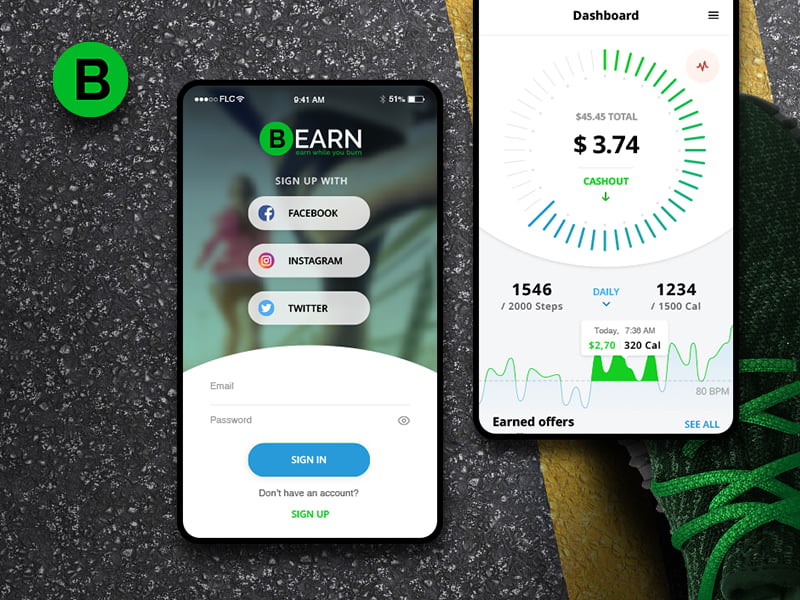
Think about what Apple has done in the recent iOS updates where the wallpaper behind the app icons blurs out and is only visible through the notification window, unless you change your settings. You can also take a look at our Bearn App project where we used various transparent elements to give our client’s users a rich experience.
This latest development ensures that content and readability don’t get compromised by design aesthetics while creating a depth of hierarchy in UI. It gives apps a modern appeal but also supports the users in focusing on the content.
Neubrutalism
A school of thought that is setting the tone for the latest trends in mobile app design for the next many years is a style that blends skeuomorphism and flat design called neubrutalism or neobrutalism. This soft app UI design style places a lot of emphasis on enhancing the appeal of each UI element present on-screen through 3D appearances, subtle shadows, and highlights and/or drop-shadows for depth.
While brutalism is a stark, powerful aesthetic, neubrutalism retains the edginess of brutalism and adds a layer of sophistication with better contrast and usability to make the interface visually appealing, which feels tactile and engaging.
Many app-building websites have already introduced this design language on their platforms, indicating that this trend is here to stay. Here is what our team did for our client, The Grid when we were asked to find a design balance between commerce and functionality with a futuristic vision.
Bento grids
You can trace bento grids back to the Nokia Lumia. As shocking as it might sound, the Windows 8 interface was also heavily influenced by this unconventional design style inspired by Japanese bento boxes. This type of geometric design is visually engaging and pleasing to the eyes.
One major difference that you will see in 2025 is that bento layouts will use asymmetrically arranged sections that group related content in a structured yet dynamic way instead of uniform rows and columns.
Bento grids work because they are as practical as aesthetic. They make it easy for the user to scan content as it groups related content extremely efficiently, increasing app retention. Apple’s iOS 17 widgets and Microsoft’s Fluent UI have already embraced bento-style layouts, setting the stage for broader adoption in 2025.
Exaggerated minimalism
Minimalism has been around for a while, so has maximalism. But the middle ground between the two is what we call exaggerated minimalism.
This year, minimalism will get a bold makeover, with a focus on large and edgy typography, oversized buttons, and generous white space overlayed on clean, minimalist backgrounds. Even the color scheme trends in mobile app design will be influenced by exaggerated minimalism.
Exaggerated minimalism is perfect for creating impactful designs while reducing distractions and improving readability. Since there are fewer but more impactful elements, the app is lighter and able to perform faster.
Motion graphics
As we have established earlier in this article, static designs are no longer enough in mobile app design. Users demand subtle animations, micro-interactions, and dynamic transitions to have a more engaging and responsive experience with the app that mirrors what they see on other apps they use every day.
Motion graphics provide visual feedback to improve usability. They add a sense of fluidity and depth to your design and make interactions feel natural and intuitive.
Google’s dinosaur game when you lose the internet connection is one of the most clever examples of motion graphics. Apps like Duolingo attempt to combine entertainment and learning at the same time. Animated characters are used in interesting ways to encourage learning, creating a more interactive and enjoyable experience.
Distinctive typography
Design principles are becoming smarter with the evolving user behavior. Hence, this year, typography will be used not just for improving readability but as an impactful branding tool for businesses.
Mobile apps will experiment with distinctive fonts, colors, and patterns to establish a unique personality using simple text. This will particularly be seen in apps with an expressive design language where fonts will convey energy and emotion that users can associate with the brand.
Zara has been doing this for a while, which is what gives it that premium yet breezy feel. But meditation apps like Calm have also joined the club with their rounded, calming fonts that evoke a relaxing experience in the user.
Accessibility: Design trends in functionality
No buttons
You may not have noticed this because the transition has been so seamless, but given the last few years, it seems as though smartphone creators don’t like buttons. Any kind of buttons.
We have gone from the revolutionary transition of physical buttons to on-screen buttons to no buttons at all. We are gradually moving towards intuitive gesture-based controls in both Apple and Android phones.
These app design trends discussed thus far are providing a unique opportunity for designers to leverage the clean, minimalistic approach while creating an immersive experience with the on-screen swiping, pinching, and tapping gestures.
Multi-modal inputs
There is no denying that touch is probably one of humankind’s greatest innovations. It has quite literally brought the world to everyone’s fingertips.
But as evolution goes on, we are becoming increasingly sensitive to diverse needs. And as it turns out, touch is not quite accessibility-friendly. While options like voice search, gestures, and even eye-tracking are fun-to-have features for many, they will soon become a necessity for others. Eye tracking for those who don’t have full use of their motor functions is already blowing new doors open for many individuals who had relied on others to help them perform their desired online activities.
These features will greatly assist people with disabilities to become more and more independent. Multi-modal inputs are crucial for any developers hoping to remain relevant in 2025.
Split screen
You must have surely noticed that having 24 hours in a day just doesn’t cut it anymore. There’s much to do, which is why apps with split-screen displays will be a critical part of our future, allowing for the multitasking that is already going on.
Split screens are emerging from our need for multitasking. They will be specifically valuable for foldable phones and devices with larger screens, allowing users to engage with multiple elements simultaneously.
In essence, in 2025, you can play games while shopping and texting your mom. Now that’s what we call multitasking!
Password-less onboarding and biometric authentication
Typing passwords is outdated, frustrating, and often insecure. And if you ask my wife, it’s the most annoying activity ever invented! About 30% of internet users have experienced a cyberattack due to a weak password. Moreover, there is a high possibility of losing users if you add layers like registrations or logins. Mostly because casual browsers may not be so forthcoming when it comes to signing up.
Google might not have made any disruptions in at least a decade, but it has been used by nearly every major website for passwordless authentication. And this year, passwordless login will become the new standard, though there’s a human-focused twist.
Apps that offer seamless authentication methods like biometrics and magic links will enjoy better engagement because there won’t be password fatigue caused by forgotten passwords, lower security risks from weak or reused passwords, and a faster login process.
Face ID and fingerprint authentication will be at the forefront of the new app trends as behavior-driven authentication is much harder to mimic. Giants like WhatsApp and Darwinbox have already made the move towards passwordless authentication and are paving the way for widespread adoption.
What’s more, is that this is one of the most critical banking app design trends as it allows increased security. In 2025, we will see medical and healthcare application design also hopping on this trend.
Predictable interfaces
Once again, we are circling back to design thinking, where the needs of the users drive the trends in app design. Users prefer apps that feel familiar and easy to navigate.
This does not mean that designers or those who provide services for the design of mobile applications can’t experiment with an entirely new navigation mechanism for your apps in 2025, but how many users will buy into it will remain to be seen because predictable interfaces allow you to reduce the cognitive load it takes for a user to use your app. This ultimately increases their accessibility, widespread appeal, and of course, your bottom line.
So, rather than reinventing the wheel, designers will stick to proven approaches to app design with standard navigation panels, familiar icons, and commonly understood gestures.
Chatbots
Chatbots were a big part of the mobile app design trends for 2025. And so, we have all used AI-powered chatbots by now whether it is on a food delivery app or an eCommerce store. But tech experts around the globe are expecting chatbots to become smarter, more advanced and conversational, and deeply integrated into apps.
If you have been following the developments in natural language processing (NLP) and generative AI, you would know that chatbots are slated to be humanized to a level where hyper-personalized experiences will be their primary scope of work.
AI is going to continue to be highly disruptive Deepseek’s epic $600 billion crash in Nvidia’s market cap is proof that it is only going to get much more serious as a solution this year.
Sustainable elements
Sustainability is influencing mobile app design. In the race against obsoletion, brands are focusing on energy-efficient interfaces, where minimal data usage and ethical design practices are taking center stage.
In 2025, becoming more conscious of digital well-being, reducing screen time, and designing apps that are less addictive and more mindful will all be part of the journey to being sustainable. Brands are expected to look beyond short-term profits and prioritize the mental health of their users. The end benefit for companies is that their users will be able to be with their brands longer, cutting down on the cost of new customer acquisition.
Bottom navigation
Everyone remembers the first version of Instagram that was available to the masses. It had a blue bottom navigation bar, which was unique to the platform when all other apps were using side navigation panels.
Now with longer smartphone screens, bottom navigation is not only great for visual appeal but it also has a functional justification to it, enabling users to navigate comfortably with one hand. The ergonomic design that makes easier thumb reach on large screens is vastly improving accessibility for countless users.
Today, almost every major platform has a bottom navigation bar. And this mobile app UI/UX design trend is only going to grow in 2025.
Hyper-personalization
Personalization has gone beyond a nice-to-have feature. Users expect algorithms to recognize and learn their patterns and make recommendations based on user behavior.
In 2025, AI will take personalization to the next level with customized experiences for every user. Services like Netflix and YouTube Music have barely scratched the surface. Think about getting music recommendations that are lyrically similar to the song you just played, and not just from the same era, what other users listened to, or your most commonly played music. Oh, if you like songs about heartbreak, well you are going to love this new AI innovation.
Your algorithms are about to be way more refined than they are today and will change in real time based on the way you engage with them.
Augmented reality
AR is no longer limited to video games. Remember the first time when you looked up a labrador using Google’s AR feature and saw it materialize in front of your eyes? Now imagine this happening on several other apps.
You can now try on glasses before buying them and even visualize your room with the furniture you want to buy – all from the comfort of your couch. AR is transforming every space from makeup and mobile shopping to healthcare and education.
There are edutech apps that are turning complex topics related to physics into practical and immersive experiences using AR, taking learning beyond the four walls of a classroom. Therefore, app designs will need to be more realistic with detailed 3D and expertly created UI/UX design components to stay competitive this year.
Slides
The clunky, multi-step menus just don’t work anymore. Users prefer the convenience that fluid transitions between screens bring. Hence, no prize for guessing that slides will be the dominating navigation pattern in mobile app design in 2025.
It doesn’t matter if it is vertical scrolling, horizontal swiping, or carousel-style slides – users want this feature for more natural and intuitive interaction with the apps they use as it also eliminates the need to memorize complex menus and encourages users to explore without friction.
You can already spot this design style on Airbnb and product marketplaces like Nike, but they will be more commonly found in 2025.
Beyond the app UI design trends: How to find a unique design language for your app
The key to a unique trend is finding a balance between innovation, user experience, and brand identity. Your brand identity and user experience should be at the top of the priority list during the design thinking process. That’s where you will derive inspiration for the fonts, colors, and content presentation style.
While predictable interfaces and following the app UI trends are important, your focus should be on adapting rather than simply copying them.
As the custodian of your app, you are also in a unique position to think about the needs of all your stakeholders – right from the consumers to the admin. So, ensure that accessibility and user-friendly is always at the core of everything you decide.
If you are interested in designing an app that’s relevant to your brand and offers your users a game-changing experience, our team of app design experts can help you with a platform that will allow you to do just that. Get in touch with our team now!
Author