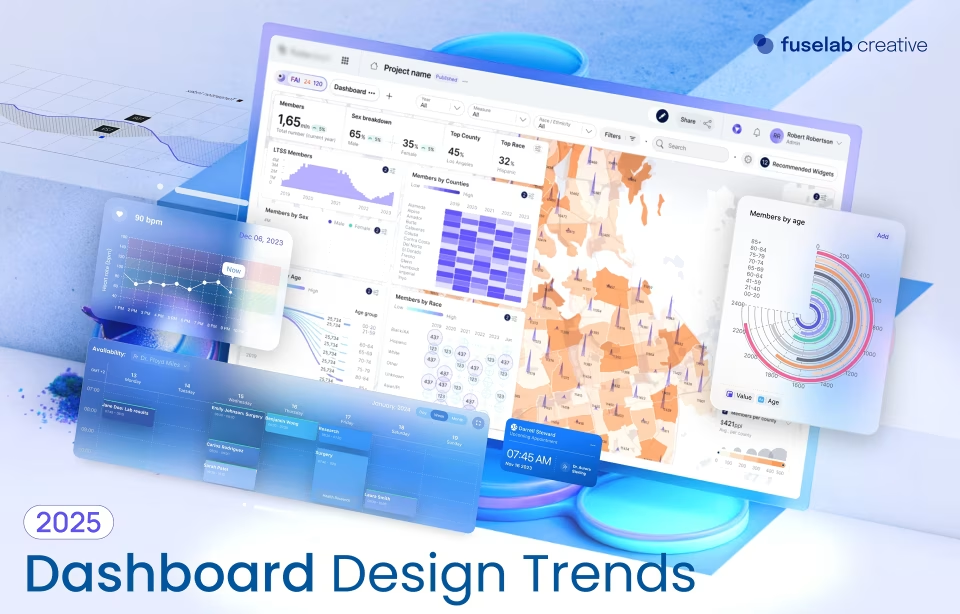
A Closer Look at Types of Dashboards in Business

How often do you find yourself immersed in a heap of data, trying to make sense of it for your next big project? What do you do when asked to present insights to the board when the data you are working on seems too complicated to discuss? Well, a business dashboard solution is now your new best friend.
Speaking of the dashboard, it is essentially a visual representation of data, typically in the form of charts, graphs, metrics, and other types of data visualization. Think of a business dashboard as a central tool for monitoring and analyzing key performance indicators (KPIs) within your organization. What this means for you is that you now have the potential to generate clear and concise overviews of critical information and identify areas for improvement in real-time and forever.
But are dashboards limited to just viewing and presenting data better? Certainly not! Dashboards can enable improved decision-making by providing timely and accurate data – paving the way for more strategic planning. They can also boost operational efficiency by identifying bottlenecks and areas for optimization in time.
Not to mention, you can also ensure better communication and collaboration among team members using your dashboards, as they offer a shared understanding of key performance metrics, and therefore, offer insight into areas of weakness. This article explores the various types of dashboards commonly used in business, including those for data visualization, business intelligence, analytics, and marketing. Read about their unique features and applications to pick the one that suits your needs the best.
What Can a Dashboard Do for Me?
Simply put, a dashboard is a dynamic and interactive tool that presents data with a visually appealing, easy-to-understand UX/UI design. It traditionally comprises a collection of charts, graphs, and metrics designed to provide a snapshot of key performance indicators (KPIs) relevant to a specific area of interest.
Dashboards are very customizable – you can use them to display data from various sources, including databases, spreadsheets, and real-time data feeds. You currently have more data than you realize just by conducting virtual meetings, sending emails, paying bills, and the list goes on.
The key components of a dashboard include:
- Charts and graphs: Visual representations of data to quickly identify trends, patterns, and anomalies. Common chart types include line charts, bar charts, pie charts, and scatter plots.
- Metrics: Numerical values representing specific performance indicators that you wish to track. Metrics can be used to measure progress toward goals, identify areas for improvement, and assess overall performance.
- Filters and drill-down capabilities: Features that allow customization of the dashboard to focus on specific data points or to explore data in greater detail.
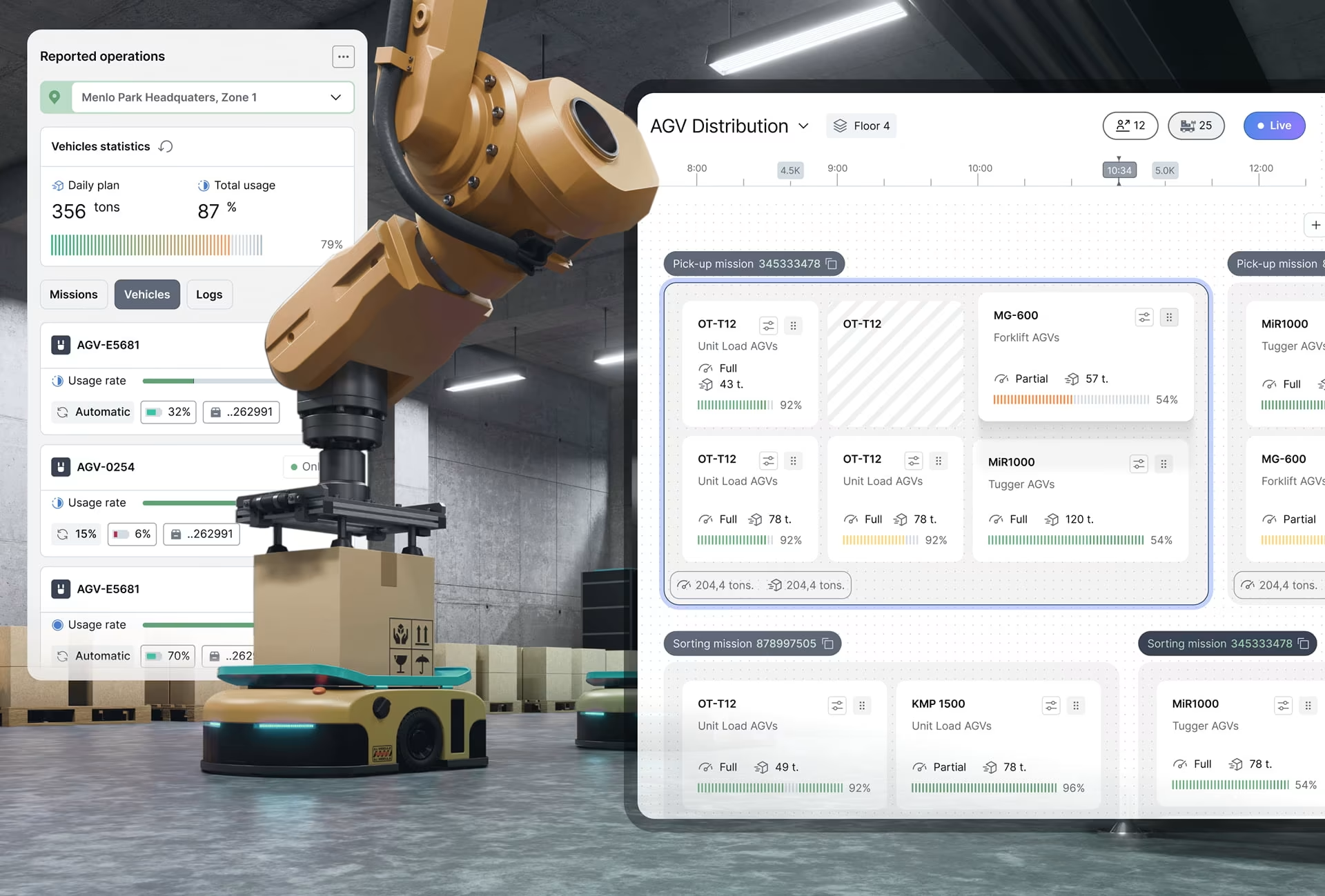
Dashboards can be used to monitor KPIs, evaluate progress towards goals, identify emerging trends and patterns in data, support informed decisions about resource allocation, strategy, and operations, and provide a common platform for collaborating with team members. For instance, Robodog AGC has revolutionized warehouse automation with real-time insights, intuitive controls, and powerful automation.
The precise use and benefit also depend on the type of dashboard being used, which we will explore in further detail in the upcoming sections.
What Are the Types of Dashboards?
A business dashboard is not a one-size-fits-all solution. There are various types of dashboards, each tailored to specific needs and industries. Understanding the various types of dashboards can help organizations leverage the right tools for effective decision-making and performance analysis.
Wondering what are the three types of dashboards most utilized by businesses? Here’s a detailed description:
#1 Data Visualization Dashboards
Data visualization dashboards, as the name suggests, are your go-to choice for transforming raw data into meaningful visual representations. These dashboards use charts and graphs to clearly present complex information. These dashboards use visual elements like lines, bars, pie charts, etc. to help stakeholders quickly grasp trends, patterns, and data-driven insights to help users make important decisions quickly and with confidence.
Data visualization is changing how we see different domains, with several new and emerging applications on the horizon. They are used in marketing to track website traffic, analyze customer behavior, and measure the effectiveness of marketing campaigns.
In finance, they can help monitor stock prices, analyze investment portfolios, and evaluate financial performance. Data visualization dashboards are also invaluable in operational management, helping track production metrics, monitor inventory levels, and identify bottlenecks in supply chains. Not to mention helping busy managers sleep better at night knowing they now have an invaluable asset on their team.
#2 Business Intelligence Dashboards
Business intelligence (BI) dashboards are your pick for a more comprehensive data analysis. These dashboards integrate data from multiple sources, providing a unified view of an organization’s performance.
BI dashboards stand out with their advanced analytics capabilities – forecasting, predictive modeling, what-if analysis, you can do it all. This means more room for businesses to understand their data and uncover valuable insights for strategic decision-making.
Various types of dashboards in business intelligence are used by executives and analysts for a holistic understanding of operations. Track financial performance, analyze customer satisfaction, evaluate market trends, and identify opportunities for growth – there’s so much you can do with a BI dashboard.
For instance, BI dashboards in the retail industry can help track sales trends, analyze customer demographics, and identify the most profitable product categories. In the healthcare sector, they can be used to monitor patient outcomes, manage resource allocation, and improve operational efficiency. The AR Health App, for example, is transforming modern HER systems with a telehealth environment.
#3 Analytics Dashboards
Analytics dashboards are specially designed for obtaining in-depth insights into data. Going beyond simple visualization, analytics dashboards offer advanced capabilities to uncover trends, patterns, and correlations that may not be immediately apparent.
Various types of analytics dashboards use statistical analysis, predictive modeling, and data mining techniques to extract valuable information from large datasets. They are widely used across industries like finance, healthcare, retail, and manufacturing. Take Future Aircraft Bluebook, for instance – the premier resource for general aviation aircraft rules is a go-to for all types of businesses in the aviation domain. And who couldn’t use an extra airplane for weekend getaways?😃
In finance, analytics dashboards can be used to analyze market trends, assess risk, and optimize investment strategies. In healthcare, they can be used to analyze patient data, identify disease outbreaks, and improve treatment outcomes. In retail, they help analyze customer behavior, optimize pricing strategies, and improve inventory management.
A Unique Mix: Marketing Dashboards
Marketing dashboards continue to be one of the most interesting types of data dashboards for businesses, combining various capabilities and outcomes. A marketing dashboard design helps track and analyze KPIs related to marketing campaigns and provides a centralized view of marketing activities.
Businesses can use various types of marketing dashboards to measure the effectiveness of their efforts and curate data-driven decisions. These dashboards typically focus on metrics like website traffic, social media engagement, email open rates, and conversion rates.
Marketing dashboards have proved essential for modern marketers. They help monitor the performance of advertising campaigns, track customer acquisition costs, analyze customer behavior, and measure the return on investment (ROI) of marketing initiatives. Marketers can optimize their strategies, allocate resources more effectively, and achieve better results using these powerful tools.
Choosing the Right Types of Performance Dashboards for Your Business
Selecting the right dashboard visualization types is crucial for the effective analysis of a business’ data pool. Businesses must carefully consider a mix of factors to ensure that the chosen dashboard aligns with their goals and desired outcomes.
Begin by defining the specific needs and objectives of the organization. What are your primary goals and objectives? What KPIs are the most important to track? What insights does your team need for effective decision-making? Answering these key questions on your needs and desired outcomes can help determine the most suitable dashboard type.
For instance, if all you are looking for is to track real-time performance metrics, a data visualization dashboard might suffice. However, if you seek complex analytics and predictive modeling, a business intelligence dashboard might be the most appropriate choice.
Next, evaluate the technical capabilities and resources available within the organization. Consider factors like the existing data infrastructure, skills of the team members, and budgets allocated for dashboard development. A complicated dashboard with advanced analytics and data integration might be beyond the capabilities of a small team with limited resources.
Thirdly, take into account the target audience for the specific types of dashboard in data visualization. Different users have different levels of technical expertise and data literacy, and the dashboard must be easily understood and interpreted by the audience in question. While a simple data visualization dashboard might suit a broad range of users, a more complex analytics dashboard is better suited for data analysts and experts.
Finally, consider the scalability and flexibility of the dashboard as well. Your organization will steadily grow and evolve in the coming years, which means the dashboard would have to be adapted to accommodate new data sources, metrics, and functionalities. A scalable and flexible dashboard goes a long way in ensuring that it remains relevant and useful over time.
Tips for Creating Effective Dashboards
Now that we have answered what are the types of dashboards and how to pick one for your needs, it is time to look at a few tips when building effective business dashboard solutions:
- Keep it simple: Avoid cluttering the dashboard with too much information. Focus on the most important metrics and visualize them clearly.
- Use consistent formatting: Consistency in terms of colors, fonts, and chart types will help improve readability and usability.
- Provide context: Include clear labels, tooltips, and explanations to provide context for the data being presented.
- Enable interactivity: Allow users to drill down into data, filter information, and customize the dashboard to their specific needs.
- Test and refine: Regularly test the dashboard with users to gather feedback and make improvements.
- Update regularly: Ensure that the dashboard is always updated with the latest data and that it remains relevant to the organization’s goals.
- Consider mobile accessibility: Design the dashboard to be responsive and compatible with different devices, including smartphones and tablets.
- Lastly, make it dummy-proof. In other words, don’t create something that needs explaining or training to use, you’ll just end up frustrating your staff.
This blog on Dashboard Design Trends for 2025 encapsulates all the above tips along with some inside ideas for the best dashboard solutions for businesses.
Dashboard Tools and Platforms
While we have understood how to design and use different types of dashboards, the market is abuzz with several ready-to-use dashboard tools and platforms for various needs and budgets. Some of the most popular ones include:
- Tableau: A powerful and versatile data visualization platform, Tableau allows users to create interactive dashboards with ease. Key highlights include a drag-and-drop interface, a large library of chart types, and integration with various data sources. Tableau is particularly well-suited for users who require advanced analytics and customization capabilities.
- Power BI: This business intelligence platform developed by Microsoft provides a comprehensive set of tools for data discovery, visualization, and analysis. Power BI integrates seamlessly with other Microsoft products like Excel and SharePoint, making it a popular choice for organizations heavily invested in the Microsoft ecosystem.
- Google Data Studio: A free data visualization tool part of the Google Workspace suite, Google Data Studio offers a user-friendly interface, multiple chart types, and integration with other Google products like Google Analytics and Sheets. It is a great option for organizations already using Google’s cloud-based services.
- Fusedash: Coming soon, a game-changing platform designed and developed by Fuselab Creative!
While each of the above types of dashboards have their unique features and benefits, businesses must consider their specific needs, the level of technical expertise of their team members, and the budget allocated for dashboard development for the right choice.
Conclusion
Dashboards have become an indispensable tool for organizations that want to make data-driven decisions and improve their overall performance. These advanced platforms help effectively visualize and analyze data, curating valuable insights, identifying trends, and optimizing operations.
When selecting the best dashboard type for your organization, consider your specific needs and objectives, the technical capabilities available, and the intended audience. Follow the best practices for designing and using dashboards outlined in this article to create effective tools that support strategic decision-making.
If you are looking for a trusted partner to help design and implement the dashboard solution of your choice, look no further than the Fuselab’s Software Design Service team. Schedule a consultation today and get help designing a business dashboard grounded in time-tested principles. We look forward to helping you explore how the data you already have access to can be put to work!
Author