SaaS dashboard design: the screen your trial users judge you on

Every guide to SaaS dashboard design treats the dashboard as an internal report with better styling. This approach is wrong, and it quietly costs products the trials they should be winning. The person reading a SaaS dashboard for the first time is usually the person deciding whether to pay for it.
SaaS dashboard design covers the primary data screen inside a multi-tenant product. That one screen must work as a sales surface during an evaluation, a daily workspace for a paying account, and a shared view for several roles within the same company. An internal reporting dashboard answers to one audience holding a full dataset. A product dashboard doesn’t have that luxury.
What SaaS dashboard design is, and why the internal-reporting playbook fails on it
SaaS dashboard design fails when it borrows the internal-reporting playbook, because that playbook assumes a captive audience, a complete dataset, and one kind of viewer. A product dashboard typically attracts a skeptical visitor, a nearly empty account, and at least three roles reading the same screen for different reasons. Those are opposite starting conditions, not variations on one.
The gap shows up first in a demo. A screen built on the reporting model looks convincing loaded with sample data, then looks abandoned the moment a real trial account opens it and tries to do some digging. Nothing about the layout changed between those two moments. What changed is that the data behind it now belongs to somebody who has not built anything yet.
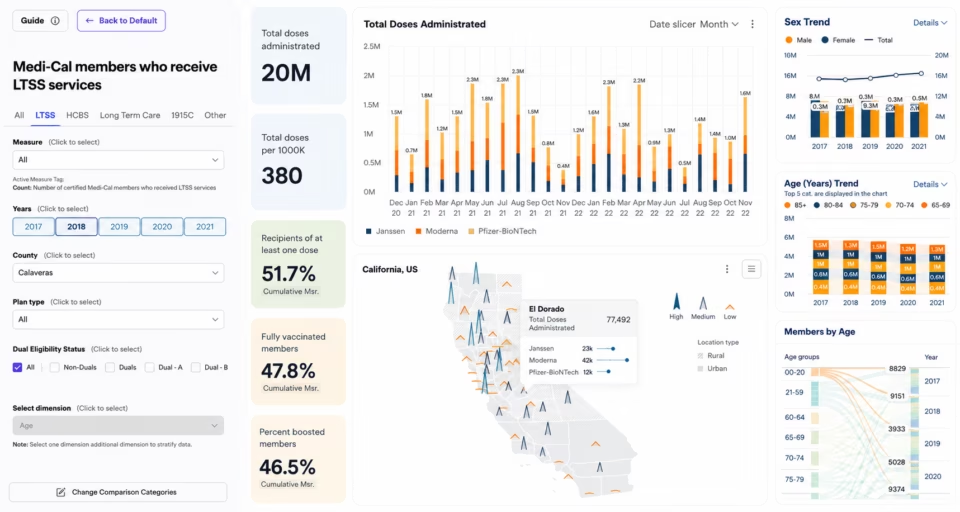
We hit this constraint head on with our Datamonitor Healthcare product design. This Informa research product was designed to help pharmaceutical teams track disease prevalence by region and timeframe. The requirement was blunt: the interface had to work with no explanation and no training, paving the way for a researcher to assemble their own criteria and produce a report inside the first session.
This 100% intuitive requirement immediately rules out most of what internal dashboards quietly depend on. There is no onboarding call, no analyst who already knows where everything lives, and no shared vocabulary built up over months of use. Product dashboard design has to carry all of it inside the screen itself, on the first visit, for someone who arrived skeptical knowing very little about the product.
The first-week problem: designing the screen a trial account actually sees
A trial account has no history, no team activity, and frequently no data at all for its first several days. This is precisely the window in which the new client is deciding whether to become a paid one. A dashboard built only to display data will show a grid of empty charts during the exact week the product most needs to argue for itself. Not a powerful position, to say the least.
Enterprise products face the same issue. A pilot seat handed to an evaluator during procurement is an empty account with a deadline attached, and the evaluator writing the recommendation is rarely the person who would use the product daily.
The Nielsen Norman Group warns that leaving a container blank creates confusion about whether the system is still loading or has failed. It costs the product user confidence, and it wastes a chance to promote the interface while someone is still paying attention. A trial account sits in that state by default rather than by accident.
Treated as a component problem, zero data produces a placeholder illustration. Treated as a commercial problem, it produces something else: a headline naming what the chart will eventually track, a line of context explaining why that number matters, and one action that starts creating the data. The empty account is an onboarding screen wearing a dashboard’s layout.
Our Datamonitor Healthcare and Blis, advertising platform benefited from our experience in this area. Almost every Blis flow starts on a map, and Datamonitor opens on a high-level map built to orient a researcher before they have chosen a single filter. Both run on data the product already owns rather than data the customer has yet to create. An empty account is only ever empty of the customer’s own data.
The specific patterns for empty, loading, and partial-data screens belong in a dashboard design system rather than in one screen’s design file. What matters at this level is the decision sitting above those patterns. A low-data state deserves the same attention as the fully populated one, because for a trial account it is the only state that exists.
One tenant, three roles: admin, paying seat, viewer
A single SaaS account is rarely a single audience. An admin manages billing, seats, and integrations. A paying seat works inside the product daily and wants speed over explanation. And a viewer, usually a manager checking progress once a month, needs context they have no time to assemble. One default screen cannot serve all three honestly.
Permissions usually arrive as a backend decision the interface reflects afterward. In practice, they are a design decision, because what a role cannot use changes what that role’s default screen should contain in the first place. In our opinion, a control a viewer can see but never press is worse than a control that was simply never rendered for them.
The canonical reference here is NIST’s role-based access control model, unified in 2000 and adopted as the ANSI/INCITS 359 standard four years later. It specifies which role may perform which operation. It says nothing whatsoever about what that role should see first, which is precisely how permissions end up implemented correctly and designed badly.
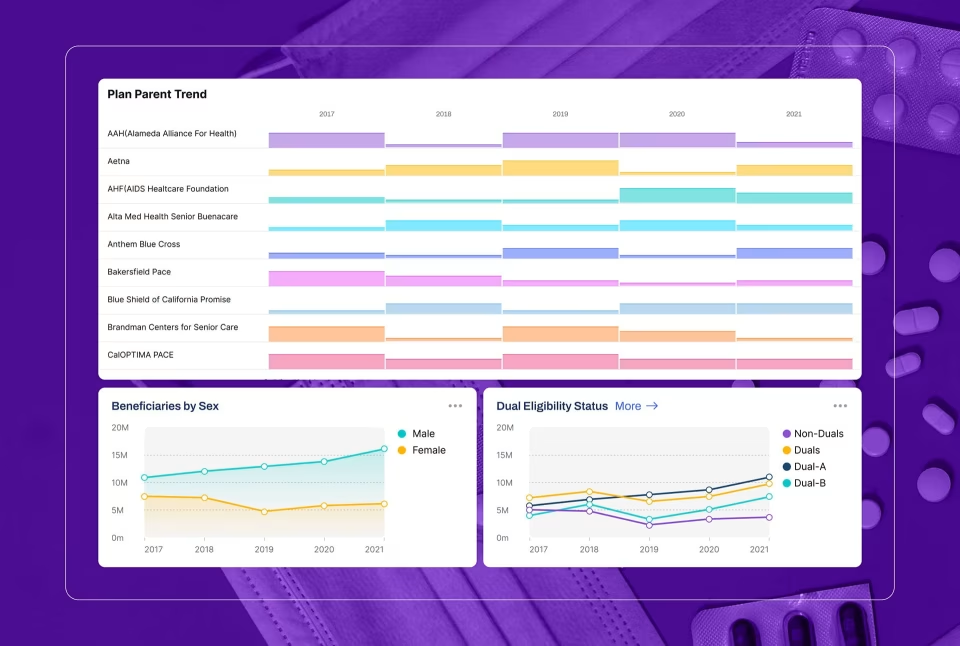
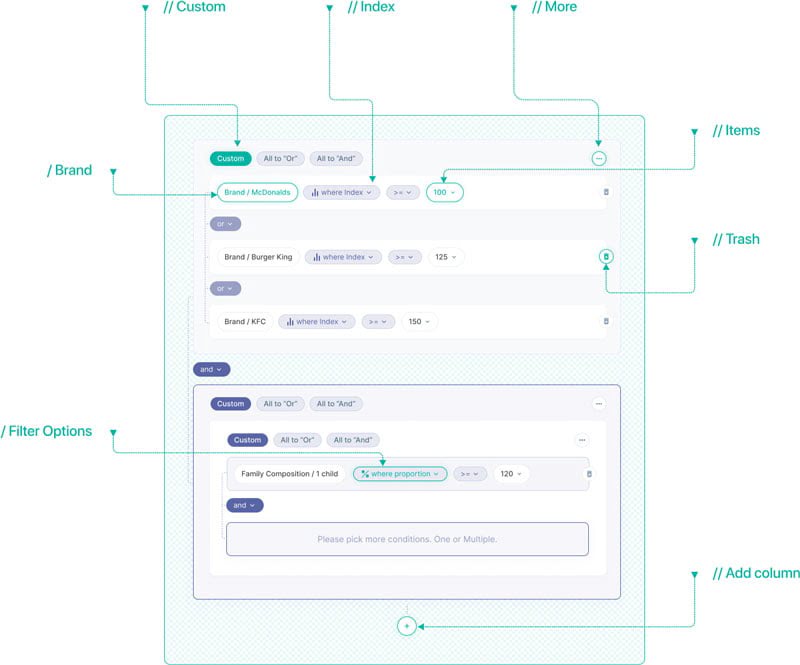
Blis, the audience targeting platform Fuselab designed, took into account all of the factors listed above and was still able to deliver an unified product that works for multiple audiences. Blis’s data scientists wanted the raw table first so they could build a view from the ground up, while less technical marketers needed the guided path through filters and maps. The table view exists because both of these groups would have left without it.
The working rule is one dashboard per role, built once and applied everywhere, so an admin’s screen looks like an admin’s screen in every corner of the product. Letting each user rearrange their own layout feels generous and makes the product harder to learn, because no two people doing the same job then see the same thing.
What belongs on the default screen, and who decides?
Per-role defaults settle most of this, and one argument survives them: what the daily user lands on. The buyer opens the dashboard to check that the product is working. The daily user opens it to start the day’s work. Those are two different screens, and teams that build one and hand it to the buyer lose the people who log in every morning.
This decision usually happens by accident. Whoever speaks loudest during design gets the default, and in B2B SaaS the loudest voice often belongs to the person who signed the contract. The result is a first screen reporting on the product to someone who logs in quarterly, while the daily user learns to click straight past it with a scowl on their face.
Choosing which metrics earn a place on the default screen is the hardest call in KPI and data dashboard design, and showing both views does not solve it. A screen that answers the buyer’s question and the daily user’s question at the same time answers neither with any real impact, and, in our experience, the daily user is the one who notices first.
Datamonitor Healthcare answers the who-decides question differently again. The comparison view is what researchers come to the product to build: they assemble their own data selections to match their goals and keep the result. The design team fixed the shape of the screen. The researcher chose its contents, a call no buyer or kickoff committee is positioned to make on their behalf.
SaaS dashboard design for a product that changes underneath it
A SaaS product does not hold still. Features ship, new metrics become worth tracking, and pricing tiers change what an account can see. A dashboard built as a fixed layout around the current feature set becomes a redesign project every time the product team ships something the layout was never shaped to hold.
Grid.ai, now Lightning AI, is the case that shows what a system buys you, because we designed two products for them, rather crowding their needs into one. Train came first, covering experiment tracking for machine learning engineers. Blueprints followed as a separate product, built on the same design system. The test was not whether either layout looked right on launch day. It was whether the second product could be built without redesigning the first.
The fix is architectural rather than visual. A dashboard needs a small set of layout zones that can take a new card without shifting everything around it, and one written rule for how a new metric earns a place on the default screen. A rule that holds up: the metric maps to a top-three decision for at least one role.
Pricing tiers make this sharper than feature releases do. Locked cards are the usual answer, and they convert. The real question is where the line sits. A dashboard that is mostly padlocks reads as a demo of a product the customer did not buy, and a layout that only looks right on the top tier undersells every tier beneath it.
Blis needed the same system for a different reason. A global change there used to mean days of screen-by-screen edits. With a design system in place, it lands across the platform in minutes. That difference decides whether a new metric is absorbed in an afternoon or the page reopens in a design tool.
How to tell a SaaS dashboard is costing you renewals
Three behaviors signal a SaaS dashboard is failing, long before churn shows it. Accounts export data to spreadsheets to rebuild a view the product should already display. Support tickets ask where a specific number lives. A single power user per company still opens the dashboard; everyone else has quietly stopped logging in.
None of these arrive as a complaint about the dashboard. Somebody who rebuilds a report in a spreadsheet has already concluded the in-product version cannot answer their question, and rarely says so out loud. Blis shipped a raw table view for that reason: users who want to build from the ground up will do it somewhere anyway.
Support tickets asking where a number lives are the clearest of the three, because they indict the information architecture rather than the person asking. One user asking is noise. The same question arriving from several accounts means the screen buried something those customers came to the product to find.
Admin-only usage is the signal that precedes churn most reliably. Once one person at a company is still opening the dashboard, the product has become that person’s tool rather than the team’s. The renewal now rests on whether they are still employed there a year from now.
Track all three by cohort rather than in aggregate. An aggregate export rate hides the pattern that matters: whether accounts that signed up last quarter behave differently from accounts that signed up two years ago. Two signals in the same recent cohort are the pattern worth acting on before the renewal conversation opens.
What to fix first
Start with whichever failure is costing money right now. If trial accounts stall in week one, the zero-data state comes before layout. If paying accounts export to spreadsheets, the role defaults hold the renewal risk. This is the question Fuselab starts with on every SaaS UI/UX design project: which failure is costing money now.
Frequently asked questions
What is a multi-tenant dashboard?
A multi-tenant dashboard is a single data screen inside a product that serves many separate customer accounts, each with its own data and its own permissions. The design difficulty is that the layout is shared while the data volume, permissions, and user sophistication behind it differ sharply from one tenant to the next.
What is a SaaS analytics dashboard?
A SaaS analytics dashboard is the reporting surface a software product gives its own paying customers, showing how they are using the product and what results it has produced for them. It differs from internal analytics because the audience is a customer who can cancel rather than an employee who cannot.
How does dashboard design differ between B2B and B2C SaaS?
B2B SaaS dashboards usually serve several roles inside one account, including a buyer who is not the daily user. B2C dashboards typically serve one person looking at their own data, which removes the permission model and the argument over whose view the default screen should show almost entirely.
Should a SaaS product build a custom dashboard or embed a BI tool?
Custom dashboards are worth the cost once the screen works as part of the product experience, shaping trial conversion and daily retention. An embedded BI tool is the faster path when the requirement is internal reporting that nobody is evaluating during a purchase decision.
How much does SaaS dashboard design cost for an existing product?
SaaS dashboard design with a US-based specialist starts around $25,000, at hourly rates of $100 to $150. The range widens with each role that needs its own default view, and narrows considerably when a usable design system already exists to build from.
What should a SaaS team prepare before starting a dashboard design project?
A SaaS team should arrive with three things. The roles that will open the screen, the permission model separating them, and an honest account of what data exists on an account’s first day. Teams that skip the third one design for a populated account that does not exist yet.
What should a company look for in a SaaS dashboard agency?
A SaaS dashboard design agency should show work involving empty and low-data states, role-based defaults, and multi-tenant permission models rather than visual polish alone. Ask for a named project where the default screen moved a number the business cared about, such as activation, renewal, or expansion. Not one that simply photographs well.