Understanding AI Workflow UI: Design, Management, and Automation
At a time when around 50% of businesses are leveraging AI to use big data effectively, AI workflows are taking center stage. And why shouldn’t they – AI’s integration into diverse sectors makes well-defined, well-structured workflows all the more important.
Organizations today are chasing machine learning and deep learning like never before, calling for AI projects that deliver tangible results, optimize resources, and maintain reliability. This is where the significance of an AI workflow snowballs into a massive form. Think of it as the end-to-end pathway that data travels, from its initial ingestion to the final, actionable insights a trained AI generates.
But what ensures that the workflow is robust? Three core components: design, management, and automation.
The Pillars of AI Workflows: Design, Management, and Automation
Serving as the crucial bridge between humans and AI systems, AI-based Workflow Design enables effective interaction and control. It also spans the strategic planning and structuring of the workflow itself, ensuring it aligns with specific objectives and scales effectively.
Management involves the orchestration, monitoring, and governance of AI tasks, guaranteeing smooth execution and performance. Automation is critical for streamlining repetitive processes, boosting efficiency, and minimizing human error. All these elements are deeply intertwined, each contributing to the overall success of AI initiatives.
What are AI Workflows?
An artificial intelligence workflow is a structured sequence of tasks specifically designed for the development, deployment, and ongoing maintenance of artificial intelligence models. Think of it as the complete lifecycle of an AI project – with all the necessary steps to transform raw data into a functional and effective AI solution outlined.
What this workflow provides is a clear roadmap, critical for consistency and efficiency throughout the project lifecycle.
Given that the entire concept relies on structure and process, it is important to explore the key stages within an AI workflow. These include:
- Data Ingestion: Raw data is collected and imported into the system.
- Preprocessing: Cleaning, transforming, and preparing the data for model training.
- Model training: Teaching the AI algorithm to recognize patterns and make predictions.
- Evaluation: Assessing the model’s performance and accuracy.
- Deployment: Making the trained model available for use in a production environment, and finally
- Monitoring: Tracking the model’s performance over time, ensuring its continued effectiveness, and identifying any potential issues.
Automation and orchestration play a crucial role in streamlining these stages. Automation uses software to perform repetitive tasks like data cleaning or model retraining, without human intervention. Orchestration helps coordinate and manage workflow components, so tasks are executed in the correct order and resources are used efficiently.
The complementary processes of automation and orchestration help make workflows more efficient, reliable, and scalable. This allows data scientists and engineers to focus on more complex and creative aspects of AI development. Read more about AI Workflow UI Design & Automation Services here.
The AI Workflow User Interface
A user-friendly interface lays the groundwork for effective interaction with artificial intelligence systems. The complexity of AI processes calls for clear and intuitive ways for users to provide input, monitor progress, and interpret results.
The benefits of an AI system fail miserably if users find the interface difficult to navigate or understand. A well-designed interface paves the way for efficient communication between humans and machines, so users can leverage AI’s capabilities without extensive technical expertise.
Types of AI UIs
AI user interfaces take various forms, each suited to different applications and user needs.
- Conversational interfaces like chatbots or voice assistants allow users to interact with AI through natural language.
- Visual interfaces, on the other hand, present data and AI outputs in graphical formats, such as charts, graphs, or dashboards. These can be particularly useful for data analysis and model visualization.
- API-based interfaces enable software developers to integrate AI functionalities into their applications using programmatic commands.
Each type of UI serves a distinct purpose, and the choice eventually depends on the specific requirements of the AI system and the intended user experience.
Best Practices for Intuitive Workflow UI Design
Best practices for designing intuitive AI interfaces are fundamental to ensuring users can effectively interact with and utilize AI systems.
Clear Communication
For one, clear communication and feedback are essential components of an intuitive AI interface. Users need to understand what the AI system is doing, what inputs it requires, and what outputs it provides. This clarity comes from concise language, helpful prompts, and informative visualizations.
User Feedback and Interaction
Immediate and relevant feedback is also crucial. When a user interacts with the system, they should receive clear indications of whether their actions were successful, if there were any errors, and what the next steps should be. This feedback loop allows users to learn how to interact with the AI and build trust in its capabilities.
Reducing Cognitive Load
Minimizing cognitive load is another key principle. Users can get overwhelmed if AI app workflows are too complex or too loaded with information. The design, instead, should focus on simplicity and clarity, with only necessary information and controls. Complex tasks should be broken into smaller, more manageable steps, using consistent design patterns and clear visual cues. For instance, our EM Dental application simplifies the management and daily needs of a dental practice using these best practices as a foundation.
Accessibility
Accessibility considerations are critical to ensuring the AI interfaces are usable by everyone, including individuals with disabilities. This includes adhering to accessibility guidelines for visual, auditory, and motor impairments. For example, providing alternative text for images, ensuring sufficient color contrast, and offering keyboard navigation can significantly improve accessibility. Designing for accessibility not only expands the potential user base but also improves the overall usability of the interface for all users.
AI Workflow Design Principles
Shaping the creation of effective and efficient AI systems, workflow UI UX design principles are foundational guidelines that go beyond mere technical implementation. Instead, they focus on the strategic planning and structuring of the entire AI lifecycle. Here’s how.
#1 Adaptability and Scalability
Designing for adaptability and scalability is a foundational consideration for AI-based workflows. AI systems often need to handle increasing volumes of data and evolving requirements. Therefore, the workflow must be designed to accommodate these changes without requiring significant redesign. Think modular components, flexible architectures, and cloud-based resources that can scale as needed. Adaptability also means the workflow can be adjusted to different AI tasks and data sets.
#2 User Needs and Context
A human-centric approach is essential for effective workflow design. This would cover understanding the needs and context of the users who will interact with the AI system – data scientists, engineers, and end-users. By understanding their goals, tasks, and challenges, designers can create intuitive, efficient workflows that focus on user needs, ensuring that the AI system is both technically sound and practically useful.
#3 User Feedback
Incorporating user feedback into the design process is fundamental to human-centric design. Continuous feedback loops allow designers to identify usability issues, gather insights into user behavior, and refine the workflow based on real-world experiences. Feedback can be collected through surveys, user testing, and direct communication and should be used to make informed decisions about workflow improvements. The iterative process allows the AI system to meet the changing needs of its users and remain effective over time.
You can also read about our EHR Interface Design Principles here.
Workflow UI Design: Focusing on Task Execution
Now that we have understood the what and whys of user interface workflow, it is time to shift the emphasis to the specifics – how to craft interfaces that streamline and optimize the execution of critical AI operations. With a tailored UI for specific activities, the project’s user productivity, intuitiveness, and interactivity all see a boost.
#1 Design for Specific AI Workflow Tasks
Designing user interfaces for AI-based workflows calls for a razor-sharp focus on the specific tasks that users must perform. This involves creating tailored interfaces for activities such as data labeling, where users manually annotate data for model training, and model training parameter setting, where users adjust various parameters to optimize model performance.
These interfaces should be designed to streamline the specific tasks, providing the necessary tools and information clearly and efficiently. The idea is to minimize the effort required to complete each task, allowing users to focus on the core objectives of the workflow.
#2 Visualizing Complex Workflow Management UI
Visualizing complex data pipelines and model architectures is crucial for understanding and managing AI workflows. Data pipelines, which involve a series of data transformations, can be intricate and difficult to comprehend without visual aids. Similarly, model architectures, which define the structure of the AI algorithm, can be complex and abstract.
Visual interfaces that graphically represent these pipelines and architectures allow users to easily understand the flow of data and the relationships between different components. This visualization aids in debugging, optimization, and overall workflow management.
#2 User Experience Considerations
User experience considerations are paramount for data scientists and engineers interacting with the AI workflow interface. These users often require advanced tools and functionalities to perform their tasks effectively and optimize workflows better.
Drag-and-Drop Interfaces
Drag-and-drop interfaces for pipeline construction allow users to visually assemble and modify data pipelines without writing extensive code, simplifying the process of building complex workflows.
Real-Time Feedback on Task Progress
Real-time feedback on task progress provides users with immediate updates on the status of their operations, enabling them to monitor performance and identify potential issues.
Parameter Tuning and Visualization Tools
Parameter tuning and visualization tools are essential for optimizing model performance. These tools allow users to adjust model parameters and visualize the impact of these changes on model accuracy and other metrics.
AI Workflow Management UI: Monitoring and Control
Workflow management user interfaces are fundamental to maintaining the health and efficiency of AI pipelines. Here’s a more detailed look:
Dashboards for Tracking Workflow Execution and Performance
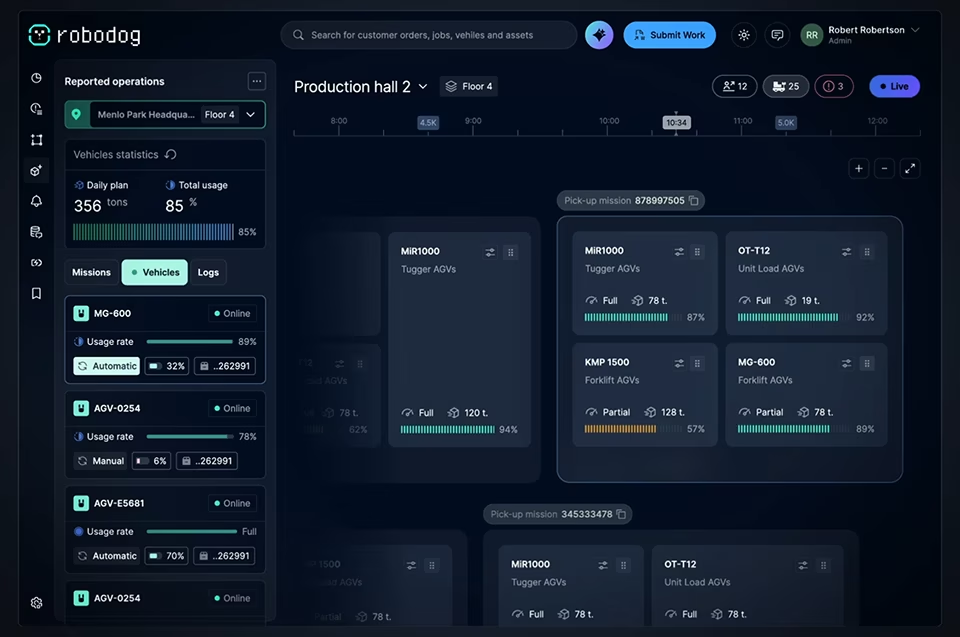
Dashboards play a critical role in this process by providing a centralized view of workflow execution and performance. They display key metrics such as task completion rates, resource utilization, and model accuracy, allowing users to quickly assess the overall status of their AI systems. This visual representation of workflow data enables proactive monitoring and informed decision-making.
Alerting and Notification Systems for Workflow Failures
Alerting and notification systems help detect and address workflow failures or anomalies. When a task fails, or when performance deviates from expected levels, these systems send immediate notifications to relevant personnel. This allows for rapid intervention and minimizes downtime. Proactively identifying and addressing issues helps organizations ensure continuous and reliable operation and improve AI workflows.
Tools for Managing Model Versions and Deployments
Here are the key tools that help manage model versions and deployments to facilitate control over AI models throughout their lifecycles:
- Visual representations of model lineage: For a clear audit trail of model development, showing how different versions were created and modified. This transparency is essential for reproducibility and accountability.
- Access control and permission management tools: Ensure only authorized users can access and modify AI models and workflows, safeguarding sensitive data and preventing unauthorized changes.
- Log viewing and debugging features: Allow users to examine detailed logs of workflow execution, enabling them to identify and resolve errors quickly. These tools provide the necessary support for effective model management, deployment, and troubleshooting.
Automation in AI Workflows
Automation is a cornerstone of efficient and scalable workflows, significantly enhancing productivity and reliability. Automating repetitive tasks helps organizations free up valuable resources and accelerate the development and deployment of AI models.
Benefits of Automating Repetitive Tasks
The benefits of workflow automation UI are numerous. First, it reduces the risk of human error, ensuring consistency and accuracy in data processing and model training. Second, it saves significant time and resources, allowing data scientists and engineers to focus on more strategic and creative aspects of their work.
Third, automation enables faster iteration cycles, facilitating rapid experimentation and model refinement. Finally, it improves the overall scalability of AI workflows, allowing organizations to handle larger volumes of data and more complex models.
Using Automation for Data Preprocessing and Feature Engineering
Automation plays a pivotal role in data preprocessing and feature engineering. Data preprocessing, which involves cleaning, transforming, and preparing raw data, often involves repetitive tasks such as data cleaning, normalization, and feature scaling. Automation tools can streamline these processes, ensuring data consistency and quality.
Feature engineering, which involves creating new features from existing data, can also be automated using techniques such as automated feature selection and generation. By automating these tasks, organizations can significantly reduce the time and effort required to prepare data for model training.
Automating Model Training and Deployment
Model training and deployment are critical aspects if you want to automate workflows with AI. Model training iterates through various algorithms and parameters. This process can be automated using tools that automatically select and tune models based on performance metrics.
Deployment makes the trained model available for use. It can also be automated using tools that streamline the process of packaging, deploying, and monitoring models in production environments. Automation ensures that models are trained and deployed consistently and efficiently, minimizing the risk of errors and delays.
Continuous Integration/Continuous Deployment for AI
Continuous Integration/Continuous Deployment (CI/CD) for AI is a critical practice for ensuring the continuous delivery of high-quality AI models.
CI/CD automates the process of building, testing, and deploying AI models, enabling rapid iteration and feedback cycles. CI involves automatically building and testing models whenever changes are made to the codebase. CD involves automatically deploying models to production environments after they have been successfully tested.
CI/CD pipelines automate the entire AI lifecycle, from data preparation to model deployment, ensuring that models are delivered quickly and reliably. This approach allows organizations to respond rapidly to changing business needs and deliver cutting-edge AI solutions.
Best Practices for Optimizing AI for Workflows
Optimizing AI workflows with a focus on user interface (UI) design involves a multifaceted approach that prioritizes usability, efficiency, and clarity. The goal is to create interfaces that not only facilitate the execution of AI tasks but also enhance the overall experience for users, enabling them to work more effectively and make informed decisions.
Here’s how:
#1 User-Centric AI Workflows
A fundamental best practice is to design interfaces that are tailored to the user’s specific needs and expertise. For data scientists, this might mean providing advanced visualization tools and customizable dashboards, while for business users, it could involve simplified interfaces that present key insights in an easily digestible format. Understanding the user’s role and responsibilities is crucial for designing interfaces that support their unique workflows.
#2 Consistency
Consistency in UI/UX design is paramount. Maintaining a consistent look and feel across all components of the AI workflow ensures that users can navigate the system intuitively. This includes using consistent terminology, layout, and interaction patterns. Consistent design reduces cognitive load and allows users to focus on the task at hand rather than trying to decipher the interface.
#3 Visualizations
Visualizations play a crucial role in optimizing the UI/UX design workflow. Presenting data and model outputs in a visual format can make complex information more accessible and understandable. This includes using charts, graphs, and interactive visualizations to represent data patterns, model performance, and workflow progress. Visualizations can help users identify trends, detect anomalies, and make informed decisions more quickly.
#4 Accessibility
Accessibility considerations help ensure that the interface is usable by individuals with disabilities. Providing alternative text for images, ensuring sufficient color contrast, and offering keyboard navigation are essential for creating inclusive AI workflows. Accessible interfaces not only benefit users with disabilities but also improve usability for all users. Fuselab’s design for California’s DHCS hinges on accessibility, inclusion, and reliability.
#5 Iterative Design and User Testing
Iterative design and user testing are vital for optimizing AI data workflows. Gathering user feedback through surveys, interviews, and usability testing can provide valuable insights into how users interact with the interface. This feedback can be used to identify areas for improvement and refine the design. Iterative design allows for continuous improvement, ensuring that the UI remains aligned with user needs and evolving requirements.
#6 Documentation
Finally, providing comprehensive documentation and tutorials can significantly enhance the user experience. Clear and concise documentation can help users understand the functionality of the AI system and learn how to use its various features. Tutorials and walkthroughs can provide step-by-step guidance on common tasks and workflows. By providing adequate support and training, organizations can ensure that users can effectively leverage the capabilities of their AI workflows.
You can also explore Best Practices for Enterprise App Design here.
Conclusion
The effective implementation of AI workflows hinges on an approach that integrates three critical aspects – user interface design, robust management, and intelligent automation.
With a focus on user-centric design, organizations can create intuitive interfaces that empower users of all technical backgrounds to interact with AI systems effectively. A well-defined workflow, encompassing data ingestion, processing, modeling, and deployment, ensures that AI projects are executed with precision and efficiency.
Robust management practices, on the other hand, safeguard the integrity and reliability of AI models. Automation, particularly through CI/CD pipelines, accelerates development cycles and enables continuous improvement.
As AI permeates industries and verticals, the ability to design, manage, and optimize workflows will become increasingly critical. Organizations that master these principles will be well-positioned to harness the transformative power of artificial intelligence, driving innovation and achieving sustainable growth. If your organization is looking to weave these fundamental elements into a successful AI workflow, look no further than our industry-leading design services at Fuselabs. Get in touch to learn more.
Author