Enterprise conversational AI: the interface layer
Vendor demos of conversational AI stop at a polished answer, which is exactly where an employee’s real decision begins. Enterprise conversational AI is a natural-language assistant that answers from an organization’s own documents, respects what each user may see, and can trigger tasks a named employee owns. The platform supplies the AI model and the connections into other systems. What employees see and do around each answer, the interface layer, is mostly left to the buyer.
What makes an enterprise AI chatbot enterprise-grade?
An enterprise AI chatbot is enterprise-grade when it answers from the organization’s own documents, adjusts to what each user may see, can start work in other systems, and leaves an audit trail. A consumer chatbot answers from general knowledge, and its user is expected to check anything important elsewhere. An employee often acts on the reply directly.
Vendors often sell conversational AI for the enterprise as a matter of scale: a consumer chatbot with more seats, an admin console, and a bigger contract. That framing misses what changes for the person using it. The employee is accountable for what happens next, so the screen has to show the evidence behind an answer as well as the answer itself.
Gartner’s definition of a conversational AI platform makes AI guardrails a mandatory feature: built-in controls that “enforce governance, security, and mitigation of AI-specific risks natively.” The risks it names include prompt injection, where hidden instructions in a message or a retrieved document redirect the AI, along with data leakage, hallucinations (answers the AI makes up), and unauthorized access.
None of those controls decides what an employee sees next to an answer. A capable platform handles security and most access rules, provided sync and caching are set up correctly. Production adds a screen that shows how far to trust each answer, and that screen rests on four decisions: sources, confidence, handoff and approval, and the audit trail. Platform defaults cover part of each.
Why conversational AI for business stalls after the platform is chosen
Conversational AI for business stalls after platform selection because the platform contract assigns nobody to the decisions users notice first: which sources appear with an answer, how the system signals doubt or failure, when a person takes over, and what gets saved. Whoever builds the first version decides them by default, and users judge the whole system by them.
Organizations know the risk and rarely act on it. In McKinsey’s analysis of its 2024 state of AI survey, 40 percent of respondents named explainability as a key risk in adopting gen AI, and only 17 percent said they were working to mitigate it. Explainability here means whether people can see why the AI gave an answer, which a demo rarely tests.
Interpretability and trust tend to rise together. The MIT Sloan Management Review and BCG 2022 study of AI value found that if users can interpret AI outcomes, they are 2.8 times as likely to trust the technology. A survey shows association, not proof of cause, but the design lesson holds: show what each answer was based on, and flag the ones that need checking.
The interface decisions an enterprise conversational AI platform leaves open
Enterprise conversational AI platforms supply access controls, guardrails, connections to other systems, and default citation and handoff components. They leave open how those defaults fit each role: which sources an employee sees, how the screen signals doubt, and when a person takes over or signs off. Those choices decide whether an employee can act on an answer without checking elsewhere.
For a low-risk internal FAQ, the defaults may be enough. The gap appears when answers feed decisions someone owns. Defaults are built for the average deployment, and nobody tunes them to a claims adjuster’s screen, with its approval limits and the compliance reviewer behind it, unless someone is assigned to the job.
Sources and provenance
Sources answer the question every professional asks first: where did this come from? Designers call this provenance. A source label can show that an answer is based on a particular document or dataset. The design still has to settle what evidence appears by default, what can be opened for a closer look, and how much detail someone needs before acting on the answer.
Where the source sits decides whether anyone checks it. In consumer search, Pew Research Center’s browsing data from March 2025 shows Google users clicked a link inside an AI summary in just 1 percent of visits. Employees have more reason to check than searchers do, but the same friction applies: a source one click away is a source most people skip.
Citations also change trust on their own. A 2025 study presented at AAAI, a leading AI research conference, found that citations raised trust in AI answers even when they were random, and that trust dropped once participants checked them. A link can make an unchecked answer look verified. Placing the source beside the answer makes checking cheap, so trust rests on what the source says.
Granularity matters as much as placement. A link to a long policy document tells an employee where to start reading, while the highlighted passage the answer drew on tells them whether it is right. The citation should also point to the version of the document the assistant used, because the live file may have changed by the time anyone checks.
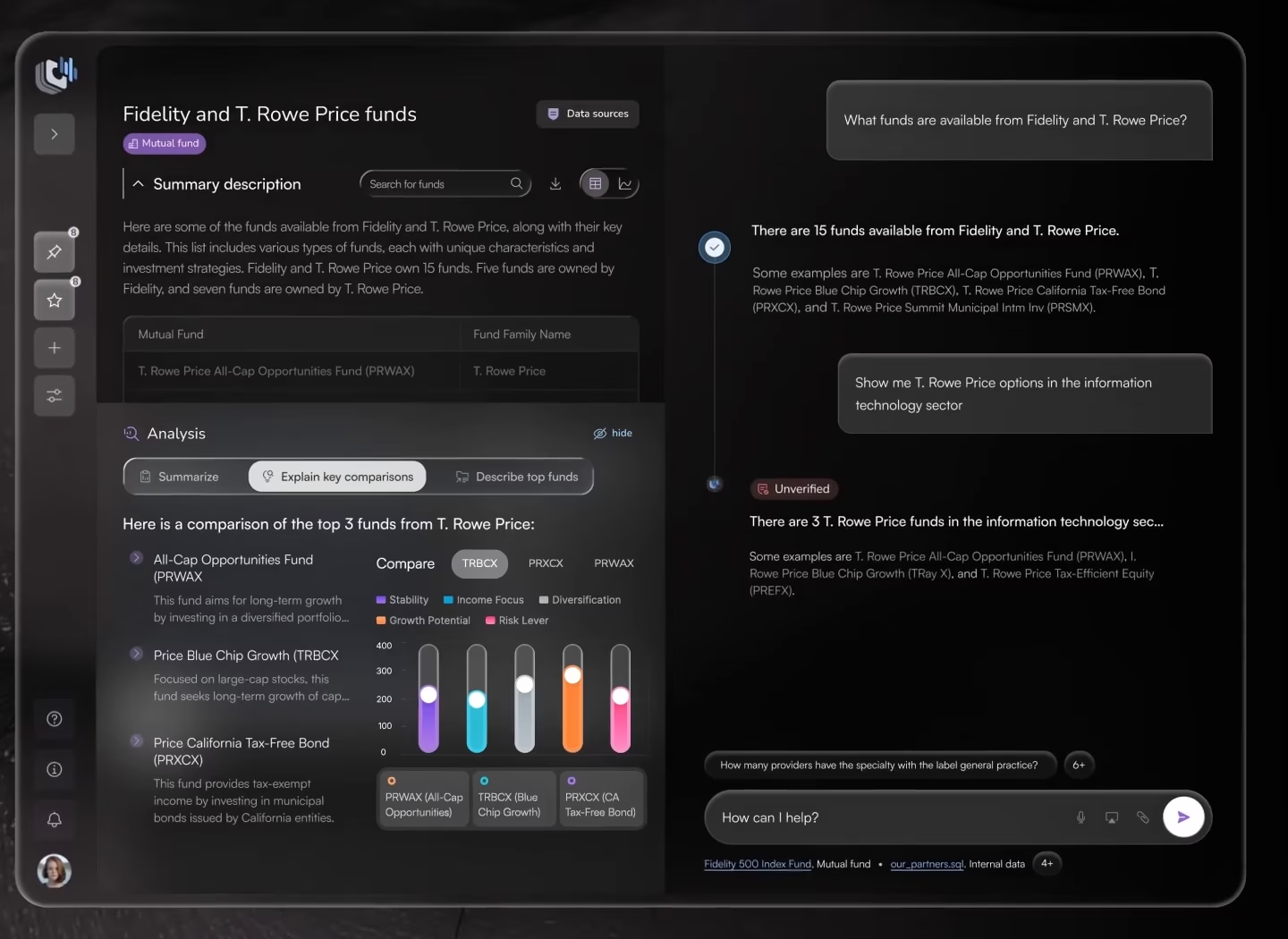
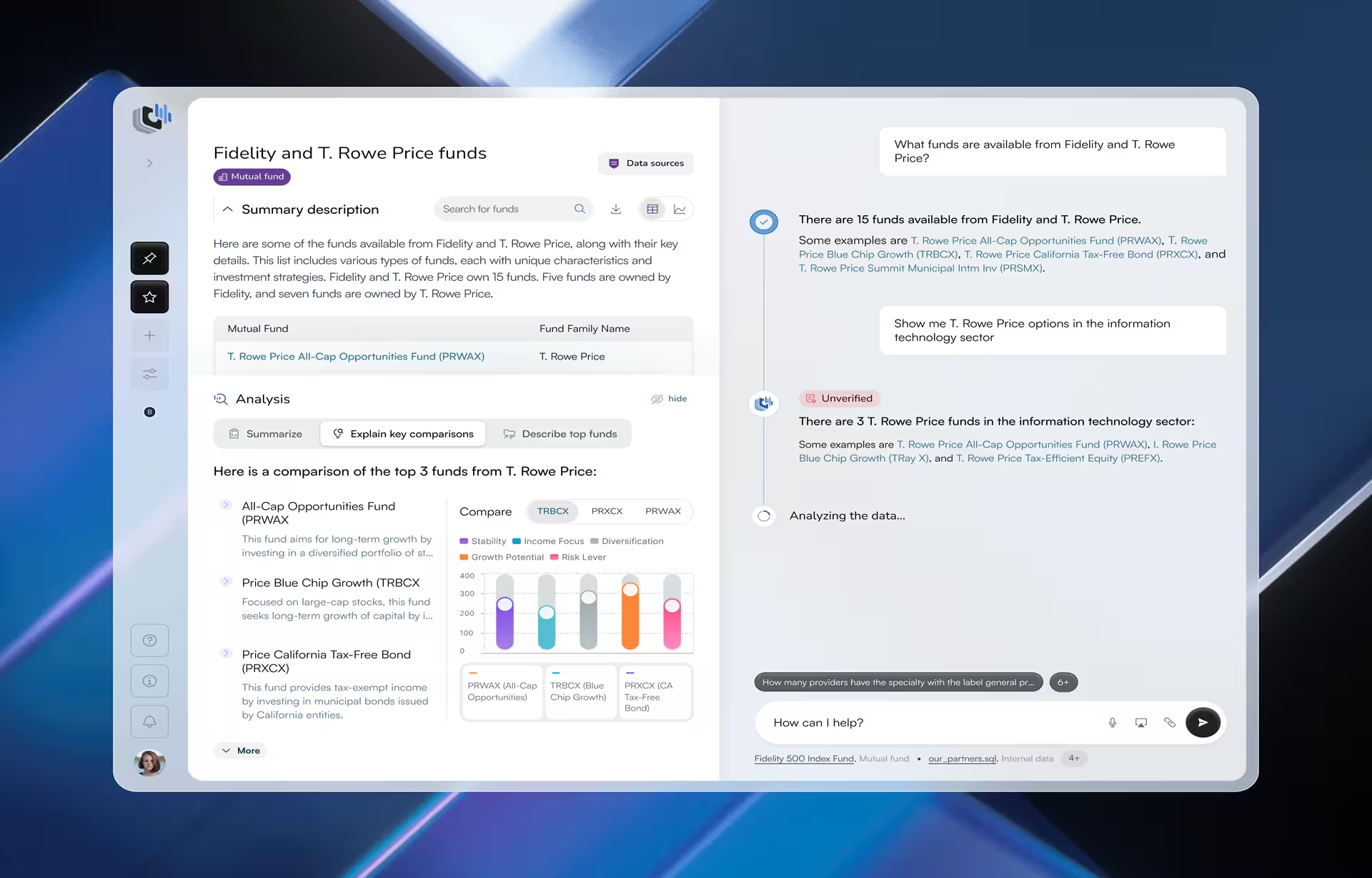
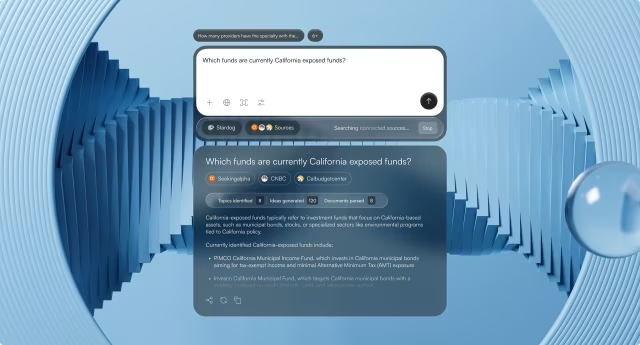
On Stardog Voicebox, a conversational AI workspace for financial analysts, we kept the evidence on the same screen as the chat. Analysts check answers against the fund data without leaving it, and each answer carries a marker showing whether it is high-confidence or needs a manual review before anyone acts on it.
Showing sources also means showing which documents from earlier in the conversation the assistant is still using. A platform may keep conversation history internally while the screen gives no sign of which documents are still in play. After several exchanges, an employee cannot tell whether “that report” still means the one discussed ten minutes earlier.
The usual cause is how the platform manages conversation memory. Every model has a context window, a limit on how much text it can consider at once, and long conversations get trimmed or summarized to fit, usually without telling the user. Ask whether the platform exposes which documents are still in play. If it does, a strip of active-document labels above the input makes that visible.
Permissions behind the sources
Access control is decades old, but a chat answer adds a new risk: a summary can reveal restricted information in a sentence even when the user could never open the underlying file. The system has to filter retrieval to each user’s access and never reuse cached answers or conversation memory across users, so the reply itself respects who is asking.
Permission checks also go stale. Many assistants copy access lists from source systems such as SharePoint or Confluence on a schedule, so someone removed from a folder this morning may still get answers drawn from it this afternoon. Cached answers carry the same risk when one user’s reply is reused for another. Ask how often access syncs and whether cached answers are checked per user.
Confidence and failure
Confidence is how the screen signals doubt, including what it shows when the assistant cannot answer at all. On Voicebox, we had to tune how visible the markers were. Markers made too prominent cast doubt on answers that were right, while markers made too subtle went unnoticed. That balance is a design decision, and no platform setting supplies it.
The signal behind a marker matters more than its styling. A language model’s own estimate of how sure it is tends to be unreliable, so the stronger signals come from retrieval: whether any source was found, whether the sources agree, and whether the answer quotes them or fills gaps between them. Each can drive its own screen state, including a plain “no source found.”
Handoff and approval
Handoff decides when a person takes over, and approval decides who signs off before the assistant acts. The platform can route a conversation to a person, but the product defines the trigger, the context that travels with it, and what the employee sees while waiting. Set the trigger by cost: a refund under a set limit goes through, while a policy exception goes to a person with the sources attached.
Approval carries more weight as assistants start acting. Gartner’s July 2026 Magic Quadrant for conversational AI platforms describes a market evolving around agentic AI, meaning assistants that take actions, and around changing governance needs. On Voicebox, the assistant drafts an action and a person approves it before it runs, a human-in-the-loop step that leaves the go-ahead with the employee responsible for the result.
An approval screen should show the action the system will actually run. A payment change is approved on the account, the field, the old value and the new one. A summary in plain language can misdescribe the underlying call, and the person who signs off is then approving a description of the transaction.
What each decision costs
Each of these decisions has a price. Sources take screen space and can slow the answer. Approval steps slow throughput, and a person asked to approve dozens of routine actions a day starts clicking through them. Reserve approval for actions a wrong answer would make expensive, and let routine ones run.
Internal enterprise assistants vs customer-facing chatbots
A customer who gets a vague answer from a support chatbot can usually ask again or switch to the phone. An employee who gets one from an internal assistant on the same platform may carry it into a workflow, where a mistake can move money, delay a claim, or put a compliance officer’s name on a decision they never reviewed.
The person asking is different too. An employee is rarely asking just for information: they are about to update a claim, reply to a customer, or approve a payment, so the answer becomes an input to an action. Months later, a manager or compliance team may ask why it was given, and that reviewer needs the visible sources and saved audit trail a customer chatbot can often skip.
Customer-facing bots in regulated businesses are the exception. When a support bot answers about fees, refunds, or policy terms, a wrong reply can bind the company, as Air Canada found in 2024 when a Canadian tribunal held it responsible for its chatbot’s wrong advice on a bereavement fare refund. Those bots need the same sources and records as an internal assistant.
Why the audit trail belongs in interaction design
Picture an auditor opening the log six months after an assistant drafted a payment change. It holds the question, the answer, the retrieved documents, and a timestamp. It does not show which sources the employee saw, whether a confidence marker was on screen, or who clicked approve. Every event was saved, and the decision still cannot be explained.
A record a reviewer can use stores more than the transcript. It keeps the version of each retrieved document, because policies change after the fact, and the model and prompt versions in use. It also keeps the passages the answer drew on, the sources and confidence state shown on screen, any handoff reason, and the name and time of the approval.
Most of that list is a logging task. The last part is not: what the employee saw and who approved exists only if the screens show it and record it. If the approval step is invisible, a reviewer cannot tell an AI suggestion from a human-approved action. That gap is locked in at the screen-sketch stage, before engineers choose what to save.
Stardog Voicebox shows the first piece of this. Each saved conversation stays linked to the documents, saved questions, and data sources behind it, so the work can be traced to its evidence later. A full audit trail adds what the employee saw on screen and who approved each action, and both are much easier to capture when the screens are designed for it.
When enterprise conversational AI is the wrong tool
Enterprise conversational AI is the wrong tool when people ask only a few predictable questions, when the source documents cannot support a trustworthy answer, or when nobody owns the outcome of a wrong one. A form or search page suits the first, cleaning the documents comes before the second, and the third needs an owner first.
Narrow question sets are the easiest case to spot and the hardest to resist. A workflow with four possible questions and four possible answers looks like a chatbot candidate on paper, but a form with four fields is faster and never invents anything. Task fit deserves its own analysis, covered in a guide to whether a product should use conversational AI at all.
Unreliable source documents are harder to see coming, because the screen can look polished while the data behind it holds duplicated policies, outdated procedures, and different terms for the same thing across departments. An assistant cannot turn contradictory documents into a reliable answer by sounding fluent. Deciding which version of a policy is official takes people who know the business, and it belongs before launch.
The third case is about ownership: who answers for the outcome when the system is wrong? On ClyHealth, an AI-powered personalized healthcare platform, we built the provider’s review into the approval step. The screen places the reasoning behind each supplement recommendation next to the recommendation, so a provider checks the logic before approving anything for a patient.
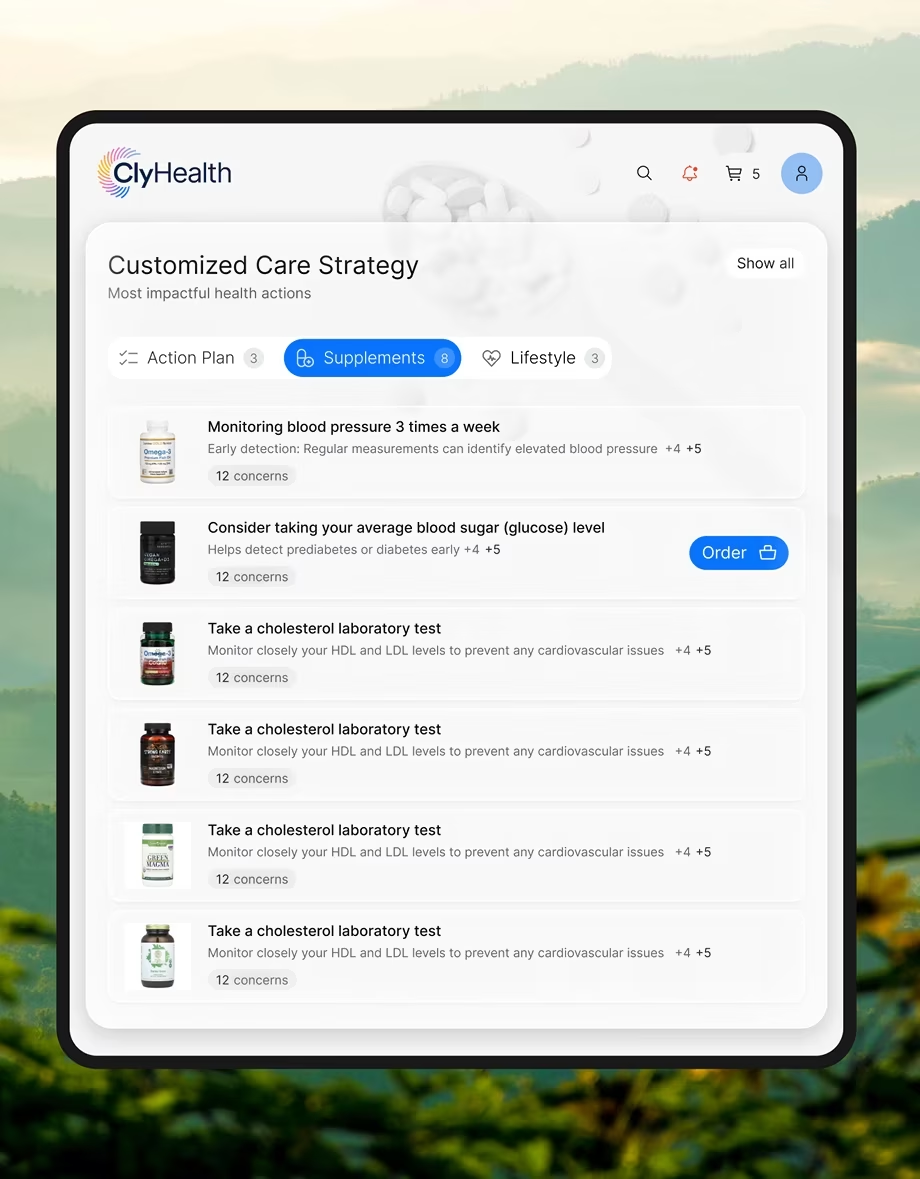
Outside healthcare, the same pattern holds. The more serious the action, the less sense it makes for the screen to hide that a person makes the final call. If no department will put its name on a wrong answer, the organization is not ready to deploy the assistant, however well the platform demos.
What to ask a vendor before signing
Before signing an enterprise conversational AI contract, whether for Microsoft Copilot Studio, Kore.ai, Moveworks, or another platform, test it on the four decisions it leaves open: sources, confidence and failure, handoff and approval, and the audit trail. A vendor that can show each one working in a demo has already done part of the interface work.
Your own documents. Run every test on your content, not the vendor’s demo set. A demo set is clean by design, while the problems above come from duplicated policies, mixed permissions, and long conversations. A few dozen real questions from past tickets, with answers your team already agrees on, show more than any scripted walkthrough.
Sources and permissions. Ask two people whose access differs, such as a claims adjuster and a claims manager, to ask the same question and compare what each sees, including the wording of the summary. If the summary mentions something one of them could not open, retrieval is not filtered per user, access has not synced, or a cached answer carried it over.
Confidence. Ask how the platform lets you show doubt when an answer might be wrong, and what that signal is computed from. Expect a specific mechanism: a confidence indicator, a retrieval-based score the screen can display, or a warning style that differs by role. A vendor that can only show or hide a raw model score has not designed for the moments its system is most likely to be wrong.
Failure screens are the part of confidence that deserves the longest look. A generic “I didn’t understand” leaves the employee guessing what to try next. A designed recovery narrows the question, offers related documents, or says what information is missing. Ask the vendor to run three failed questions live: one out of scope, one ambiguous, and one the data cannot answer.
The three should produce different screens: a scope message that says what the assistant covers, a clarifying question, and a plain statement of which data is missing. If they all return the same apology, nobody has designed what happens when the assistant fails, and that work will land on your team.
Handoff and approval. Ask the vendor to trigger a handoff and check that the person receiving it sees the full conversation and its sources. Then ask the assistant to draft an action, such as a payment change, and confirm it waits for a named person’s approval and shows the exact values that will change before it runs.
Audit trail. Ask for a sample from a real incident, redacted or from a reference customer, showing which sources the employee saw, the document versions, the confidence signal, any handoff, and who approved the action. If the vendor cannot share one, make producing one from a test session a condition of the pilot.
Before the vendor meeting, name the role that answers for a wrong reply, such as a claims lead, a compliance officer, or a care coordinator. That person’s workflow is the one the interface layer has to serve, and every handoff and audit trail decision should trace back to what they need to see.
If you hire a design partner for the interface layer, ask what you will receive. A visual skin on top of the platform is a different deliverable from a full design of how the assistant behaves in every situation: normal answers, failures, handoffs, and approvals. Two agencies can describe their work the same way and take on very different responsibility, so list the deliverables in the statement of work.
Not every deployment needs one. If the assistant only answers low-risk internal questions and the platform’s default screens pass the tests above, configure them and skip a separate design engagement. Design work is easiest to justify where a wrong answer has an owner and a cost, which is usually the moment an assistant starts drafting actions.
Put the interface layer in the contract
Whether employees keep trusting the assistant depends on sources, confidence, handoff and approval, and the audit trail, and each needs a named owner before launch. Write what the vendor configures into the platform contract and what your team or a partner designs into the statement of work. Fuselab’s AI chat interface design engagements start from that list.
Frequently asked questions
What is the interface layer in enterprise conversational AI?
The interface layer is everything an employee sees and does around an assistant’s answer: the sources shown with it, the confidence signal, the handoff or approval step, and the audit trail a reviewer reads later. The platform supplies the AI model and connections underneath, and the interface layer is designed separately.
What is answer provenance in an enterprise AI assistant?
Answer provenance is the visible link between an answer and the document, passage, and document version it came from. Strong provenance shows that source next to the answer, because users rarely open citation links on their own.
Should the platform vendor or a separate design team own the interface layer?
Platform vendors configure what their product exposes, such as confidence scores, handoff routing, and event logs. A design team, internal or external, decides how those capabilities appear in the buyer’s own workflows, roles, and approval rules. Low-risk assistants can often run on platform defaults, while assistants that draft actions usually need both, with the design work in its own statement of work.
How is an internal enterprise AI chatbot different from a customer chatbot?
An internal enterprise AI chatbot sits inside work an employee is responsible for, so it needs visible sources, answers that respect each role’s access, approval before actions, and an audit trail. A customer chatbot can often drop most of that, because an unclear answer usually costs a repeat contact, unless it answers on fees, refunds, or policy terms in a regulated business.
What should an enterprise RFP for a conversational AI vendor ask about the interface?
An enterprise RFP for a conversational AI vendor should ask how each answer shows its source and document version, what the employee sees when the system is unsure or cannot answer, whether drafted actions can be held for approval, and what the audit trail records beyond the text of the conversation. It should also ask how often access permissions sync and for a sample audit trail from a real or test incident.
How much does interface design for enterprise conversational AI cost?
Interface design for an enterprise AI assistant at Fuselab is billed at $100 to $149 per hour with a $25,000 minimum project size, the rates listed on Fuselab’s Clutch profile. Platform licensing is priced separately by the vendor, and design scope grows with the number of user roles, source systems, and approval steps the assistant has to support.
How long does design work for an enterprise AI assistant take?
Design work for an enterprise AI assistant typically runs eight to sixteen weeks from kickoff to finished designs. Production launch depends on platform onboarding, integrations, and how long it takes to agree which source documents are official, so plan the design timeline and the rollout timeline separately.