Healthcare UX design: best practices from real projects
A healthcare interface is judged at the moment its user has the least time to read it: a lab value found during a handoff, an allergy spotted before an order is signed. Healthcare UX design shapes how clinical, patient and administrative software behaves under those conditions, from EHRs and patient portals to device screens and telemedicine. Fuselab Creative has designed these interfaces since 2017.
This guide draws on that work. Four projects we ran directly: the Health Monitor EHR redesign, the Radiology Queue scan review platform, the Qgen Health Lab biotech research platform, and the Vasolabs artery scan platform. Fuselab’s wider health work cited here includes ClyHealth, an AI-assisted care platform, and long-term care dashboards for California’s Department of Health Care Services.
What Exactly Is Healthcare UX Design?
Healthcare UX design covers the research, interface design, prototyping, and validation of digital products used in clinical, patient, and administrative healthcare settings, including EHRs, patient portals, medical device interfaces, and telemedicine platforms. The discipline differs from general UX in three ways: regulatory compliance (HIPAA, plus FDA, Section 504 or 508 where they apply) adds overhead to every project phase, every interface must serve multiple user types simultaneously, and usability errors carry patient safety consequences.
The users are rarely one group. Patients may be anxious, elderly or reading in a second language. Physicians and nurses work under time pressure and constant interruption. Administrators care about billing and compliance reporting, and caregivers are often finding their way through a system they did not choose – usually griping the entire time, depending on the platform. A chronic-care patient needs clear guidance, while a physician on a clinical dashboard needs speed and an obvious signal when something is wrong.
The key components of healthcare UX
Five layers decide whether a clinical product works in use. A team that skips one usually finds out late, in testing with clinicians or after launch, when the fix costs the most. Each layer fails in its own way:
- Interface design: layout, visual hierarchy, readable type and color contrast that still works under the lighting of a ward or an exam room.
- Interaction model: predictable behavior, because a clinician who has to guess what a control does will stop trusting the screen.
- Accessibility: WCAG conformance for patients with tremors or low vision, and for clinicians with color blindness.
- Workflow integration: screens that follow the real sequence of care, including its interruptions and handoffs.
- Information architecture: years of labs, prescriptions and history structured so the newest and most critical values surface first.
For a broader reading list, the Interaction Design Foundation’s healthcare UX collection covers the field’s foundations. The rest of this guide focuses on the decisions a product team has to make, and what those decisions looked like on real projects.
Why Healthcare UX Design Matters
Healthcare UX design directly affects patient safety, the speed of clinical decision-making, treatment adherence, and operational costs across every organization that relies on digital clinical tools. A cluttered interface that obscures an allergy warning or delays access to critical lab values creates risk that no amount of hardware capability can compensate for, which is why UX is a clinical concern rather than a visual preference.
The reason is attention. A clinician holds several things in mind at once: the patient in front of them, the last result they checked and the order they are about to sign. Every extra screen, unclear label or buried value pulls attention away from the patient. An interruption costs more than the seconds it takes, because the clinician then has to reconstruct where they were. Ask any provider what frustrates them most about their job, and they’ll say they have to log in and out of different platforms all day.
The administrative side carries risk too. Inaccurate documentation, billing errors and compliance gaps often start in poorly designed input screens rather than with careless staff. A form that accepts ambiguous entries or hides a required field until submission creates errors that someone downstream has to find and fix. Good input design protects revenue and regulatory standing at the point of entry.
Benefits of Healthcare UX Design
A patient reading a result at home and a nurse finding it at a glance get the same benefit from opposite sides of the system. Patients get results they can read, appointments they can book and care plans in plain language. Phone-first layouts and readable type broaden who can use the product, and a portal that explains a result can head off some of the anxious calls a confusing one causes.
Clinicians and staff get time back, because they spend less of each encounter searching, re-entering data or working around the software. Documentation that fits the encounter, decision support that shows its evidence and screens that load the critical values first all shorten the path from seeing to deciding. Design alone will not solve clinician burnout, but a system that adds clicks and workarounds to every shift makes it worse.
Challenges in Healthcare UX Design
The primary challenges in healthcare UX design are regulatory compliance constraints (HIPAA, plus FDA, Section 504 or 508 where they apply) that limit design flexibility, system fragmentation across EHRs, labs, billing, and imaging platforms that must interoperate, diverse user groups with conflicting needs and varying technical literacy, high-stakes clinical environments where usability errors affect patient safety, and organizational resistance to adopting new interfaces after previous technology failures.
Fragmentation is the challenge teams underestimate most. A single patient interaction can touch the EHR, the lab system, billing, imaging, and an insurer, and each has its own data format and owner. The interface has to make that feel like one record. The harder work is agreeing which system is the source of truth for each value, and what the screen shows when two systems disagree. Imagine being a care coordinator, and your hospital data system has one address and contact info for a patient, and your EHR has another; who do you trust, or do you take it on yourself to find out which is right and correct the other? Welcome to the wild world of modern healthcare.
The same system may also serve a young clinician, an 80-year-old patient with failing eyesight, a surgeon wearing gloves, and an administrator building a compliance report, so designing for one persona fails all the others. And staff who lived through a disruptive rollout will judge any new interface by the workarounds it breaks, long before they notice the features it adds.

What Each Rule Asks of the Screen
Most US healthcare interfaces answer to some mix of four rules: the HIPAA Security Rule, Sections 504 and 508, FDA human factors guidance and ONC information blocking. Two screens can look identical and still differ. A community hospital’s portal falls under HHS’s accessibility rule, a federal agency’s under Section 508, and device software brings in FDA. None certifies a design as compliant, so the first decision is knowing which ones apply.
HIPAA compliance and usability stop competing when both are settled before the layout. On the ClyHealth platform Fuselab designed, which handles genomic and clinical data, we designed data display rules, session management and permission structures around regulatory requirements before any visual design began. Role-based views, audit trails and accessible components change the navigation and sign-in flow, so treating them as a final review means rebuilding screens late.
This section is design guidance, not legal advice, and it does not describe the regulatory status of any Fuselab project. A compliance team should confirm which rules apply to a specific product and organization.
Best Practices for Healthcare UX Design
Healthcare UX best practices differ from general product design practices: clinical workflow observation replaces standard user interviews, prototypes must be validated under simulated clinical stress rather than conference-room conditions, accessibility must meet WCAG standards from the first wireframe, and every design decision must connect to a documented clinical or compliance requirement.
Put more on one screen, arranged by urgency
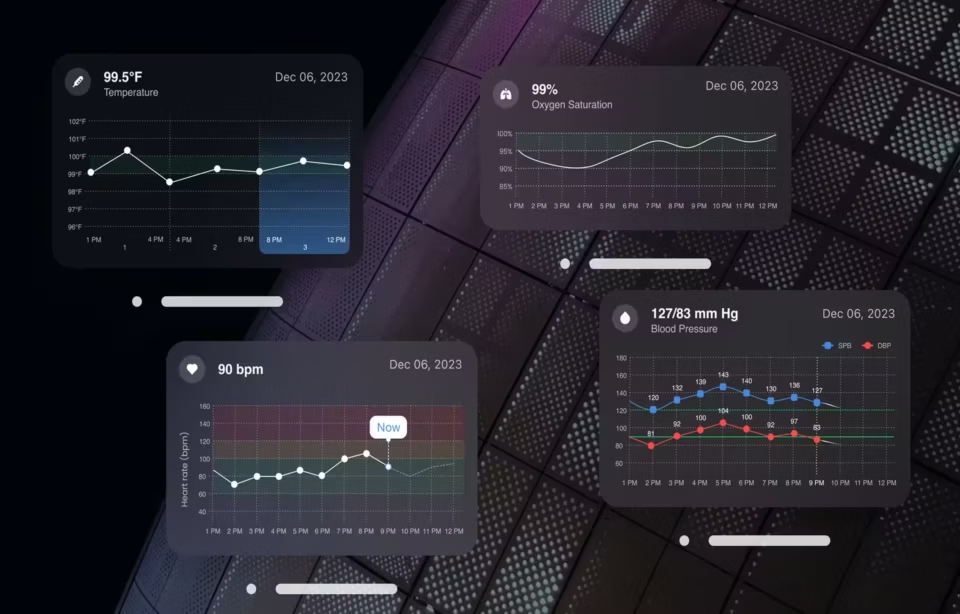
Reducing clicks and screen switches for nurses and physicians usually means putting more data on one screen, ordered so the abnormal values stand out. On Fuselab’s Health Monitor EHR redesign, the two principles we had to settle first were data density and speed of use. What we found working with doctors and nurses was that denser data made them more confident, because they were looking for signals in the noise.
The blood pressure panel shows how that works. It displays every reading with its high and low, marks abnormal readings in red and draws a healthy baseline across the middle of the graph, all in the least space the data allows. Each switch to another screen forces a clinician to carry a value in memory and compare it with the next one. A dense panel with a clear hierarchy removes that step.
Density has a limit, though. It helps trained clinical users who already know what normal looks like. A patient opening the same data at home needs the opposite: fewer values and one comparison they can act on.
Design for the reader on the other side of a handoff
In a hospital or field setting, the real constraint is often who reads a screen and whether they ever speak to the person who produced it. When Fuselab built Radiology Queue for x-ray specialists to annotate scans, the deciding constraint was that most technicians never speak to the medical provider. Every note, measurement and approval had to make sense to someone elsewhere in the care workflow.
Take one scan through the system. The technician reviews the image, adds measurements and notes, and approves or rejects it. The provider then opens the annotation, but does not have to take it on trust: the design lets them confirm the finding against their own view of the same X-ray. If something is unclear, or another scan is needed, they can reach the radiology clinic through the platform.
Features like these rarely come from interviewing one user group alone. They come from mapping the handoff: who produces the information, who acts on it, and what the second person cannot recover if the first one is unclear. That is what contextual inquiry in a hospital is for. It is also why prototypes should be tested under the interruptions and time pressure of the real setting, not in a quiet meeting room.
Test AI trust per task, with clinicians, before launch
Whether an AI assistant’s interface is trustworthy enough for clinicians can only be settled in formative sessions with practicing clinicians, before launch. Each session tests, task by task, whether the clinician can see what a suggestion is based on, tell what it did not consider, and reject it without extra steps. The ClyHealth platform Fuselab designed was user-tested with both patients and clinicians before launch.
FDA’s 2026 clinical decision support guidance names the risk these sessions look for: automation bias, the tendency to over-rely on a suggestion from an automated system. A confident, polished output invites it. Our reading is that trust has to be judged per task rather than per product, because a clinician can reasonably accept a system’s measurement and still need the full evidence behind a treatment proposal.
At the bedside, that means the suggestion never appears alone. The same screen shows the inputs it used, flags any result it could not see, and offers a one-tap way to reject or change it, with the reason recorded.
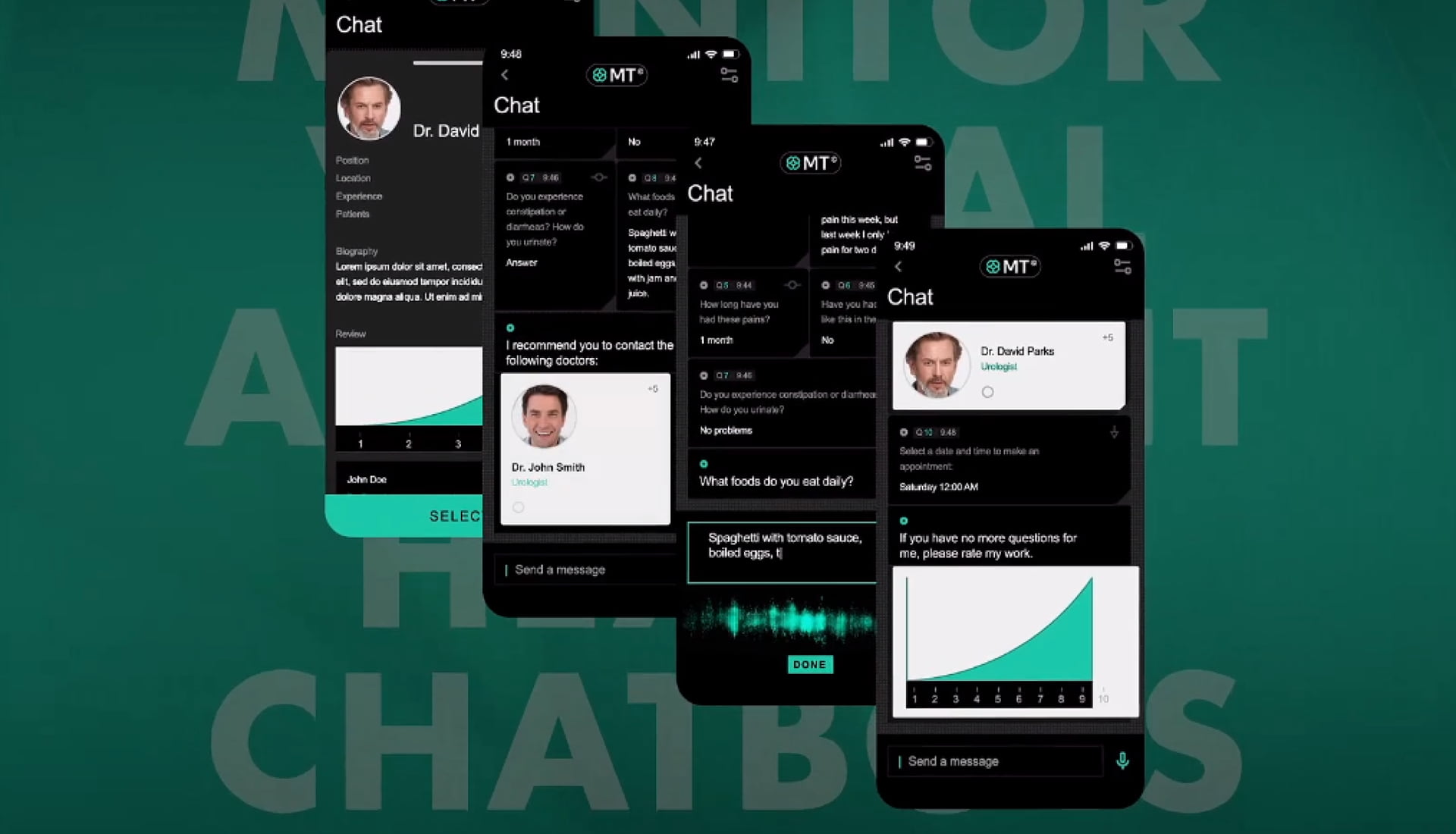
ClyHealth applies the first part of that pattern: it shows its reasoning beside each supplement recommendation, so the provider can review the logic before approving it. Our healthcare UX design examples walk through that screen and several others where a person checks automated output before it counts.
Patient portals: accessibility now has a deadline
A patient portal run by a hospital, clinic or health system that receives federal financial assistance from HHS has to meet WCAG 2.1 Level AA under HHS’s Section 504 rule. HHS announced on May 7, 2026, that it was extending the compliance dates: recipients with 15 or more employees now have until May 11, 2027, and smaller recipients until May 10, 2028. The rule covers web content and mobile apps.
The flows most likely to fail an accessibility review are rarely the home page. We would test sign-in with multi-factor authentication first, then lab results shown as dense tables, scanned PDFs attached to messages, and appointment pickers that only work with a mouse. Those are also the flows older patients and caregivers use most, so they need testing with a screen reader and with real patients, not only an automated checker.
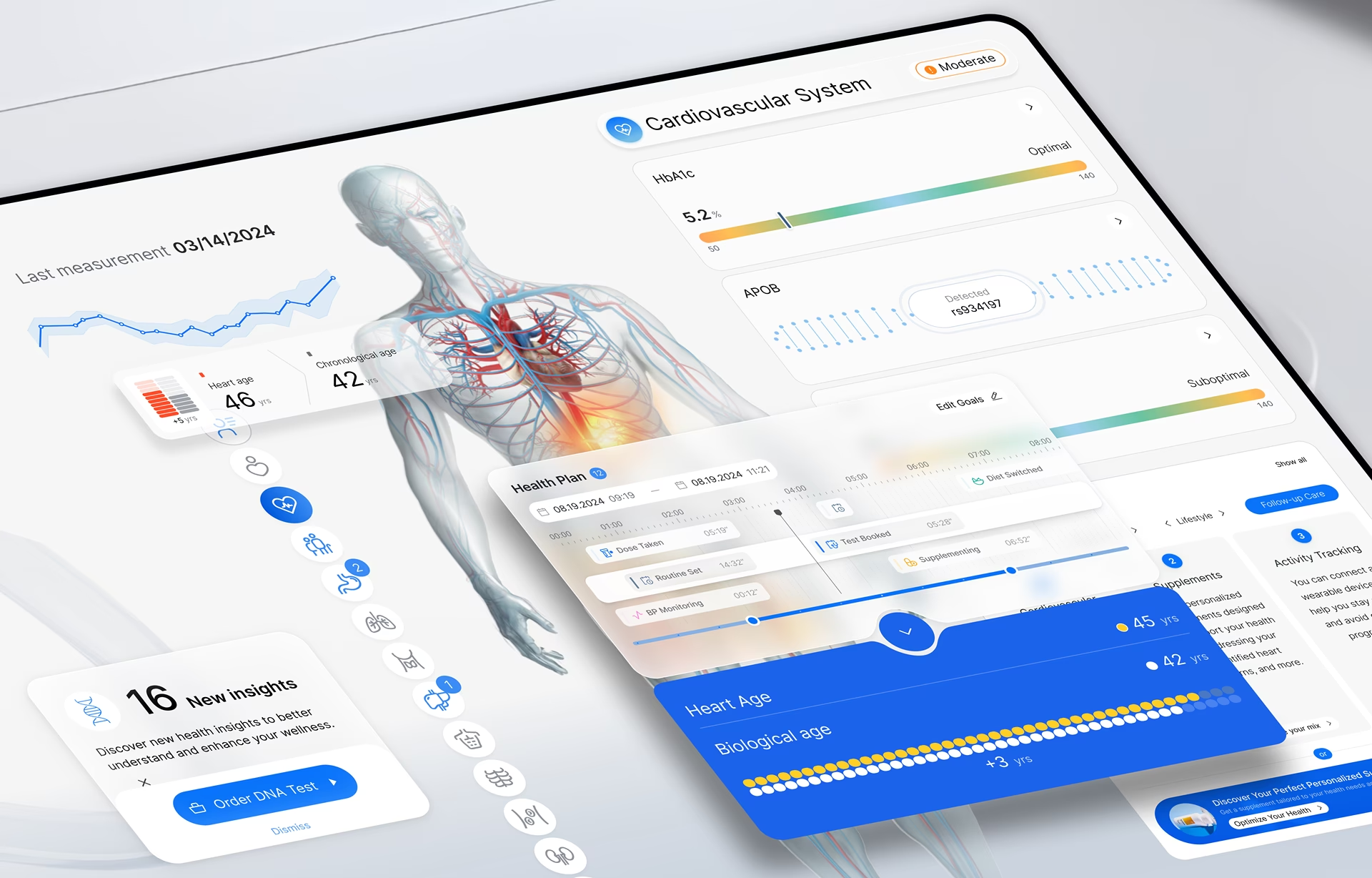
Security has to be usable as well. Multi-factor sign-in needs a route for patients without a smartphone, caregiver access needs its own permissions rather than a shared password, and a session timeout should keep the patient’s place in a long form. Readability is the last layer: the Vasolabs platform we designed shows a patient’s vascular age next to their actual age, because a raw scan result gives a patient nothing to act on.
Research, lab and biotech platforms
Research and lab software is used differently from clinical software. The user is often a technician running the same procedure many times, and a result only counts if it can be repeated. When Fuselab designed the Qgen Health Lab, a biotech platform for oncology drug research, grouping and documenting experiments came first, because useful experiments depend on repeating actions and getting the same provable results.
Researchers in pharma and life sciences also don’t share a single method. Qgen gives technicians more room to customize their workflow than most lab tools allow, and a network visualization shows the relationships between drugs, therapies and cancer conditions. For trial and research platforms, the questions to settle first are how experiments are grouped and recorded, and how far the workflow can bend before results stop being comparable.
Tie UX to clinical and operational safety goals
Design has to show its value in the terms a hospital already measures. Useful measures include documentation time per encounter, portal use, compliance reporting accuracy and use errors on critical tasks found in formative testing. The last one matters most, because it links a design change directly to a safety goal the clinical team already owns. Each design decision should trace back to one of these measures or to a documented compliance requirement.
Real-World Healthcare UX Examples
Three more Fuselab projects show how the design problem changes when the user, the data and the setting change. Each was shaped by a constraint that became clear only once the team knew who would use the screen and when. The three constraints were one platform for three audiences, a new interface over an existing record system, and government staff who are not data analysts.
Vasolabs artery scan platform
Vasolabs uses ultrasound artery scans to help detect cardiovascular risk early, and its platform serves three audiences at once: the technicians who run the scans, the providers who act on them and the patients themselves. Our design shows blockage in each artery as color-coded severity percentages, with 3D illustrations of the artery layers and the plaque inside them.
The scans themselves need a trained technician to interpret. The illustrations let anyone see where the areas of concern are and where the tissue is healthy. The platform works on a touchscreen and with a desktop and mouse, and live images can be viewed remotely, so technicians at other locations can provide guidance, including in real time.
ClyHealth AI clinical platform
ClyHealth is a personalized care platform that combines genomic data, lab results and health history to propose treatment plans and supplement protocols for provider review. Its constraint was structural: the product is the entry interface to an existing EHR, so the design had to make a complex, multi-source record feel like a single coherent product to the clinical user.
Its most unusual element is a human-body digital twin that Fuselab designed and built, covering the skeleton, nervous system, brain and organs. When a patient’s genetic data, lab results and reports are uploaded, the twin shows how their body systems are performing. Providers use it to visualize a patient’s current state and to model how an intervention might play out over time.
DHCS California long-term care dashboards
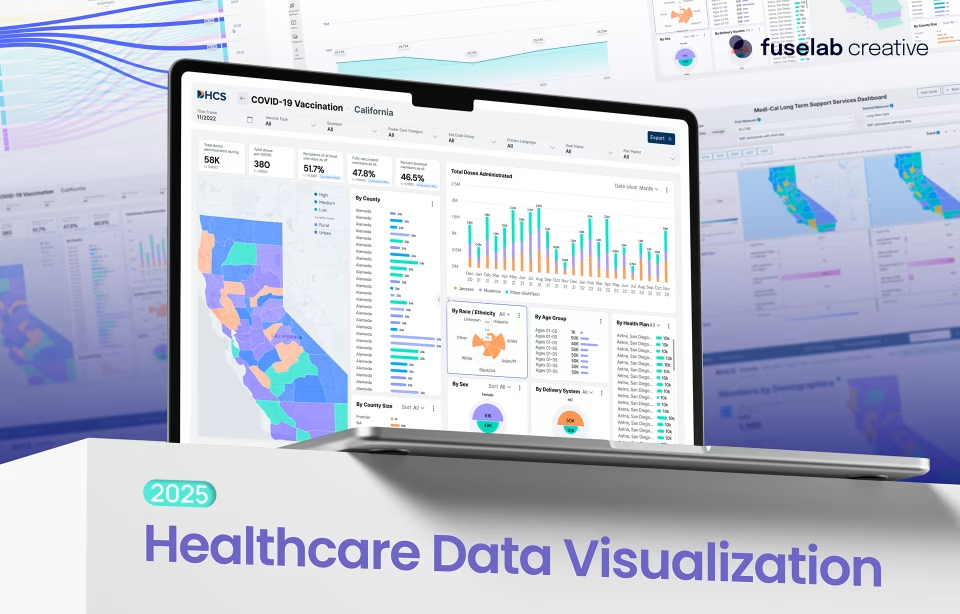
The California Department of Health Care Services asked for dashboards on its long-term services and supports program that non-technical government staff could read without training, on desktop and mobile. The data spans 2017 to 2021 and covers more than 784,600 beneficiaries, filterable by county, ethnicity, language, age group and delivery system. The DHCS engagement is now in its second two-year contract.
The users were policy staff, public health administrators and program managers rather than data analysts, and that shaped the navigation and filters. Each dashboard surfaces the most important metrics on load. A user can drill into county or demographic detail with a single filter action, so staff can reach conclusions from the data without an analyst’s help.
Healthcare Data Visualization and Dashboards
Healthcare data visualization converts raw clinical information (lab results, vital signs, medication histories, population health metrics) into visual formats that clinicians can scan and act on within seconds. The primary design challenge is progressive disclosure: presenting critical anomalies immediately while keeping the full dataset accessible without overwhelming the user or the screen. This is particularly challenging when you consider that an average medical provider has about 90 seconds to view a chart, give or take.
The first test for a clinical dashboard is what Fuselab calls the Three-Second Rule: can a clinician glance at the screen and identify which patients are in danger within three seconds? Abnormal lab values, deteriorating vital signs and medication conflicts have to stand out through a strict color hierarchy and logical grouping. A dashboard that gives every value equal weight leaves attention nowhere to land.
Trend lines, historical comparisons and summary indicators then shorten the step between seeing a number and deciding what to do about it. The healthcare dashboard design best practices guide covers layout, alerting and role-based views in more depth, including how much history belongs on the first view and how much one level down.
Healthcare UX Design Trends 2026
Three healthcare UX design trends carry the most design work in 2026: AI clinical decision support that shows its evidence, remote patient monitoring that manages alert fatigue and interoperable views that combine EHR, pharmacy and device data. Ambient interfaces, personalized digital therapeutics and VR or AR tools are growing too, and each raises the same question of when to interrupt the user.
AI decision support carries the heaviest design load. More systems now propose an action and leave the decision with the clinician, which puts the burden on the interface. The evidence behind a suggestion, the data it did not see, and how to reject it all have to be visible where the decision is made.
Remote monitoring and telehealth move care into homes and field settings, with unreliable bandwidth, shared devices and little privacy for a video visit. Structured symptom intake before a visit and a summary the patient can reread afterward do more for these visits than video quality.
Continuous data from wearables also creates a new form of alert fatigue, which AHRQ’s patient safety network describes as clinicians becoming desensitized to safety alerts. A monitoring interface has to decide which changes deserve an interruption and which belong in a daily summary.
Interoperability is the quieter shift. Patients and clinicians increasingly expect one view that combines EHR, pharmacy and device data, which brings the source-of-truth question from the challenges section straight onto the screen.

What to Look for in a Healthcare UX Design Team
A healthcare UX team should show three things (at least). First, a shipped clinical or patient-facing product with a named client. The second is a research plan that puts practicing clinicians or patients in front of prototypes. The third is people who can explain HIPAA, WCAG and FDA human factors terms correctly. A portfolio of clean interfaces without those three belongs to a general design team and, in all honesty, needs additional experience to be trusted with your project.
Beyond the portfolio, five capabilities separate teams that can deliver in this field:
- Systems thinking: the ability to map how the EHR, labs, billing and telemedicine systems connect before designing any one screen.
- Domain knowledge: fluency in clinical terms and workflows, without pretending to be clinicians.
- Data literacy: the skill to turn years of clinical data into a view a tired clinician can read quickly.
- Stakeholder alignment: explaining to a compliance officer or chief medical officer why a layout is safer, not just why it looks better.
- Testing rigor: realistic simulations of clinical pressure, since no one can test in production with real patients.
For independent research on how clinicians and patients use these systems, Nielsen Norman Group’s healthcare articles are a useful benchmark to hold any team’s methods against.
What to Settle First
Before drawing any screen, settle three things. Decide who reads each screen and under what time pressure, which rules from the table above apply, and when practicing clinicians or patients will see a prototype. Teams that answer those in the proposal avoid the most expensive redesigns. Fuselab’s healthcare UX design services start from the same three questions.
Frequently asked questions
What is healthcare UX design?
Healthcare UX design is the specialized practice of creating digital interfaces for clinical, patient-facing, and administrative healthcare applications where regulatory compliance (HIPAA, plus FDA, Section 504 or Section 508 where they apply), patient safety, and clinical workflow integration constrain every design decision. The scope spans EHR systems, patient portals, medical device screens, telemedicine platforms, and clinical decision support tools used by clinicians, patients, and administrators.
What is the difference between healthcare UX and medical device UX?
Healthcare UX design is the broader discipline covering all digital interfaces used in healthcare delivery, from patient portals to administrative dashboards. Medical device UX is a subset that specifically addresses the interface design of FDA-regulated hardware and software devices, requiring additional human factors documentation, human factors validation testing, and formal regulatory submission materials that general healthcare UX projects do not encounter.
How does healthcare UX design differ from general UX design?
Healthcare UX design requires compliance work that general UX projects rarely encounter: HIPAA for most products, and FDA, Section 504 or Section 508 depending on the product and its buyer. Most healthcare interfaces also serve several distinct user types at once, which is uncommon in consumer design. Standard product patterns applied to clinical interfaces often miss problems that only show up in testing with actual clinicians.
How much does healthcare UX design cost?
Healthcare UX work with a US-based specialist agency usually runs $100 to $300 per hour. Project budgets range from $25,000 for a focused engagement to $250,000 or more for a multi-platform design system. Offshore generalists charge $25 to $80 per hour, so check their clinical workflow and regulatory experience before comparing on rate alone.
What should I look for when choosing a healthcare UX agency?
A qualified healthcare UX agency should show shipped EHR or clinical interfaces with named clients, documented HIPAA compliance experience, and evidence of usability testing conducted with actual clinicians or patients rather than internal team members. Named government or regulated-industry clients indicate the agency has worked within real compliance constraints rather than around them.
How long does a healthcare UX design project take?
A healthcare UX engagement usually runs 12 to 24 weeks from discovery to design system handoff, with scope and regulation setting where in that range it lands. Discovery and research take 3 to 6 weeks of that time, because observing clinical workflows, interviewing each user type and mapping the regulations cannot be rushed without losing depth.
What are the biggest challenges in healthcare UX design?
Healthcare UX design faces five primary challenges: regulatory compliance constraints that limit design flexibility, system fragmentation across EHRs, labs, and billing platforms that must interoperate, diverse user groups with conflicting workflow needs and technical literacy, high-stakes environments where interface errors affect patient safety, and organizational resistance to new interfaces after previous technology adoption failures.