18
min read
18
min read
 Oct 7, 2026
CRM interface design: what enterprise teams get wrong in 2026
CRM interface design is the discipline of structuring how sales, service, and operations teams interact with customer data, covering navigation architecture, role-based views, and the feedback patterns that decide whether a CRM gets used or ignored. Enterprise projects budget heavily for platform licensing and migration while underinvesting in the interface layer, which is why the most common finding after a failed CRM deployment is that the software works but the team rebuilt their workflow in spreadsheets alongside it.
What CRM interface design actually involves
CRM interface design structures how different users, from sales reps to service agents to executives, access and act on the same customer data within a shared system. The discipline covers the architectural decisions about what each role sees, in what order, and what actions the system makes available. Visual styling applied to an existing platform is categorically different work.
Most CRM deployments treat interface design as a configuration task rather than a design problem. Platform administrators check boxes in a settings panel, add fields, and call it done. The result is an equal-weight interface where a sales rep opening a contact record sees the same 47 fields as a billing analyst, regardless of which two or three fields actually matter for their next specific action.
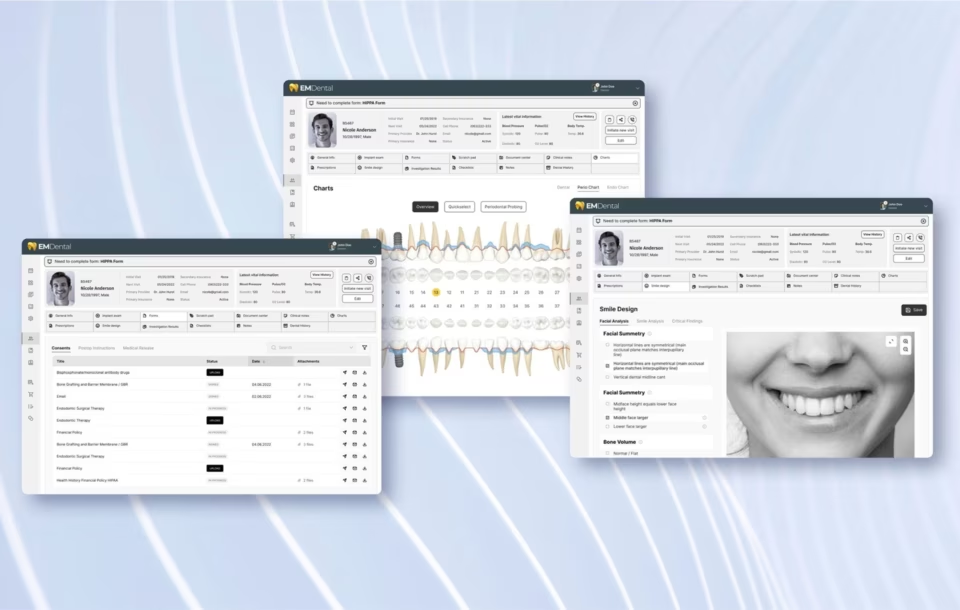
In our work on the DHCS Medi-Cal case management interface, the measure we used to evaluate every design iteration was time-to-first-meaningful-action: how long it took a new caseworker to reach enrollment status, prior authorizations, and pending tasks from a cold open. Two clicks was the target. Anything requiring more was an information architecture failure, not a training gap.
For enterprise teams managing thousands of contacts across multiple departments, the interface layer also determines data quality. When an interface buries the fields that matter under a wall of optional fields nobody fills out, users learn to skip data entry. Incomplete records then degrade the analytics and reporting layers built on top of the CRM, which in turn undermines the business case for the platform investment.
Why enterprise CRM interfaces fail their users
Enterprise CRM interfaces fail primarily because they are designed from the data model outward rather than from the user’s task inward. The platform’s object structure becomes the navigation, and users find themselves in a schema that reflects how the database was built rather than how a sales call, a service interaction, or an account review actually unfolds.
Feature accumulation compounds this over time. A CRM platform that ships with 30 fields gets extended to 80 within two years of enterprise deployment. Every department adds the fields they need without removing the fields they do not. The interface never shrinks. Users learn to scroll past the noise, which means they also scroll past fields that matter, and data quality degrades across the board.
In our experience, the first two weeks of a new enterprise system determine the behavioral patterns users carry forward. If the CRM interface is confusing during onboarding, most users develop workarounds, keeping spreadsheets alongside the system and managing data outside the CRM rather than learning a better path. Those workarounds persist even after the interface improves, and the design attention paid to the onboarding experience is never wasted.
In regulated industries the failure mode is more specific. A healthcare or financial services CRM must surface compliance-relevant data, consent status, authorization history, and audit trail at every interaction point. When those fields are buried or inconsistently positioned across record types, compliance officers find the gap during an audit rather than during daily use, and the remediation cost is significantly higher than the interface design cost would have been.
In our Fiserv work on financial product interfaces, the difference between a compliant and a non-compliant customer interaction often came down to one field’s position: whether a required disclosure appeared before or after the action confirmation step. That is a CRM interface design decision with regulatory consequences. Getting it wrong surfaces in an audit, not in a usability test.
Role-based view design: the principle most CRM projects skip
Role-based view design in CRM means giving each user type, the sales rep, the account manager, the service agent, the executive, a distinct interface configuration that surfaces their specific data and actions while suppressing what is irrelevant to their job. It is the single design decision with the highest measurable impact on adoption rates and the most commonly skipped in enterprise deployments.
The argument against role-based design is usually speed. Configuring multiple views takes longer than deploying a single default layout, and most CRM implementations run over time and over budget before the interface layer is addressed. The practical result is a shared view that works adequately for nobody and generates the most complaints from the users who touch the most records per day, typically field sales reps and frontline service agents.
A sales rep needs pipeline sorted by close date. An executive needs a metrics dashboard. The service agent context is the most often misconfigured: an agent handling inbound contact all day needs a queue ordered by wait time and escalation level, not a contact directory they must search before each interaction. Getting that starting screen right returns more adoption than any other interface decision.
The service agent case is the most commonly wrong because CRM deployments typically gather requirements from sales and build the service interface as a variation of the sales layout with a few fields renamed. Agents who spend 30 seconds navigating before reaching the customer record on every contact lose meaningful service time across every shift, and they learn quickly to keep a personal workaround tab open alongside the system.
On the DHCS Medi-Cal interface, the caseworker view, the supervisor view, and the program administrator view were designed as three distinct products sharing a data layer. A caseworker sees a single beneficiary and their immediate action items. A supervisor sees workload queues and escalation flags. A program administrator sees enrollment metrics by region and plan type. Collapsing them would have made all three tasks slower and more error-prone.
The practical starting point for role-based design is a task frequency analysis: listing the ten actions each user type performs most often in a week. Those ten actions determine the interface hierarchy. Everything else goes behind secondary navigation or a detail panel, the progressive disclosure pattern that Nielsen Norman Group documents in enterprise software contexts. An interface built from task analysis looks nothing like a vendor’s default.
AI-powered CRM: designing interfaces for agentic systems
An AI-powered CRM interface must show users three things beyond raw data: how confident the system is in any given output, what the AI did autonomously on their behalf, and how to override or correct it. Without those three signals in the interface, users either over-trust the output or ignore it entirely, and neither produces the adoption that justifies the implementation cost.
Agentic AI is accelerating what the interface needs to communicate. A CRM that qualifies leads, drafts proposals, and follows up with prospects autonomously does not eliminate the human’s role. It changes it. The user is now auditing outputs and making approval decisions rather than performing the underlying tasks. That shift requires an interface designed around review and exception handling, not one designed around data entry and task completion.
The three interface patterns that matter most in an AI-powered CRM are not equal in weight. Confidence indicators, visible markers showing where the AI inferred rather than read a stored fact, are the most commonly designed for. Action provenance, a clear record of what the AI initiated autonomously, is less consistently implemented.
Graceful fallback is the most neglected of the three and the most consequential. When the AI output is wrong, there must be an obvious path to manual control that does not require understanding how the model produced it or navigating a settings panel to override it. A sales rep who cannot easily correct a wrong lead score stops trusting all lead scores, regardless of accuracy.
Treating all three as optional disclosures is the mistake. They are the architectural foundation for a system people will use under time pressure in high-stakes interactions, not a feature set to add in a later release. An AI CRM that buries these signals in a settings panel or an audit log will not be trusted, and untrusted AI tools get switched off.
In our AI interface design work, including the Grid AI platform and enterprise tools for clients such as Uber, the most consistent finding is that AI output without confidence framing creates a behavioral split: users accept everything the system surfaces, concentrating errors into decisions, or they reject the AI layer and revert to manual processes. The design problem is making uncertainty legible, not improving accuracy.
Salesforce’s Agentforce, which the company has publicly credited with significant pipeline acceleration across enterprise accounts, represents the commercial proof point that autonomous CRM actions can scale. The design implication is that every enterprise CRM investment in the next two years needs an interface architecture that accounts for AI-initiated actions alongside human-initiated ones. Getting that architecture wrong at the design phase is significantly more expensive to correct at the engineering phase.
Omnichannel CRM: the unified view design problem
Omnichannel CRM design means building an interface that shows the complete customer history regardless of which channel the customer used. Connecting those data sources is an integration problem. The real design challenge is presenting a cross-channel history clearly enough that a service agent can understand the customer’s current situation and respond within the first 30 seconds of contact.
Most enterprise CRM interfaces that claim omnichannel capability present channel history as a raw activity log. Every email, call, chat, and form submission appears in reverse chronological order in a single timeline. The result is 200 activity entries that contain the complete history but communicate no narrative. An agent cannot tell in 30 seconds whether the customer is satisfied, mid-complaint, or a high-value account requiring escalation.
The design principle that resolves this is progressive summarization of the channel history. The interface should show the customer’s current status at the top of the record: a single indicator derived from the most recent interaction, the most critical open issue, and the sentiment of the last three contacts. The full activity log remains accessible but should not be the default view for agents handling inbound contact.
In our DHCS Medi-Cal work, where caseworkers handle inbound enrollment, service, and compliance requests across phone and digital channels, the design change with the most immediate impact on resolution time was replacing the raw activity timeline with a summarized status view at the top of the record. Caseworkers spent less time reconstructing the beneficiary’s situation from a log and more time addressing the actual reason for the contact.
Social channels add complexity that most CRM interfaces have not caught up with. A customer’s history increasingly includes LinkedIn messages, Instagram direct messages, and public social mentions alongside traditional email and phone records. Integrating those streams requires deliberate decisions about which channel signals matter for service interactions and which belong in a marketing analytics layer rather than the agent’s primary contact view.
Customer journey mapping in CRM interface design
A CRM without journey stage mapping shows the same contact record to a rep managing a retention account and a rep chasing a cold lead, even though one needs renewal dates and at-risk indicators while the other needs campaign attribution and engagement signals. The journey stage an account sits in should determine what the interface surfaces, not the platform’s default record layout.
The four stages most enterprise CRM interfaces should address, awareness, consideration, purchase, and retention, require genuinely different interface patterns. An awareness-stage record might show lead source, campaign attribution, and content engagement signals. A retention-stage record should show renewal date, usage metrics, support ticket history, and at-risk indicators. Building a single contact record layout that serves both contexts equally produces an interface that serves neither well.
AI-enhanced journey mapping changes what CRM interfaces should surface proactively. Rather than requiring an account manager to manually assess retention risk by reading through a record, a well-designed interface uses behavioral signals to classify the account and flag it automatically. The design challenge is making that classification visible, attributable to specific signals, and easy to act on without requiring the user to interrogate the underlying model.
The retention stage is where most CRM interfaces fail enterprise accounts. The data required to assess renewal risk, usage frequency, support ticket volume, sentiment across recent interactions, executive engagement levels, lives in different modules and rarely appears in a single assembled view. An account manager who must open four different record screens to build a mental picture of account health will check that picture infrequently, and at-risk accounts slip through.
In our experience, the organizations that connect their journey maps directly to the CRM interface, configuring different data views and available actions based on lifecycle stage, achieve sustained usage that presentation-deck-only journey work never produces. For practical guidance on the strategy behind this, the 5 smart CRM design strategies article covers how to align CRM structure to customer lifecycle intent.
CRM interface design for regulated industries
Regulated industry environments, healthcare, financial services, and government, carry interface requirements that standard enterprise CRM design does not: compliance-relevant fields must appear consistently at every interaction point, audit trails must be visibly accessible without interrupting the primary workflow, and consent or authorization status must be current and prominently displayed before any action is taken.
Healthcare CRM interfaces face a specific structural tension. HIPAA requires role-limited data access and logged access events, which pushes toward minimal data display. Clinical workflows push toward full patient context at every touchpoint. The resolution is a role-based view that surfaces clinically relevant context within a HIPAA-compliant access boundary, with compliance constraints enforced by the architecture rather than by user behavior.
We have applied this in healthcare data interfaces for DHCS and NIH’s ORIP research program, where the access model is non-trivial. A frontline caseworker, a supervisor, a program administrator, and a compliance auditor all use the same underlying system. Each role needs a different access boundary and default view, or the architecture defaults to the least restrictive access level and satisfies neither requirement.
Public sector CRM interfaces carry a different constraint set. Section 508 accessibility requirements apply across the board, meaning every interface element must be operable via keyboard navigation and screen reader, and every data visualization must have a text equivalent. In our work on public sector interfaces for NASA and DHCS, Section 508 compliance is not a final-phase checklist item. It shapes the information architecture from the earliest wireframes.
Financial services CRM interfaces must surface disclosure fields before the action they govern, not after. An agent adding a new product must see the required disclosure before the confirmation step. That is a design decision with regulatory consequences. In our work with Fiserv and finance industry clients, this field-position mapping was the step most often skipped by prior vendors and the one that triggered audit findings when wrong.
The common mistake is treating compliance as a layer added after the core design is complete. Requirements embedded from the first wireframe cost less and generate less rework. For healthcare, financial services, or public sector organizations, the key qualification question for any CRM interface design agency should be whether they have shipped a compliant interface in a regulated environment, not whether they understand the theory.
Social CRM: turning conversation data into interface decisions
Social CRM integration surfaces customer conversation data from LinkedIn, Instagram, and other platforms within the same record as traditional interaction history, so a team member can read the customer’s recent social context alongside their purchase and support history. The design challenge is curation: deciding which social signals belong in the agent’s contact view and which belong in a marketing analytics layer the service team never opens.
Most social CRM integrations fail at the interface layer rather than the data layer. The raw volume of social signals for any active enterprise account runs into thousands of data points per year. An interface that surfaces all of them creates the same undifferentiated activity log problem. The agent sees a wall of data and extracts nothing, and the work of deciding which signals matter never gets done.
Based on what we have seen produce actionable data rather than noise, we recommend keeping three types of social signals in the primary contact record: negative sentiment mentions in the last 30 days, direct messages that received no response within 72 hours, and public posts that explicitly name the product or service. Everything else belongs in a marketing analytics layer the service team accesses separately.
LinkedIn signals, a contact viewing your page, engaging with a post, or changing roles, carry genuine intent data for B2B sales teams. An interface that makes these signals visible alongside CRM activity history improves outreach timing in a way that manual research cannot match at scale. The design problem is positioning those signals without dominating the primary record view, which typically means a collapsible panel rather than a top-level field.
How to choose a CRM interface design agency
A qualified CRM interface design agency shows named client work in the same regulated industry or enterprise scale as your project and demonstrates a documented research process before wireframing begins. Both signals are visible before any sales conversation: the portfolio shows evidence of shipped work, and how an agency describes their discovery process reveals whether they design from task analysis or from the platform’s default layout.
Portfolio depth is the fastest signal. Look for at least one shipped CRM interface with named client attribution, a visible explanation of what design problems were solved, and evidence of the research process that preceded the design. An agency that shows polished mockups without context is demonstrating aesthetic skill. An agency that explains the research process that produced those mockups is showing the complete service you are actually buying.
Project scope is the primary driver of timeline and cost in CRM interface design. The number of distinct user roles requiring separate views, the complexity of data source integration, and whether the scope includes user research and design system handoff all shape the engagement significantly. The research phase is the element most often compressed and the one with the most direct effect on whether the delivered interface actually gets adopted.
Research protocol is what separates an agency that designs from the platform’s data model from one that designs from how people actually work. Ask how they determine task frequency and information hierarchy for each user role before wireframes begin. An agency that starts with wireframes is designing for the platform. A UX research-led agency starts with structured interviews across all user types and produces wireframes that reflect actual task patterns.
Fuselab’s enterprise CRM engagements begin with a role-based discovery phase: structured interviews with at least two representatives from each user role and a task frequency analysis of the twenty most common actions per role. The interface architecture follows from that analysis, not from the platform’s default layout. We have applied this to enterprise systems for Fiserv, DHCS, and Grid AI, where default platform deployments had already been attempted and abandoned.
Conclusion
CRM interface design is distinct from CRM implementation and from general UI design. Organizations that treat it as a configuration step get platforms their teams work around rather than within. Role-based task analysis before the first wireframe is where adoption is determined, not in the platform decision or migration. Fuselab’s practice in this discipline is built on this research-first approach.
What is CRM interface design?
CRM interface design is the discipline of structuring how different user roles, sales reps, service agents, account managers, and executives, access and act on customer data within a shared system. It covers navigation architecture, role-based view configuration, dashboard hierarchy, and the feedback patterns that determine whether a CRM gets used or ignored by the teams it is built for. It is distinct from CRM software selection, platform implementation, and database administration.
What is role-based view design in a CRM?
Role-based view design in a CRM means configuring a distinct interface layout for each user type so that a sales rep, a service agent, and a finance analyst see different fields, different navigation options, and different default dashboards when they open the same system. Each view is built from a task frequency analysis of what that role does most often, not from a one-size-fits-all platform default. Role-based design is the single CRM interface decision with the highest measurable impact on user adoption.
What is the difference between CRM interface design and CRM implementation?
CRM implementation covers platform selection, data migration, and system integration. CRM interface design covers the research and design decisions that determine what each user sees, in what order, and with what available actions, and those decisions should precede implementation rather than follow it. A CRM can be technically implemented correctly and still fail adoption if the interface design work was treated as configuration or skipped entirely.
How does CRM interface design differ from general UX design?
CRM interface design operates in an environment with more user types, more data complexity, and more compliance constraints than most consumer or general business application design projects. A general UX practitioner can design a CRM interface, but they need deep domain knowledge of the specific industry and its regulatory requirements governing data access, display, and user actions within that sector. A specialist who has shipped a compliant CRM interface in a regulated environment brings that knowledge already integrated into their design process.
How much does CRM interface design cost?
A CRM interface design project for an enterprise system with multiple user roles typically costs between $60,000 and $250,000, with the range driven by user role count, the number of data sources being surfaced, the scope of the research phase, and whether the deliverable includes a full design system handoff. Narrower projects with two or three user roles and a single core workflow typically start around $30,000 to $50,000. The research phase is the element most frequently descoped and the one that most directly determines whether the delivered interface gets used.
How long does a CRM interface design project take?
A CRM interface design project with a full research phase, role-based design across multiple user types, and usability testing typically runs 12 to 20 weeks depending on stakeholder availability and the complexity of the user role structure. A narrower engagement focused on redesigning a single module or specific user flow can complete in six to eight weeks. The research phase, typically two to four weeks, is the part most often compressed and the part that most directly determines whether the delivered design gets adopted.
What should I look for in a CRM interface design portfolio?
A CRM interface design portfolio should show named clients with enough context to understand what design problem was solved, not just screenshots of polished screens. The most informative portfolio entries explain the user research process that preceded the design decisions, the specific user roles the interface served, and any measurable outcomes such as improved adoption rates or reduced task completion times. An agency showing screens without context demonstrates aesthetic skill; an agency explaining process and measurable outcomes demonstrates design competence at enterprise scale.