AI in regulated industries: UX guide for health and finance

AI in regulated industries is AI-powered software built for healthcare, finance, and other sectors where a regulator can review what the interface showed, what the user did with it, and what the system recorded. HIPAA, FDA guidance on clinical decision support, the Equal Credit Opportunity Act, and bank model risk guidance therefore shape the screen itself, and each becomes a visible element: an override, an audit log, a basis panel, or a reason code.
What AI in regulated industries requires in 2026
Three things set AI in regulated industries apart from general AI products. A regulator decides what the interface must show and store, decisions made with the software face formal review and sometimes legal consequences, and the reviewer inspects the workflow, not just the database. The user saw, what they did, and what was recorded must all be reconstructible, and the reviewer starts with the interface.
Why the backend is not enough. A general AI product can tuck its audit log into a database and move on. A clinical decision support tool or a credit underwriting assistant cannot, because the reviewer will ask to see the screen at the moment of decision. That single difference turns AI compliance into a design problem, and it is why review so often blocks products that passed every technical test.
The volume is growing. The number of regulated AI products is also rising fast. The Stanford HAI 2026 AI Index reports 258 FDA approvals of AI-enabled medical devices in 2025, bringing the cumulative total to nearly 1,400. Each of those went through premarket review, and the January 2025 draft guidance now asks submissions to describe the user interface. The same scrutiny is arriving in credit, insurance, and payments.
The rules keep moving
AI compliance cannot be a one-time checklist, because the guidance that governs AI in health and finance moved five times in under two years. Most of these documents interpret the law rather than change it, but reviewers apply them as written, so a team that mapped its screens to the 2024 versions is already out of date. The table lists the five moves a design team needs to know.
The one most teams miss. The change control plan guidance gets the least attention. The FDA’s final guidance on predetermined change control plans, first issued in December 2024 and reissued in August 2025, defines how makers of AI medical devices plan and document model changes across a product’s life. If the model can change after clearance, every output needs a version a reviewer can trace back to a documented modification.
State laws add a second layer
State legislatures have added disclosure duties on top of the federal rules, and most of them reach the screen the same way federal rules do: as a disclosure label, a disclaimer on AI-written text or a route to a human. Three are already in force and shape healthcare interfaces directly, and more are moving through state legislatures every session. For what it’s worth, we fully support this kind of oversight.
- Utah (2024). The AI Policy Act requires licensed professions to disclose when people are interacting with generative AI. The 2025 amendments narrowed that duty to high-risk interactions.
- California (2024). AB 3030 requires disclaimers on AI-generated patient communications. The broader SB 1047 was vetoed the same month.
- Nevada (2025). AB 406 restricts how AI can be used in mental and behavioral healthcare.
Track the actual status of each bill before designing for it. We have watched teams build disclosure flows for bills that never passed, or miss a narrowing amendment that would have let them simplify the screen. A one-line status check with counsel at kickoff costs far less than a disclosure banner nobody needed.
From rule to screen: how four regulations become interface patterns
Each major AI rule in health and finance maps to one interface pattern. HIPAA’s audit controls become per-user logging of every suggestion and override. FDA decision support guidance becomes a basis panel beside each recommendation. ECOA becomes reason codes confirmed before a decision is final. Bank model risk guidance becomes a model version and validation status on every output.
HIPAA and FDA rows. The HIPAA row rests on the Security Rule’s audit controls at 45 CFR 164.312 and on the minimum-necessary standard. In practice, compliance staff should be able to open a patient’s activity history from the interface without asking an engineer to run a database query. The FDA row’s basis panel shows the inputs used, the guideline or logic behind the recommendation, known limitations, and any missing data.
ECOA and model risk rows. The ECOA row cites Regulation B at 12 CFR 1002.9, whose text rules out reasons such as “internal standards” or “failed to achieve a qualifying score”. Each reason code therefore has to map to plain-language notice text. The model risk row adds one more element that the table cannot hold: a warning when inputs fall outside the model’s intended use.
Rule in three columns, practice in the fourth. The first three columns state the rule and where it lives. The fourth is the pattern we have seen satisfy it in review, not the only design that can. What separates teams that pass review is designing these before the primary flow, and the two projects later in this guide show both outcomes. Confirm which requirements apply with your compliance team.
The three constraints that change the design playbook
Designing AI in regulated industries adds three constraints that general AI product design does not face in this form. Actually, this list is longer, but these are three important details. Every AI decision must be auditable on the screen itself, every output must follow a pattern a regulator can recognize, and every workflow must record who accepted or overrode each recommendation. The first of the three is the one most teams get wrong.
1. Every AI decision must be auditable on screen. Most teams assume a backend log satisfies this. It does not. Reviewers inspect what the user saw when deciding: the AI’s output, its confidence and what the user did next. The FDA’s January 2025 draft guidance on AI device lifecycle management expects submissions to document how a person and the AI interact at each decision point. Only the interface shows that.
2. Every output must follow a pattern a regulator can recognize. Consumer AI patterns, such as conversational answers and vague confidence indicators, work when the user is the only reviewer. In health and finance the regulator reviews too, and each reviewer expects a specific form of evidence:
- A clinician needs confidence mapped to clinical documentation, not a chatbot explaining probabilities.
- A credit reviewer needs a structured explanation that meets ECOA’s specific-reason standard.
- A compliance officer needs a decision record, not a chat history.
3. Every workflow needs explicit accountability. This one is the smallest on paper and the most often designed last. Each AI-influenced decision needs a visible record of who authorized, accepted, or overrode it; the override path lets a clinician or credit reviewer trust the output enough to act. We cover the general case in our guide to enterprise AI interface design when the model can be wrong.
AI in healthcare UX: HIPAA, FDA guidance and audit trails
AI in healthcare UX is shaped by three sets of rules. HIPAA governs how patient data is accessed, recorded, and disclosed; FDA guidance decides whether decision support counts as a regulated device and what it must document; and Section 508 governs who can use the result. Together they push the interface toward visible audit trails, reviewable recommendations, and documented overrides.
HIPAA: no AI rule needed
HIPAA has no AI-specific rule, and it does not need one. Its Security Rule already requires audit controls and access controls tied to individual users, and its minimum-necessary standard limits how much patient data each use may touch. For an AI feature, that means every suggestion, view, and override is attributed to a named user, and each role sees only the data its task requires.
FDA: the basis must be on the screen
In January 2026, the FDA revised its clinical decision support guidance, replacing the 2022 version. Two changes matter for designers. The agency eased its position that software giving a single, specific recommendation was automatically a regulated device, and it now discusses automation bias, the risk that clinicians accept a suggestion without checking it.
The statutory test stays the same. The four criteria sit in section 520(o)(1)(E) of the FD&C Act; the guidance only interprets them. To stay outside device regulation, decision support must let the clinician independently review the basis of its recommendation, and in a clinical workflow, that review happens on the screen. A recommendation with no visible reasoning is a regulatory risk and the fastest way to lose a clinician’s trust.
Model updates add three more patterns. The interface cannot stay static while the model changes. The January 2025 lifecycle draft recommends a model card in the submission and asks for a description of the user interface, and we believe clinicians need the same information in the workflow, not in a PDF. So we design three more elements:
- Version on every output, so reviewers can map it to a modification record.
- Confidence by patient group, because one generic percentage hides where the model is weak.
- A model card inside the workflow: what the model was trained on, where it performs well and where it does not.
Section 508: accessibility is part of the record
Section 508 binds federal agencies to WCAG 2.0 AA, California adopts it in state law, and the Justice Department’s 2024 ADA Title II rule holds state and local programs to WCAG 2.1 AA from April 2027, or April 2028 for smaller governments. A state Medicaid platform gets the same checks. For AI, the hard cases are streaming output screen readers cannot follow and AI images with no usable alt text.
In practice: one recommendation, one tap
In our work on the ClyHealth clinical AI interface, clinicians did not want a list of probabilistic options to weigh. They wanted one recommendation they could verify or reject, and they wanted verification to take seconds, because the tool sits inside a workflow where every extra tap costs patient time. So the interface uses:
- One recommendation per step
- Confidence always visible
- A one-tap override, with no multi-step confirmation flow
Every interaction produces a structured record of the human-AI workflow: what was recommended, at what confidence, and whether the clinician accepted or overrode it. That simplicity is what made the audit trail clean enough to withstand compliance review, and it is the same structure a reviewer would otherwise have to reconstruct by hand.
AI in fintech UX: ECOA, model risk guidance and explainability
AI in fintech UX is shaped by two sets of rules. ECOA and Regulation B dictate what a lender must tell applicants when AI contributes to a denial or a change in terms, and bank model risk guidance dictates how institutions oversee the models themselves. Examination practice, including the FFIEC IT Examination Handbook, SEC and FINRA obligations, and a growing set of state AI laws, sits on top of both.
ECOA: reasons belong in the workflow
ECOA requires creditors to give the “specific principal reasons” for adverse action, so a system cannot simply report that the model flagged an application. In 2022, the CFPB stated in a circular that this applies in full when creditors use AI. The CFPB withdrew that circular in May 2025 along with dozens of other guidance documents, but Regulation B did not change.
Withdrawing the circular removed the commentary and left the rule in place. In practice, the reason for an AI-influenced credit decision does not survive examination as a tooltip or a help article. The pattern that holds up is a structured part of the workflow that the reviewer sees and confirms before the decision is final, mapped directly to the notice the applicant receives.
Model risk: new guidance, same screen
In April 2026, the Federal Reserve, OCC, and FDIC replaced SR 11-7, in force since 2011, with revised guidance published as Fed SR 26-2 and OCC Bulletin 2026-13. The letter says it applies most to banks with over $30 billion in assets and expects practices to vary with each bank’s risk profile, which affects how much documentation it keeps. What a reviewer expects to see on screen has not changed.
One scope note matters for AI teams. A footnote places generative and agentic AI outside the guidance as novel and rapidly evolving, while its principles still apply to traditional and non-generative AI models. A credit scoring or underwriting model is therefore covered. A generative assistant for analysts is not, and falls back on the bank’s own governance, which examiners still expect to see documented.
On screen, it comes down to three elements. The revised guidance changes how a bank documents and tiers its models, but a reviewer looking at an AI-influenced decision still expects the same three things to be visible without leaving the workflow:
- Model name, version, and validation status on each output
- A warning when inputs fall outside the model’s intended use
- Overrides logged with a reason, so they feed performance monitoring instead of disappearing into a support ticket
In practice: answers beside the evidence
Stardog Voicebox is an AI workspace for financial analysts. It is not a credit decisioning tool, but the analyst faces the reviewer’s question in the same form: can this answer be checked before anyone acts on it? We designed for that question directly:
- Answers beside the evidence: a structured fund data table and the AI’s answers in one view, so source numbers stay next to each response
- Verification markers that separate high-confidence answers from those that need manual review
- Linked context: each research conversation tied to the documents and data behind it
The same pattern applies to credit. ECOA explainability works the same way. The reasons usually exist somewhere in the system, and the design job is to put them in the reviewer’s workflow rather than in fine print or a post-decision letter.
What about government AI?
Government AI has its own stack: Section 508 for accessibility, FedRAMP for cloud services, and OMB Memorandum M-25-21, which replaced M-24-10 in April 2025 and requires minimum risk practices for high-impact AI, including human oversight and accountability. The design consequences mirror those in health and finance. We cover them in full in our federal AI UX design procurement guide.
Common mistakes with AI in regulated industries
AI products in regulated industries fail in three predictable ways: treating compliance as a backend concern, transplanting consumer AI patterns into clinical or credit workflows, and designing for accessibility last. The cause is rarely technical. In each case, the team assumed compliance lived somewhere else in the stack, only to find at review that it lived on the screen. Hello designers! Are you listening? Don’t fall into this mental trap.
Treating compliance as a backend concern. This is the most common mistake. The team has audit logs, encryption, and a legal sign-off, and feels covered until a reviewer asks to see what the user saw at the moment of decision. The interface cannot show it, so the team rebuilds core workflows while users are already in the system.
Transplanting consumer AI patterns. This is the second. A line like “the model is fairly confident” works in a consumer app. No one would accept that phrasing from a surgeon, and a clinical tool should not use it either. The same applies to a credit reviewer reading a chat transcript, where a reason code should be used instead.
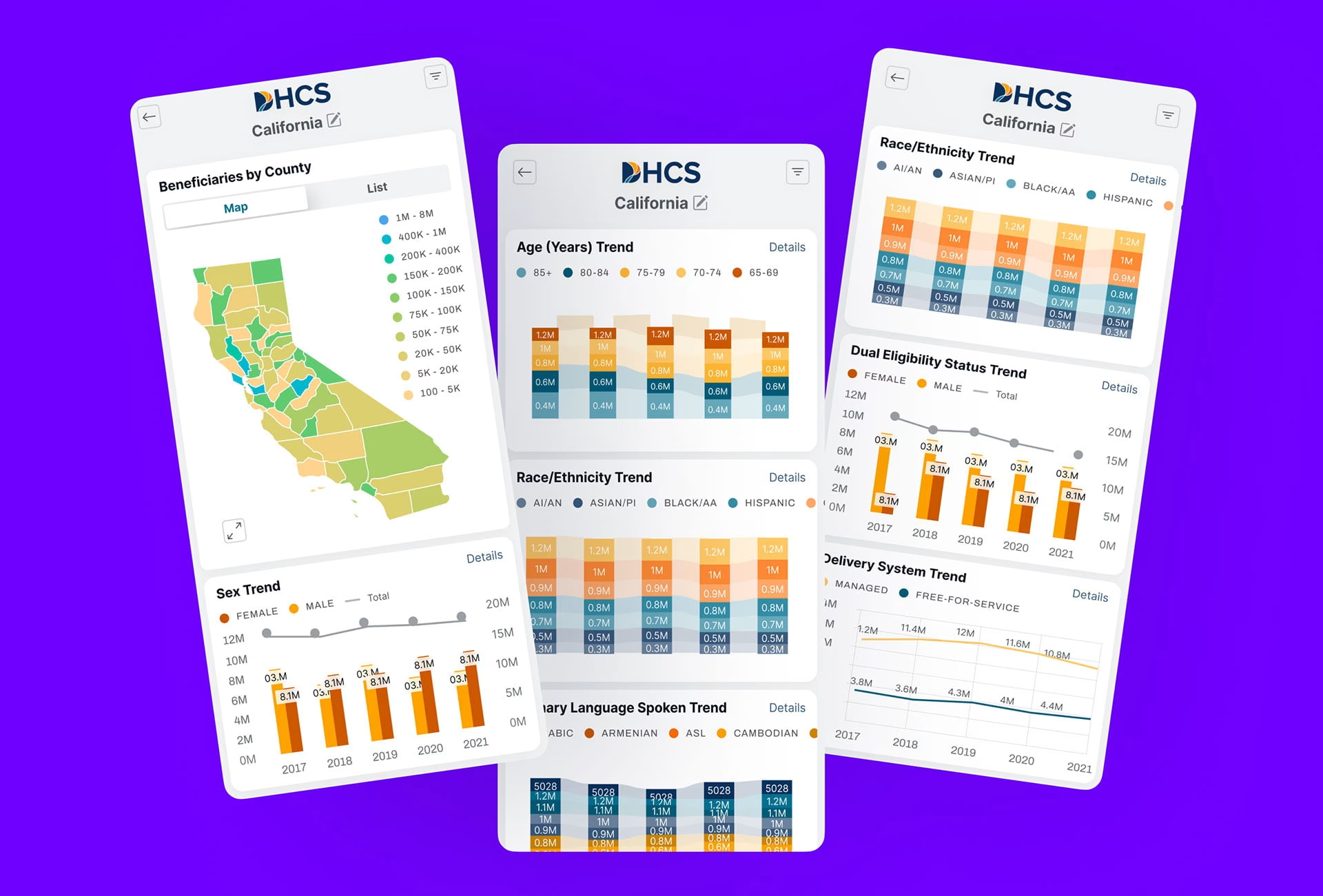
Designing for accessibility last. This is the third, and the one we built ourselves. On the DHCS Medi-Cal data platform, Section 508 requirements surfaced late because we filed them as a separate workstream. Streaming output and AI-generated alt text need architectural choices that are usually locked by the time an accessibility review happens.
How regulated-industry teams should approach AI product design
Regulated-industry teams should start with the rules before the model, design the audit trail and override path as core workflows, and validate every iteration through a regulator’s eyes. The strongest products in health and finance build audit trails, override paths, decision records and accessibility in from the first sketch, and reach compliance review with nothing left to discover.
- Start with the rules, not the model. Before sketching a screen, list what applies: HIPAA, FDA guidance and accessibility for healthcare; ECOA, Regulation B, model risk guidance and state laws for fintech. Put that list in the design brief, next to the user research, so the designer knows which elements are required before deciding what the primary flow looks like.
- Design the audit trail and override path as core workflows. This follows from how these tools are used. An AI tool asks a clinician or credit reviewer to stake their professional judgment on its output. Without visibility into the reasoning and a fast way to override it, they will not use the tool, however accurate the underlying model turns out to be.
- Add regulator-lens validation. This is the step most teams have never run. Usability testing checks whether a user can finish the task. Regulator-lens validation checks whether a reviewer could reconstruct what the AI showed, what the user did, and what was recorded, from the interface alone. Run it alongside design iterations, because a finding at formal review costs a rebuild.
What the validation produces. Three artifacts, each starting from the interface: a reconstruction of one decision showing what the AI presented, its confidence, and what the user did; a mapping from each output version to its modification record; and a mapping from each reason code to the notice text. On ClyHealth, the structured record supplied the first. On DHCS, the missing accessibility artifact is why Section 508 surfaced late.
Conclusion
Every AI rule in health and finance ends up on a screen as an override, an audit log, a basis panel, or a reason code. The rules keep shifting, as the 2026 changes to FDA decision support and bank model risk guidance show, but that pattern holds. If you are scoping a regulated AI product, see how our AI design agency approaches the work.
Frequently asked questions
What is AI in regulated industries?
AI in regulated industries means AI-powered software built for sectors such as healthcare and finance, where regulation requires the interface itself to support audit, review and accountability. HIPAA, FDA guidance, ECOA and bank model risk guidance shape what the screen must show and record. Teams that treat these requirements as part of workflow design spend less of the review fixing the interface.
How is regulated-industry AI design different from general AI product design?
Regulated-industry AI design adds three things general AI design mostly ignores. Every AI decision needs a visible audit trail that the user and a reviewer can both see, every output needs to follow a pattern a regulator can inspect, and every workflow needs a clear record of who saw the recommendation, what they decided and why.
How does AI in healthcare UX differ from AI in fintech UX?
AI in healthcare UX must satisfy HIPAA, FDA guidance and accessibility rules at once, with audit trails that fit clinical documentation and recommendations whose basis the clinician can review. AI in fintech UX must satisfy ECOA’s specific-reasons requirement and bank model risk expectations, with reason codes and model details shown to credit reviewers. Both share the audit-trail and accountability pattern.
Does the FDA regulate clinical decision support software?
FDA regulation of clinical decision support depends on what the software does. Decision support stays outside device regulation only if it meets four statutory criteria, explained in guidance the FDA revised in January 2026, and one criterion requires that the clinician can independently review the basis of each recommendation. Software that analyzes medical images or signals generally remains a regulated device, so confirm your product’s status with regulatory counsel.
How much does AI design for a regulated industry cost?
AI design for a regulated industry is priced at the same rates as other enterprise interface work, and Fuselab’s Clutch profile lists $100 to $149 per hour with a $25,000 minimum project. The regulatory mapping, audit-trail design and regulator-lens validation add weeks of scope rather than a different rate. A full clinical or credit product across several roles typically runs well into six figures, often $150,000 or more.
How long does an AI design project in a regulated industry take?
An AI design project in a regulated industry typically runs five to nine months for a full product, compared with four to seven months for a comparable enterprise AI product outside regulation. The difference comes from the regulatory mapping at kickoff and the compliance review cycles before launch. A contained feature with one clear job can ship in ten to fourteen weeks.
How do you choose an AI design agency for a regulated-industry product?
Choosing an AI design agency for a regulated product comes down to documented experience with the rules that apply to you, named projects in comparable industries, and a process that maps regulations at kickoff. An agency without work in your regulated industry is a general AI design agency. Switching after a compliance failure usually costs more than choosing a specialist first, because the rebuild reaches into the primary flow.