AI UX vs traditional UX and what actually changes in 2026
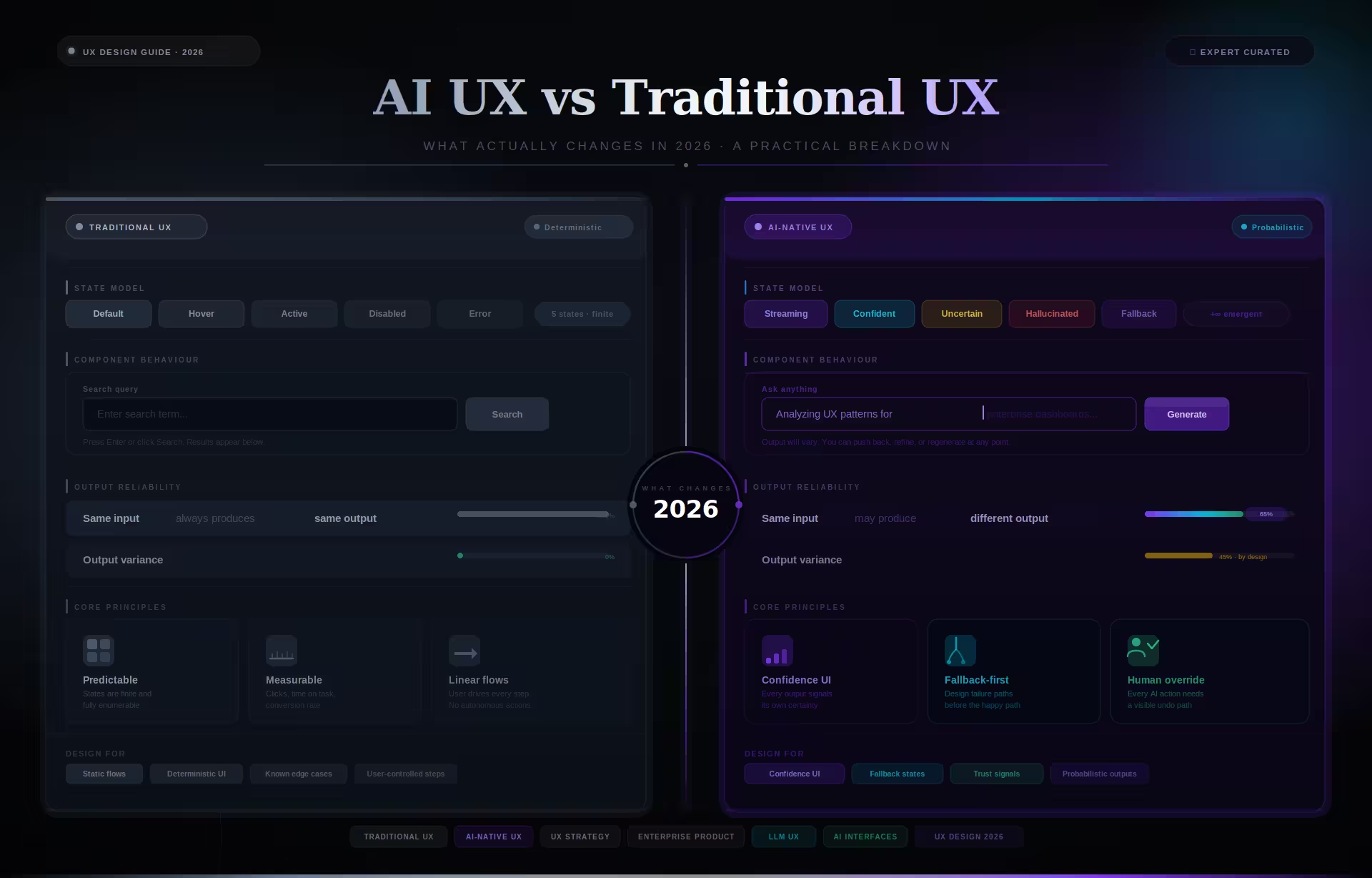
Traditional UX design is built for deterministic systems, where every user input produces a single predictable output that the team can map, prototype, and test before launch. AI UX design is built for probabilistic systems where the same input can yield different outputs depending on model confidence, training data, and context, which forces product teams to rethink how they handle errors, build trust, and test interfaces.
Deterministic design assumes the system is fully knowable before it ships. A save button saves, a validation error means something failed, and every path can be mapped, tested, and documented. You can prototype the entire product in Figma, and what ships will behave the way the prototype behaved. That is the promise traditional UX was built on.
AI UX operates in a different reality. The same query can throw up different answers depending on the user, model updates, training data, or subtle changes in context. The system is not fully knowable during the design process, and its behavior continues to evolve after launch. You can prototype the layout in Figma, but you cannot prototype the behavior.
This AI UX vs traditional UX distinction matters because the entire design toolkit changes. Methods that assume fixed outcomes start to break when outcomes are variable, and the patterns that worked for predictable software quietly fail when the system begins generating its own responses.
Rather than only easing user journeys or increasing engagement, AI UX design must also communicate uncertainty, provide fallback paths, and build trust gradually. A probabilistic system is a fundamentally different design problem, and as Stanford’s 2025 AI Index report documents, the widespread effects of AI will not reach all users unless the technology is developed with deliberate care.
Why the AI UX vs traditional UX distinction affects procurement
The difference between deterministic and probabilistic interface design directly affects how enterprise teams select agencies, scope projects, and estimate budgets. A procurement process that applies traditional UX criteria to an AI product will underestimate the timeline, misjudge the required expertise, and ship an interface that users abandon within weeks of launch.
Project scoping is where the gap costs the most money. When an enterprise team scopes an AI product using traditional UX assumptions, the resulting timeline and budget are built for a deterministic interface. The scope covers screens, flows, and visual design but omits confidence patterns, fallback architecture, and the iteration cycles required to validate against real model outputs.
Vendor evaluation breaks down for the same reason. Procurement teams assess AI product agencies using portfolio criteria designed for traditional software, looking for clean screens and polished prototypes rather than evidence of shipped interfaces that handle model uncertainty. In our work with NASA and Fiserv, the projects that ran over budget shared one root cause: the original scope was built on deterministic assumptions.
What makes this expensive is that the gap surfaces late. Teams discover the disconnect not during procurement or kickoff but during live testing, when the model returns 40% confidence and the interface has no pattern for displaying it. Redesigning fallback flows and confidence patterns after development has started typically adds 20% to 30% to the original budget and two to three months to the timeline.
Agency selection criteria also need to change for AI products. Traditional vendor evaluation weighs visual design quality, case study volume, and process documentation. For probabilistic systems, the relevant criteria are whether the agency has shipped an interface with visible confidence states, whether their portfolio shows override and fallback patterns, and whether their team includes designers who have worked with live model outputs rather than static prototypes.
AI UX vs traditional UX in practice: same problem, two design approaches
The clearest way to see the difference between AI UX and traditional UX is to apply both approaches to the same clinical interface and compare how each handles variable model confidence, from 40% to 95%, on the same diagnostic suggestion. The design choices diverge immediately once the system can no longer guarantee a correct answer.
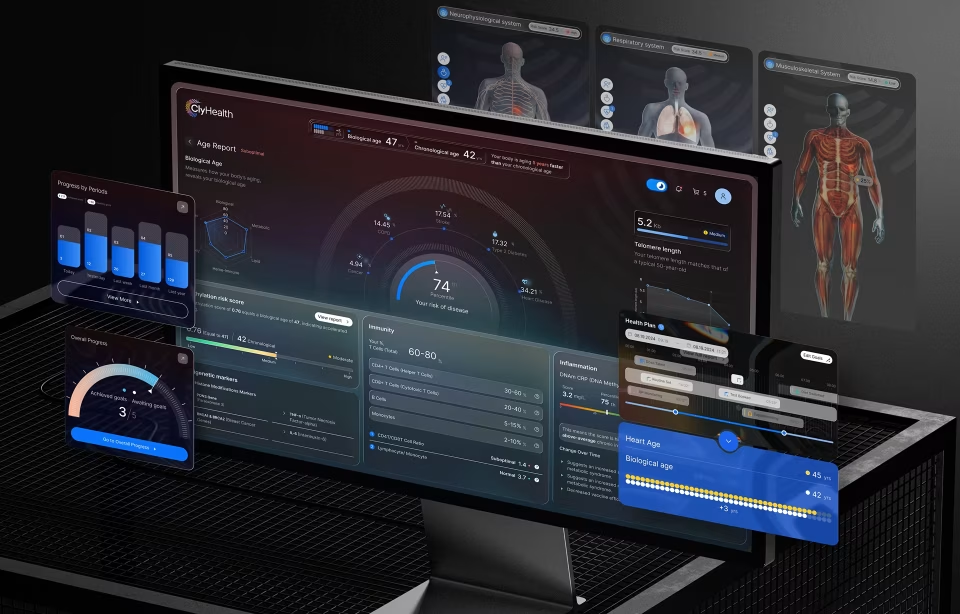
ClyHealth is a supplement personalization system that generates daily protocols using biomarker data, lab results, lifestyle inputs, and patient goals. The project required an interface that could present AI recommendations to clinicians while making confidence levels visible and overridable at every step.
A traditional UX approach would focus on a clean screen, a top suggestion, and a confirm button. In controlled testing, the model returns high-confidence outputs, so the interface feels efficient. When the product goes live, however, the model sometimes returns 40% confidence but presents it identically to a 95% output because it was never designed to show probability. The clinician cannot distinguish a strong recommendation from a weak one.
The ClyHealth interface with an AI UX approach restructures everything around confidence. At 95% confidence, the recommendation is prominent with a clear approval path and minimal supporting detail. At 40%, the interface shifts visually. The focus moves away from the confirmation path, additional documentation surfaces, and the user is guided toward manual review instead.
Beyond confidence scoring, the interface must also build trust through visible reasoning. Traditional UX interfaces are not expected to show background processing, but AI systems must surface the logic behind every output. ClyHealth does not just show system suggestions. It shows why the system arrived at that suggestion by accompanying every output with visible reasoning, including biomarkers, flagged deviations, and how specific inputs influenced the outcome.
For the ClyHealth project, the team implemented a single-recommendation-per-step pattern that presented one AI suggestion at a time with the confidence score always visible. This included a one-tap override to a manual workflow, chosen to reduce the cognitive overload caused by multiple simultaneous AI suggestions. Clinicians did not want a list of options from the AI. They wanted one suggestion they could quickly verify or reject.
The result was a measurable reduction in decision fatigue reported by clinicians during post-launch interviews. By putting the model’s probabilistic nature front and center, the interface gave doctors a tool that saved time while leaving the final decision to them. The system supported the human rather than trying to replace the human’s judgment.
Where the boundary between AI UX and traditional UX actually falls
Traditional UX works well when AI operates behind the scenes, handling ranking, filtering, spam detection, or background automation, and the user interacts with a stable, predictable interface. It breaks when AI outputs are visible to users and require interpretation, validation, or explicit override. That boundary determines which design approach a product team should use.
Not every AI product needs AI UX patterns. When AI manages search ranking, recommendation sorting, or content moderation without exposing its uncertainty to the user, the interface remains deterministic from the user’s perspective. If the user never sees the model’s output directly, traditional patterns work fine. The distinction matters only when the model’s confidence level becomes relevant to the user’s next decision.
The breakdown happens when AI outputs become part of the user’s decision-making process. Recommendations, predictions, diagnoses, and generated content introduce uncertainty that must be shown explicitly and managed carefully. Traditional UX has no built-in patterns for communicating confidence, handling ambiguity, or guiding user verification. In AI UX vs traditional UX terms, this is where the old toolkit stops being sufficient.
Most failures follow the same pattern: existing deterministic products are extended with AI features but the underlying interface was never designed for probabilistic behavior. The original structure, designed to convey certainty, must now somehow show variability. In our work on AI interface design projects, this is consistently the hardest scenario to resolve because the existing design actively resists change.
Common mistakes when teams move from traditional UX to AI interfaces
The most damaging mistakes in AI interface design come from applying traditional UX assumptions to probabilistic systems without adjusting the underlying design process. These are not theoretical risks. They appear in shipped products repeatedly, and they follow predictable patterns that experienced teams have learned to identify during the first week of a project.
Treating confidence as a binary condition is the most common pattern failure. Teams from traditional UX instinctively design two states: the model is right, or the model is wrong. AI outputs exist on a spectrum. A model at 72% confidence requires a different interface treatment than one at 95% or 40%, and designing only for the extremes leaves the majority of real outputs with no appropriate visual treatment.
Relying on high-confidence outputs during testing is the second predictable failure. Traditional usability testing assumes the prototype behaves like the shipped product, which is true for deterministic systems but not for AI. Design teams that test only with the model’s best outputs are validating a product that does not exist in production. The live system will return uncertain, conflicting, and occasionally wrong results that the tested interface cannot handle.
Designing the override path last is a structural error that compounds over the life of the product. In traditional UX, error recovery is an edge case handled with a message and a retry button. In AI UX, the override path is how users maintain control when they disagree with the model, and it must be designed before the primary happy-path interface.
Products that bolt on override flows after the primary interface is built end up with overrides that are buried and slow to use. When overrides are difficult to reach, users stop correcting the system, and the AI continues producing outputs that no one trusts or acts on. The override path is not a fallback. It is the product’s credibility mechanism.
Humanizing the AI is a subtler mistake but equally destructive to long-term adoption. Giving the model a persona, a name, or conversational language that implies understanding creates expectations the system cannot meet. When the model fails, and probabilistic systems always fail eventually, the gap between implied capability and actual output destroys trust faster than any technical error would in a system that presented itself honestly.
Copying interaction patterns from consumer AI products is equally damaging. Enterprise teams frequently reference ChatGPT or Google’s AI features as design benchmarks for domain-specific tools. Those products are built for general-purpose text interactions with massive user bases, not for specialized decisions where a single wrong output has consequences. Patterns that work for a chatbot answering general questions actively harm a clinical decision-support tool or a financial risk assessment interface.
Practical implications for product teams building AI interfaces
Building AI products requires a shift in three areas of product development: how teams test interfaces, how they write specifications, and how they plan timelines. Testing must involve live models rather than static mockups, specifications must define fallback behaviors for low-confidence outputs, and timelines must account for iteration cycles as the model’s behavior evolves during development.
Testing is where the AI UX vs traditional UX difference becomes most painful. Fixed Figma prototypes cannot test AI failure modes. You need live model outputs to test low-confidence, conflicting, and wrong outputs. Design teams often learn this the hard way when the prototype tests well but the live product falls apart because they only tested the correct-output path rather than the range of real-world scenarios.
Specifications also have to evolve. Traditional specs define what the system does, limited to one right and one wrong answer. AI specs must also define what happens when the system is wrong, uncertain, or overridden. These are core workflows, not edge cases. In our experience with healthcare UX projects and NIH-funded clinical tools, the override screen is almost always the most important screen in an AI product.
In our project experience, AI UX timelines run 4 to 8 months compared to 2 to 4 months for traditional projects of similar scope. The extra time goes into fallback design, confidence display patterns, and iteration as model behavior changes during development. Teams that plan traditional timelines for AI products consistently run over budget.
Conclusion
The shift from traditional UX to AI UX is a structural change in how interfaces function. When the system generates its own outputs, the designer’s job expands from mapping user journeys to building trust, showing confidence, and making every override path obvious. Teams evaluating this shift can explore how Fuselab approaches enterprise AI interface design for regulated and complex products.
Frequently asked questions
What is AI UX design?
AI UX design is the practice of creating interfaces for systems that produce probabilistic and variable outputs. It focuses on communicating model confidence, providing clear fallback paths, and building user trust by surfacing reasoning, showing sources, and making override paths obvious at every step.
What is traditional UX design?
Traditional UX design focuses on deterministic systems where user inputs lead to predictable, repeatable results. Every user action maps to a single known outcome, which means the entire product can be prototyped, tested, and documented before launch. It relies on fixed user journeys and consistent, binary states for every interaction within the software.
How does AI UX differ from traditional UX?
AI UX is different from traditional UX because it must manage uncertainty and variability rather than assuming every action has a single correct result. While traditional UX focuses on efficiency in a known environment, AI UX focuses on safety and trust in a system that can present answers across a spectrum of probabilities.
How does testing differ between AI UX and traditional UX projects?
AI UX testing requires live model outputs rather than static Figma prototypes because the interface must handle low-confidence, conflicting, and incorrect outputs that cannot be simulated in a deterministic mockup. Traditional UX testing works well with fixed prototypes because every user action produces a predictable result that the prototype can replicate accurately.
Does AI UX design cost more than traditional UX?
Enterprise AI UX design typically costs 20% to 30% more than comparable traditional projects in our experience, because the workflows are significantly more complex. Projects in our portfolio have ranged from $80,000 to $200,000 compared to $60,000 to $150,000 for equivalent deterministic systems, with the final cost depending on the number of non-deterministic states required.
What should an AI UX design portfolio demonstrate?
A strong AI UX design portfolio should demonstrate how the designer handles low-confidence states, fallback flows, and override paths in real shipped products. It must show more than happy-path screenshots to prove the designer understands how the system behaves when it is uncertain or wrong.
How long does an AI interface design project take?
An AI interface design project typically takes 4 to 8 months from initial research to a ship-ready handoff in our experience. This is roughly double the timeline of traditional 2 to 4 month projects because of the iteration cycles required for testing with real model outputs.