23
min read
23
min read
 Oct 7, 2026
Manufacturing dashboard design for industrial interfaces in 2026
Manufacturing dashboard design begins where a screen stops being a product surface and becomes part of a machine. On plant floors, production lines, and in control rooms, interfaces carry live sensor streams and safety-critical alarms to people wearing gloves, standing in noise, watching equipment that will not wait for anyone to finish reading. Most of what holds elsewhere in dashboard design comes apart under those conditions. Two standards govern the territory, ISA-101 and IEC 63303, and few product teams have opened either. Failure is not counted in churn here. It is counted in downtime, scrapped batches, and incident reports.
What follows is a practitioner’s account rather than a survey: where the standards bind, the seven problems that surface on every plant-floor project, how to write a screen specification that survives 50 feet of viewing distance, and how to read a portfolio for the signals that actually predict competence. Industrial data visualization takes the most space, because it is the part that refuses to transfer from other domains. Most of these positions were paid for by building manufacturing dashboards and getting the first version wrong.
What makes manufacturing dashboard design a separate discipline
Three conditions do the separating. The environment fights the screen. The data never pauses. And an ambiguous alert can end with a hand on the wrong control.
SaaS patterns assume a desk, a quiet room, a mouse, and a reader who can afford to read. Strip those assumptions and most of the toolkit goes with them. Operators run 24-hour shifts in high noise, inside safety equipment that narrows peripheral vision and shortens reach, with attention divided between the screen, the machine, and whatever is moving behind both. Meaning has to arrive at a glance, carried by contrast and hierarchy, never by sustained reading.
Consequence is where this argument usually gets oversold, so here is the careful version. Miss a notification in a project tool and a deadline slips. Miss an alarm in a control room and you have contributed one failure to a chain that also holds interlocks, safety instrumented systems, and relief devices. The screen is seldom the last defense. It must never be the one that gives way. Everything downstream follows from that: type contrast, alarm color, the size of the acknowledge control and where a gloved thumb finds it.
Then there is the stream. Programmable Logic Controllers push values every second or faster and do not stop for anyone’s render cycle. Absorbing that rate without flicker or visual churn is the defining constraint of a real time manufacturing dashboard, and no amount of SaaS experience rehearses it, because those interfaces update on request.
Hardware closes in from the other side. Screen model, mounting height, viewing angle, enclosure rating, resistive against capacitive touch: each one narrows what the interface is allowed to be. A capacitive panel can refuse a gloved hand entirely unless the controller was specified for it. Software and hardware decisions are one decision in this work, taken together or taken badly.
Engagement stops being the objective. Clarity under time pressure replaces it. That is the premise, though as the Hyperfab section makes plain, a great deal of the work never touches a screen at all.
The ISA-101 and IEC 63303 standards UX agencies should know
ANSI/ISA-101.01-2015 is the American national standard for human-machine interface design in process automation, issued by the International Society of Automation. It was approved for adoption as an IEC standard in 2020, then carried through IEC TC65/SC65A WG19 into IEC 63303, which covers the same ground internationally and across the whole HMI lifecycle: philosophy, design, implementation, operation, maintenance. A published draft of the IEC text will show you the structure before you pay for the standard.
Read them as a floor, not a shield. They displace nothing in machine safety, functional safety, cybersecurity, or whatever your sector adds on top. A process-control HMI, a robot teach pendant, a CNC interface, a production-planning dashboard, and a wall-mounted Andon board share an ecosystem and almost nothing else. Their tasks differ. So do the ways they hurt people.
The display hierarchy
ISA-101 puts displays in layers, and the point of the layering is that each level answers a question the others cannot. Get that right and one data architecture yields several genuinely different screens. Get it wrong and you have built the same screen at four magnifications. Four levels is the reference model, not a quota.
Fit the structure to your process and to what your operators are answerable for. A plant overview shrunk down is not a component diagnostic view, and that particular confusion is the structural fault we turn up most often inside existing manufacturing dashboards.
The gray background principle in industrial data visualization
High Performance HMI practice runs gray, flat, and quiet: muted backgrounds, restrained 2D equipment, a vocabulary small enough to memorize. Neutral tones do a specific job. They define normal, so that abnormal has somewhere to appear from. Color stays in reserve for alarms, status changes, and anything else with fixed operational meaning, because decorative color bids against alarm color for the same attention at the worst possible moment.
Anyone trained on consumer or SaaS work will read this as impoverishment, and that reflex is the problem. Motion, gradients, and an accent palette make an interface feel current; they also introduce ambiguity about system state, which is why industrial HMI removes them. The apparent downgrade is a safety framework holding its ground.
None of that sentences industrial data visualization to ugliness, or bans color outside alarms. The rule is narrower and harder: color, motion, shape, and contrast must each carry one stable operational meaning, and no meaning may be carried twice.
Do not digitize the P&ID
Nothing marks a newcomer to industrial work faster than a dashboard laid out like a Piping and Instrumentation Diagram. The P&ID describes engineering relationships and physical connectivity. Operators do not think in pipe runs when they are deciding whether to intervene. Build the screen around the decision and the action, not around the arrangement of hardware in the building. Physical routing has its uses in diagnosis and gets in the way almost everywhere else.
7 UX problems unique to manufacturing dashboards
7 problems recur, and none of them has much of a life in general dashboard ui design work. Healthcare, energy, and transportation each know a version of one or two. Manufacturing is where all seven land on one screen at once, under continuous processes, physical machinery, direct control authority, and conditions that change between shifts.
1. Alarm fatigue
Desensitization is the documented risk. Alerts arrive without pause, operators stop registering them, and a real fault passes unread among the noise. ISA-18.2 and IEC 62682 respond with tiered priority classification, which the screen has to make visible: advisory, high, and urgent separated by color, size, and position, resolvable at a glance rather than on inspection.
Hierarchy is the visible half. The other half is rationalization, and it is unglamorous work: every alarm reviewed for whether it should exist at all, whether anyone can act on it, what response it demands, how shelving and suppression behave when it fires. Legacy systems add alarms far faster than they ever retire them. Expect to sit in those sessions, because no amount of design improves an alarm that should not have been sent.
Keep the room in mind while you do it. Audible alarms are going off somewhere else, forklifts pass with strobes and reversing beepers, and your visual layer is bidding for attention against all of it.
2. Shift handoff continuity
Around-the-clock production turns handoff into a design problem, whatever the procedure manual says. Someone walks in at 6 am and has roughly two minutes to absorb eight hours they did not witness. Give them alarms raised and cleared, setpoints changed, anomalies observed, and every temporary workaround still holding, written as a narrative a tired person can read. An event log is not a handoff.
Analytics justify themselves here more than anywhere else on the screen. Overnight anomaly detection surfaces what the departing operator never noticed: temperature drifting slowly, a flow rate decaying a little more with each cycle. Frame those as things to watch rather than as alarms and the incoming shift starts with context instead of archaeology.
3. Physical environment constraints
A gloved hand does not hit the targets consumer guidance calls generous, which tops out around 44 pt on mobile and 24 x 24 CSS px in WCAG 2.2. Specify in millimeters instead. Somewhere around 15 to 20 mm makes a defensible opening position, with real space between adjacent controls, and then you go and prove it on the mounted panel with the gloves your operators were actually issued. A CSS pixel says nothing about a vibrating enclosure at a 40-degree angle, which is why the pixel figures in the table below belong to the desk row and nowhere else. Hover is simply unavailable; these panels are touch-only.
Around 1 in 12 men have some degree of color vision deficiency, which moves color-alone status encoding out of the accessibility column and into the safety one. Carry status in shape, position, and label as well. Light finishes the job: a sunlit bay and a dim control room are different specifications, and the screen has to be chosen for the position it will occupy rather than the position it was demoed in.
4. Andon boards vs workstation panels
An Andon board is read by a shift team from 3 to 10 meters away, and it shares almost nothing with a screen at arm’s length. It needs open layout, type sized for the distance, and a handful of status states that resolve instantly. Nobody touches it. Its entire job is to be understood from across the floor by someone walking past.
The same production data usually lands on a workstation panel that wants the opposite: control, drill-down, trends, history. Manufacturing dashboards have to produce both from one source of truth, with numbers that never disagree and presentation that changes with distance, task, and authority. That makes it a dashboard systems design problem before it is a screen problem, because the model underneath has to feed several surfaces without drifting between them.
One source of truth means the data model, not the display. The same tags and calculations run out to Andon, workstation, manager, and executive views. What changes by role is the KPI set, the time window, and the density. What never changes is the number.
5. Role-based information density
Operators, supervisors, plant managers, and executives are looking at one system through four different apertures. The line operator wants seconds on the machine in front of them. The plant manager wants a consolidated manufacturing OEE dashboard for the site. The executive wants site-against-site throughput over quarters. Build role-based entry points and stop trying to satisfy all of them in one view. The permission modeling is familiar from any enterprise dashboard design engagement, with one difference that changes the stakes: a role here carries authority over physical equipment.
Read the last column twice. It is what separates this from analytics. A role does not merely filter a view; it determines what a person may do to a running machine from where they are standing. The metrics behind each row come later in this piece.
6. Real-time refresh cognitive load
Update every field every second and the screen becomes weather. Operators stop tracking change because change is constant. Deadbands and progressive update rules fix it: a value redraws when it crosses a threshold, not on every tick, and flicker disappears without any real transition being hidden. This costs nothing in immediacy. A real time manufacturing dashboard is not one that redraws constantly, it is one where a genuine change reaches the operator the moment it matters. Data still arrives without pause. The deadband only decides when arrival is worth showing. Refresh rate is a design decision, and inheriting it from the data pipeline is a decision too, just an unexamined one.
Task sets the threshold. Watch a reactor and you care about drift over minutes, which aggressive updating buries. Watch a packaging line and you care about cycles per second, which slow updating renders useless. The only reliable way to pick is to stand there while operators decide, at the speed their work actually runs.
7. Stale-data visibility
A frozen number displayed with full confidence is among the most dangerous things an industrial dashboard can do. Five minutes of staleness is enough for an operator to act on a reading and deepen the fault that stopped it updating. Degrade in plain sight: timestamps, hatched or struck values, explicit offline states, so the reliability of a value is as visible as the value. Dimming is the tempting instrument and the wrong one, since it pushes contrast under the floor the rest of the screen is held to.
Data visualization does the talking. A hatched field with a visible timestamp reads as degraded from across the room; a small warning icon does not. Behind it, put an automatic fallback. When the primary source drops, move to last-known-good with a stated time, or to an averaged historical band, and hold a persistent banner on connection state. Never let the screen imply that nothing happened. Operators handle stale data competently. What they cannot handle is stale data wearing the face of live data.
What a manufacturing KPI dashboard should display by role
Role, time scale, and process type determine the metrics. Define entry points by role and tune each to the decisions that role actually owns. Treat the following as raw material for a manufacturing KPI dashboard, something to cut from rather than adopt.
Decomposing the manufacturing OEE dashboard
The manufacturing OEE dashboard fails more predictably than anything else on this list, and always the same way. OEE compresses availability, performance, and quality into one figure, and a figure that cannot be pulled apart cannot be acted on. Two lines sitting at 65% may need opposite interventions, one bleeding time in changeover and the other bleeding product to scrap. Publish the three components next to the composite at every level, the operator’s own machine included. The same decomposition logic runs through our factory operations dashboard work, which splits robot working hours, energy, and staffing rather than rolling them up.
What predictive maintenance changes about manufacturing dashboard design
Prediction introduces probability into a screen otherwise built from measurement, and the whole design problem is keeping the two apart in the operator’s head. A forecast component failure must never read as an observed one. Structure and hierarchy enforce that; probability labels do not, because under time pressure nobody reads them. The same separation governs AI dashboard design wherever model output shares a canvas with measured data.
Automatize, a fleet management platform with predictive analytics, is the clearest version of the pattern in our own work. Live vehicle positions, trip progress, and traffic held the primary layer and were treated as the interface’s ground truth. Predictions about fuel inefficiency, route deviation, and cost anomalies lived one layer back, reached deliberately through expandable cards and analysis modules.
Structure carried the separation, not labels. Probability percentages were left off individual predictions on purpose, because testing showed managers either dismissed them or leaned on them far too hard, and neither response was worth the pixels. Containment let managers read live conditions cleanly and treat forecasting as its own task, entered when they chose to enter it.
The limits of the analogy are worth stating plainly, since we have not shipped a plant-floor predictive maintenance interface. A predicted bearing failure differs from a route-cost anomaly in horizon, in consequence, and in what verification it demands. The requirement still transfers. Mean Time To Failure has to look unlike live temperature, vibration, and flow. Where a prediction is indistinguishable from a fault, operators either move early on forecasts that would have resolved themselves, or stop believing the screen altogether, which is the more expensive failure.
Confidence is the harder half of the problem. A percentage on every forecast manufactures precision that the model does not have. Bands tied to action thresholds, answering what to do at this level of confidence, sit closer to how decisions actually get made. That was right for fleet work, where a bad forecast costs fuel. It would not transfer unexamined to a plant floor, where suppressing uncertainty before a maintenance call could mislead someone with a wrench. The question is never whether to show a number in the abstract. It is whether this number changes what a competent operator does next, here.
One piece of received wisdom deserves correcting, our own earlier version of it included. Do not raise the prominence of predictions because the last few happened to land. Prominence should track validated model performance, current operating conditions, and the cost of being wrong. A model that behaves in steady-state production can lose its footing during startup, changeover, or maintenance, and an interface that learned confidence from a good week will shout loudest exactly when it should hesitate. Introduce predictions as advisory, make dismissal and investigation cheap, and let trust accumulate from transparent behavior rather than from visual escalation.
Physical display specifications for plant-floor dashboards
The specification is written before hardware is chosen, and it records the conditions the screen has to survive: viewing distance, character height, ambient light, viewing angle, touch conditions, brightness, enclosure treatment, PPE, acceptance criteria. What defines it is the operator’s task. What must not define it is somebody’s preferred display model.
Desk monitors, panel HMIs, and wall boards may draw from the same data and still answer to different decisions. Desks carry trends and tables. Panels carry PPE, restricted reach, vibration, and control authority. Wall boards carry status to people crossing the floor. A layout that is comfortable at arm’s length can be worthless mounted four meters above a line.
What follows are opening requirements for common contexts. Wall-board character heights come from the 20 arc-minute visual-angle guidance in ISO 9241-303, worked per distance and rounded up to practical millimeters. They cover essential status, alarm, constraint, and production information, not instructions, dense tables, or diagnostic history.
Visual angle is an input, not a verdict. Typeface, stroke width, luminance, contrast polarity, angle of approach, language, and whether the reader is walking all bear on whether the spec-sheet figure holds up in the building.
WCAG 2.2 hands you a contrast floor for text and a baseline for pointer targets, and stops there. It has nothing to say about reflected light, dust on an enclosure, a panel five years into its life, or a reader passing at an angle between two machines. Treat it as a floor and never as an environmental specification.
Test under production lighting. Not office lighting, not the vendor’s booth. Note whether the assessment ran under LED, sodium, daylight, or some mixture, and log ambient readings and brightness settings at every viewing position. Commissioning-day contrast can be destroyed by a lighting retrofit two years later, which is precisely why the lighting conditions belong in the document rather than in someone’s memory.
Touch gets the same treatment. Run the tasks most likely to generate an input error, on the selected panel, at the real mounting position, in the required protective equipment. Acknowledging an alarm, entering a setpoint, changing mode, backing out of a mistake: all of it without removing gloves. Record completion times, missed taps, adjacent taps, accidental activations, and any workaround an operator invents. Size and spacing come from what you observe. They do not come from a guideline, and they do not come from us.
Shared wall displays deserve a content model of their own, because they serve awareness rather than control. From the standing positions that matter, a board should give current production state, the active constraint, and the responsible team without asking anyone to parse a trend or an alarm log. Diagnostics, history, and controls live at the workstation nearby. The board is a status surface and gains nothing by pretending otherwise.
A finished specification lists viewing positions, light sources, ambient readings, brightness settings, acceptable angles, enclosure finishes, and test tasks. It states what has to be readable from each position and shows the character-height arithmetic for distant viewers. Procurement, controls, and operations can then argue about hardware proposals on shared ground. If a specification cannot be tested, it is a preference with formatting.
The OT and IT boundary determines what a dashboard can show
The OT/IT boundary sets three limits at once: what a dashboard may display, how current that value can be, and whether anyone may act on it from where they are. A number might be a live process condition, a replicated operational summary, a historian record, or a calculation, and its meaning shifts with its origin, its owner, and how fresh it is expected to be.
ISA-95 divides physical processes, sensing and manipulation, supervisory control, manufacturing operations, and business planning into levels of responsibility. An operator watching one machine, a plant manager reviewing output, and an executive comparing sites are not looking at the same system at different resolutions. Role governs detail and authority together.
Settle source and expected freshness for every value before touching refresh behavior or control states. One screen might read a supervisory system, take replicated data from an operations platform, and query a historian on an unrelated schedule. Where freshness cannot meet the cadence of the decision, show the last update time and an unmistakable stale state. Freshness is part of the value, and the interface owes the operator a distinction between current, delayed, estimated, substituted, historical, and bad-quality data. A timestamp alone will not carry that when the number still looks alive.
Control capability needs the same rigor. A read-only dashboard can show alarm state or a setpoint as context; a supervisory interface may let an authorized operator acknowledge or change one. IEC 62443-3-2 draws zones and conduits around where those interactions may happen and which boundaries they cross. Seeing a value has never implied the right to change it.
None of this is settled by a design team alone, and treating it as a design decision is how projects stall in month three. The systems integrator confirms available tags, protocol behavior, latency, and approved routes. Controls owns alarm philosophy and command ownership. Operations judges workflow fit. Cybersecurity rules on identity, remote access, authorization, and segmentation.
Keep the following for every screen. A screen-to-tag record is what makes a degraded state traceable, and what tells you whether a wrong-looking number in production is a design problem, a source-system problem, a network problem, or an instrument that has drifted.
Configuration is not the end of testing. Factory and site reviews ask different questions: the first checks that screens handle documented operating and failure states, the second finds out whether they survive the plant’s lighting, layout, network, equipment, and shift habits. IEC 62381 gives you the acceptance-test framework, and site validation should stretch it to cover usability, environment, control, safety, and degraded operation.
What we learned building the Hyperfab robotics dashboard
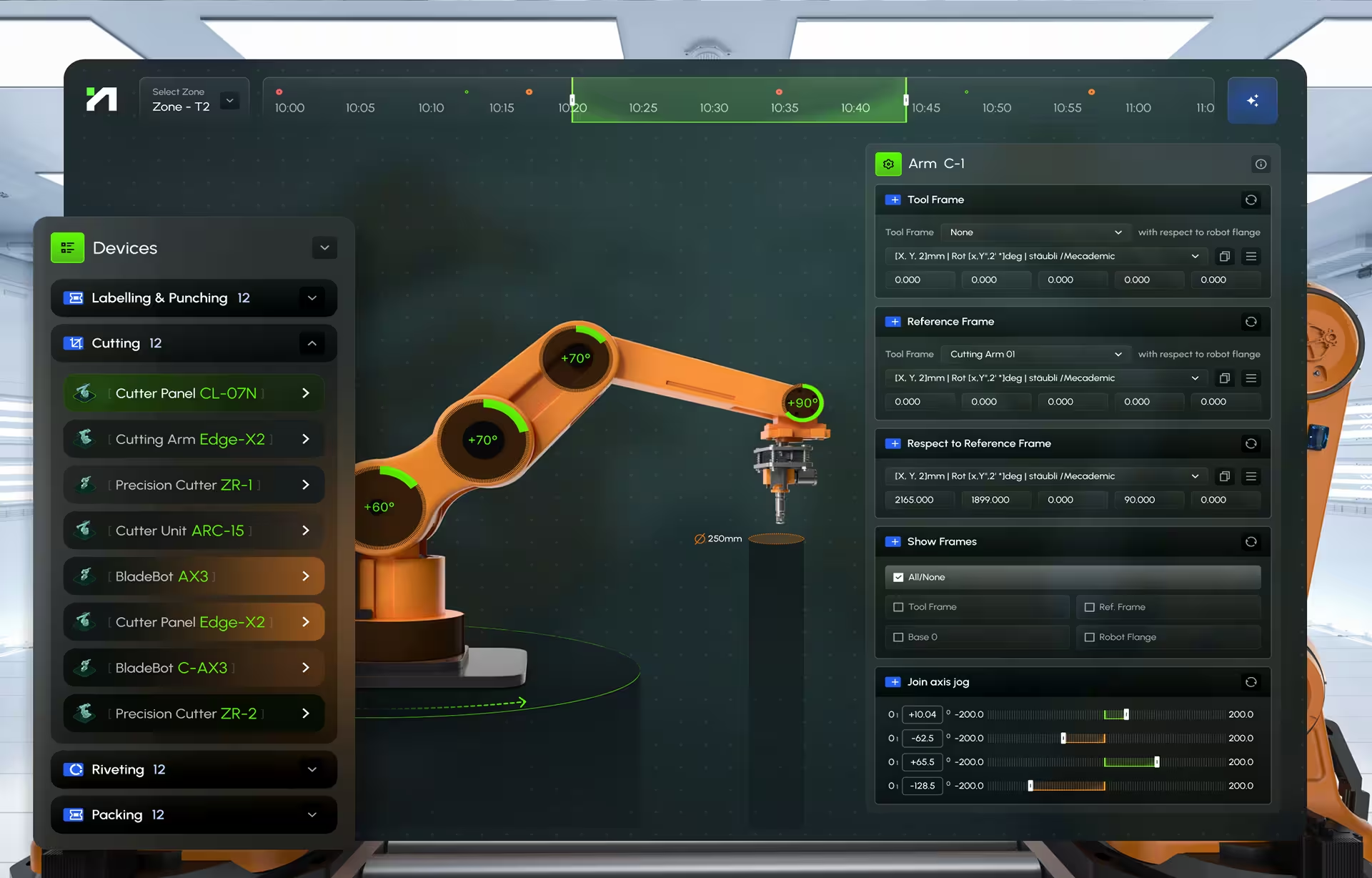
Hyperfab runs in live construction environments and comes in two halves: a desktop dashboard and an augmented-reality layer rendered on goggles worn on site. Our part covered UX research, interface design, and motion design across both. It took us into industrial UX with thinner experience than the project deserved; healthcare lab work was the nearest thing we had. Most of the positions in this article were formed there.
The system handles production planning, real-time monitoring, robotic arm control, and AI-driven simulation of cutting, labeling, and assembly. On site, operators work almost entirely through the AR layer, which manages spatial calibration and hand-positioned interaction. Supervisors and production managers work through the desktop, which aggregates performance across robotic stations and sets output against target.
Research had to happen on site, in shifts, not in a conference room. We watched arms being calibrated, talked to operators during breaks, and tested AR prototypes under the conditions the product would live in. That is the only way to learn how protective gear shortens reach, how the light changes what can be read at eleven in the morning, how a person moves between the process and the interface without dropping either.
The hard problem was that one system had to hold two incompatible contexts. AR served spatial interaction during physical movement. The desktop served oversight across equipment, performance, and output. Splitting attention and information between them without flooding either user consumed more of the engagement than anything else, and nothing in our SaaS background had prepared us for it.
Pre-execution simulation is the feature we would most like another pass at. Operators preview a robotic process, the path of a cutting arm or the trajectory of a labeling head, before anything physical moves. Prompt-based configuration and motion animation let them check the intended path against the real environment and catch collisions and positioning errors that would otherwise announce themselves only after the machine had committed.
The project changed our working definition of clarity. SaaS had taught us that clarity is organization and hierarchy on one screen. Hyperfab dismantled that. Clarity turned out to be distribution: the right information on the right surface, with a visual vocabulary consistent enough that goggles and desktop read as one product. Half a second of interpretation delay costs something there that it has never cost us in software.
The genuine surprise was how little of the problem lived on the screens. Environment audits, goggle ergonomics, calibration workflows, and the handoff between AR and desktop took more of the engagement than visual design did. Industrial interfaces are systems of interaction across surfaces, and once the physical context is understood, the screen is usually the easiest thing in the room.

How to evaluate whether a UX agency can handle manufacturing dashboards
Experience in general dashboard ui design does not carry over by itself, and portfolios are built to obscure that. Three things predict competence: at least one plant-floor interface shipped and used by operators in live production, research conducted in the physical environment rather than a meeting room, and fluency in the data architecture joining PLCs, SCADA, MES, and the UI. Claims unsupported by those signals rarely survive ten minutes of questions.
Apply these with some judgment. Nobody is asking a design team to build PLC, SCADA, MES, or ERP systems, but a designer who cannot tell you whether a value is live or replicated has no basis for designing its freshness or its failure behavior. Confidentiality keeps plenty of good work off the table, so use the request for screens as an opening rather than a test, and where an NDA closes it down, examine the research method and the decisions it produced instead. When you ask for artifacts, ask about machine types and shift conditions. Named operators should not be in anyone’s portfolio.
Regulated environments push the documentation bar higher still. Decisions have to hold up in front of controls, operations, cybersecurity, and quality, which calls for a package that survives an audit rather than a design file that survives a presentation.
The distance between this and SaaS UX is real: different standards, different physics, different consequences when an alert is ambiguous. If you are drawing up a shortlist, use the criteria above, and for a starting point there is our breakdown of industrial robotics dashboard design agencies.
Almost everything here was learned by shipping a first version that was wrong and going back to the floor to find out why. If it would help to talk through a process, its operators, and its constraints before anyone opens a design file, book a discovery call. Our industrial interface design work with manufacturing and warehousing clients is where these positions came from.
Frequently asked questions
What is manufacturing dashboard design?
It is the practice of building operational interfaces for plant floors, production lines, and control rooms. The scope covers real-time sensor data, alarm hierarchies, shift handoffs, role-based access, and the physical conditions the screen is installed into, governed by standards including ISA-101, IEC 63303, and ISA-18.2.
What KPIs should a manufacturing dashboard display?
Production views usually carry Overall Equipment Effectiveness, cycle time, throughput, and first-pass yield. Maintenance adds downtime by cause, MTBF, and MTTR. Executive views add cross-site throughput trends and capacity utilization across longer windows. Role and time scale decide the rest, and the full table by role is above.
How does manufacturing dashboard UX differ from SaaS dashboard design?
In environment, in data, and in consequence. Operators read screens in noise and glare, through gloves and PPE, with attention split between interface and machine, fed by continuous PLC streams rather than paginated updates. Engagement gives way to clarity under time pressure, and hardware becomes a design material.
What is the difference between an HMI and a dashboard in manufacturing?
An HMI is the operator-facing control interface for a process or machine, and it usually carries authority: acknowledging alarms, changing setpoints, switching modes. Human machine interface design starts from that authority. A manufacturing dashboard is more often a monitoring and analysis surface, frequently read-only, aggregating across machines, lines, or sites. Plenty of projects contain both, and the difference matters most the moment permissions are defined.
How much does a manufacturing dashboard project cost?
The drivers are the number of display levels, the number of source systems to integrate, whether alarm rationalization falls in scope, how much on-site research the plant demands, and whether hardware specification and site acceptance testing are included.
How long does a manufacturing dashboard redesign take?
Access sets the timeline more often than design effort does: how fast you can get onto the floor across several shifts, how long tag and permission mapping takes with the integrator, and when site acceptance testing can be fitted around production.
How does manufacturing dashboard design account for viewing distance?
Through a physical display specification. Character height comes out of viewing distance by visual-angle guidance, landing near 27 mm at 15 feet, 53 mm at 30 feet, and 89 mm at 50 feet, and each figure is then verified on the installed screen under production lighting.