Legacy application modernization without losing your users
Every legacy system carries 2 sets of requirements. The first is the specification: what the system was built to do. The second is everything people built around it to get their work done, from the spreadsheet that re-sorts the export to the rule only one senior clerk remembers. Ugh. Most modernization work rebuilds the first set and leaves the second undocumented, so workarounds return after launch as support tickets.
That way, legacy application modernization can meet every technical measure and still leave the business worse off. The new system runs on a supported stack, passes the security review, and takes staff longer to finish the work they did in the old one. For a CIO, that is an expensive outcome: a funded transformation that slowed the operation it was meant to support.
What legacy application modernization covers
Legacy application modernization moves an aging business application onto technology the organization can support, secure, and extend. It follows 5 paths, often combined: rehost, replatform, refactor, rebuild, or replace. The path determines how much changes under the hood, and each path can affect what people use every day.
The financial case is usually made first. The US Government Accountability Office reports that federal agencies typically spend about 80% of their IT budgets operating and maintaining existing systems, including legacy ones. When most of the budget keeps old software running, very little is left for anything new. Because the business case rests on that cost, user impact rarely makes it into the approval process.
Compliance is the second case. Security and privacy obligations assume software that still receives vendor patches, and a system its vendor has stopped supporting is hard to defend in an audit. Accessibility obligations such as Section 508 assume an interface can be brought up to current standards, and a platform nobody can safely modify cannot meet them.
AI readiness is the third, and newest, case. Legacy systems rarely expose clean data or integration points, so teams bolt on AI features through exports and side databases instead of building them into the workflow. An AI feature can also only use what the system records, and the steps that live in workarounds never get recorded: the spreadsheet step, the second check, the field left blank on purpose.
All 3 cases are about the system, and so are the risks most plans weigh: technical debt, business continuity, and cost. The question that rarely gets its own budget line is whether employees can still finish their work accurately and quickly. Answering it takes a second line of investigation, run alongside the technical audit, into what people actually do, where they hit friction, and what they cannot afford to lose.
Why legacy application modernization projects fail
The failure that hurts most looks like success on the status report. The project passes acceptance testing, the old servers get a shutdown date, and staff keep the old system open in a second window anyway. Legacy application modernization projects that disappoint usually do so in adoption, because the team defined success as delivering the application rather than the work.
Consider an employee processing a transaction. On paper, the workflow begins with the user entering details, validating the record, and submitting. In practice, the employee checks a second system or an exported spreadsheet, saves an unfinished record, and returns to it after another department confirms a detail. Those extra steps look like waste to remove, but some exist because the old application never supported an essential part of the process.
Remove a workaround without learning its purpose, and the employee has to invent a new one, usually outside the system. The new interface looks cleaner while the job underneath gets harder. In the projects we see, 2 mistakes cause much of this damage, and both come from reading the old system through its documents and its complaints instead of through the work itself.
Mistaking familiarity for a requirement. Users often ask to keep the old interface, rarely because the design is good. Years in it made them fast, and they fear losing that speed. Copying every old screen is wrong, and so is dismissing the request as resistance. A narrower question works better: what does the current interface let this person do that they are afraid of losing?
Often the answer is speed, and speed can be kept: dense expert views can stay one step from a simpler default, which is the job progressive disclosure does. Other complaints need no fix. Jakob Nielsen’s video on change aversion notes that every new interface draws complaints, and that complaints alone do not prove the new design is worse.
Two kinds of complaints sound alike and need opposite responses. “It’s different” reflects unfamiliarity and fades as people learn. “I can’t do X anymore” reports a lost workaround, and no amount of training fixes it. After a launch, we sort feedback into those 2 piles first. Teams that read every complaint as change aversion treat lost workarounds as teething pain and wait for complaints that never fade, and most likely begin to multiply
Rebuilding the documented process instead of the real one. Process documents describe what a system is supposed to do. They rarely describe how work gets done across departments, at month-end, or when a record arrives incomplete. A new application that supports only the ideal path pushes staff into parallel records and unofficial tools, recreating the shadow process the new system was supposed to absorb.
The 5 legacy modernization paths
The 5 paths (rehost, replatform, refactor, rebuild, and replace) differ in how much of the existing system changes, and each one can affect users, even the paths that leave the screens alone. A rehost can leave screens intact while sign-in and integrations shift underneath. A rebuild changes nearly every step of a familiar workflow, and a replacement hands the workflow itself to a vendor.
An application modernization strategy rarely picks one path for a whole portfolio, or even for one application. A reporting module can be rehosted while the intake workflow next to it is rebuilt. The choice for each component should rest on 3 things: which workflows are business-critical, which parts are safe to change, and how much change each user group can absorb at the same time.
Map workflows before you rebuild
Ask a clerk how they process a claim, and you get the official process. Watch them do it, and you see the exported spreadsheet, the sticky note on the monitor, and the call to accounts. Workflow mapping is watching: recording every step the old system doesn’t support and finding the reason behind each workaround.
Interviews miss this because people stop noticing their own workarounds. Instead, sit with users through a full working session, then ask about the last time the system failed them and what they did next. Ask every workaround the same question: why does it exist? A practical mapping exercise has 5 parts, and in our experience, step 4 is the first to get cut when the schedule gets tight.
- Identify the people and their responsibilities. Include supervisors, approvers, administrators, and the downstream teams who receive the output, not only the people at the keyboard.
- Observe real work in context. Ask users to run their actual tasks in the existing system while you watch, and note every point where they switch tools or rely on memory.
- Record decisions and dependencies. Capture the information each step needs, the systems consulted, the approvals obtained, the data entered twice, and the conditions that send a task down a different route.
- Capture exceptions. Review incomplete records, conflicting data, rejected submissions, corrections, and rare, high-impact cases. Exceptions are where workarounds concentrate.
- Validate the map with users and business owners. Separate the prescribed process from what people actually do, and agree on why they differ before anyone designs a screen.
Finding a workaround does not mean it belongs in the new system. Some exist because the old application lacked a capability the work needs, and those become requirements. Others reflect retired policies, duplicate data entry, or habits that no longer serve anyone, and those can go. Each one needs a recorded reason before the team decides, or the team argues about it again during user acceptance testing.
The finished map gives product, design, and engineering one shared basis for deciding what to keep, improve, or drop. In enterprise UX design work, it also becomes the test plan. Each mapped workflow, exceptions included, is a scenario the new system has to pass before anyone schedules a cutover date.
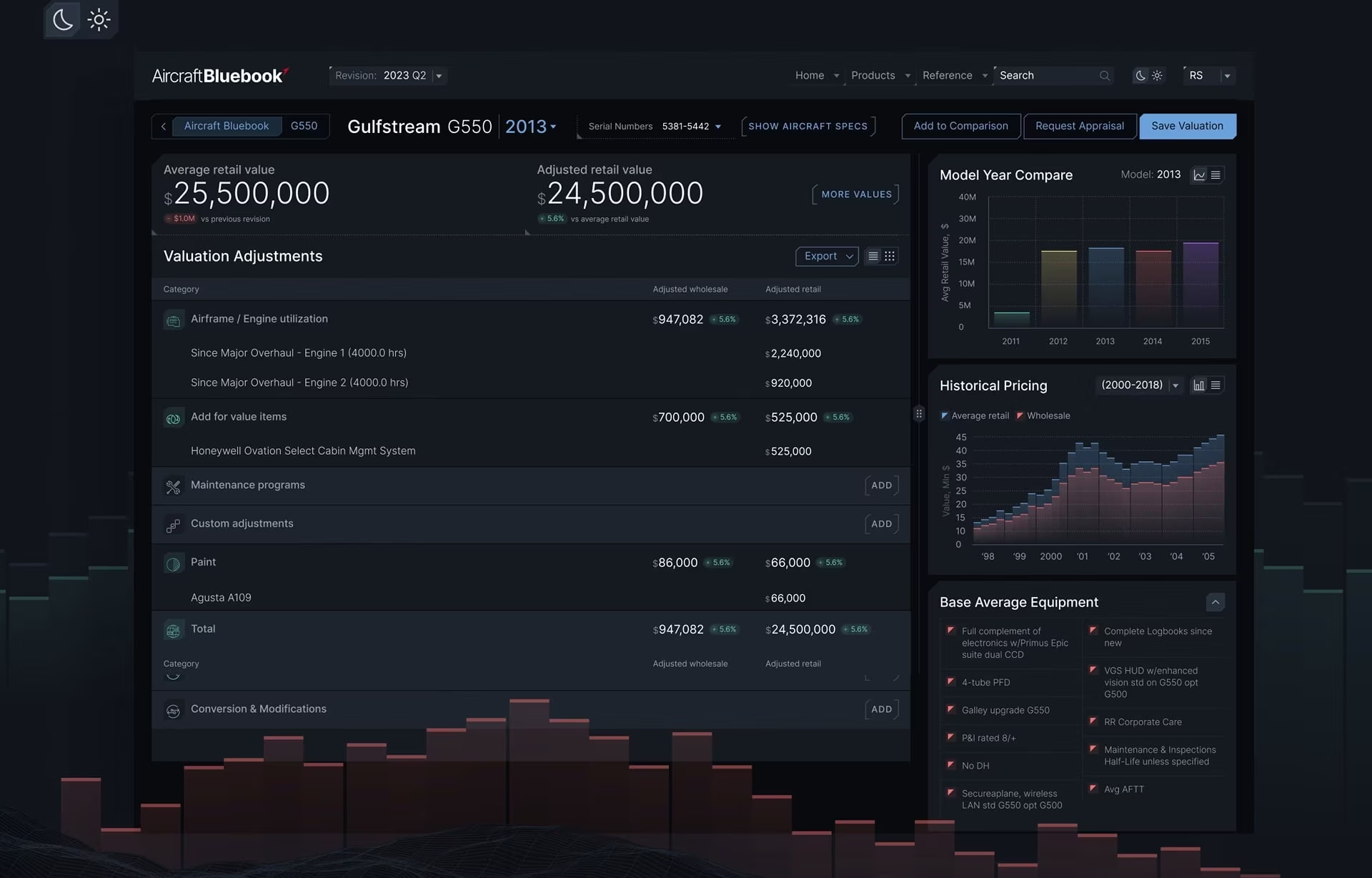
Aircraft Bluebook shows how the shape of the work, more than a feature list, sets requirements on a long-lived platform. The platform has provided aircraft valuations for more than 100 years and hosts data going back more than a century. A valuation is rarely finished in one sitting, and users come back to continue work they started yesterday or 10 years ago.
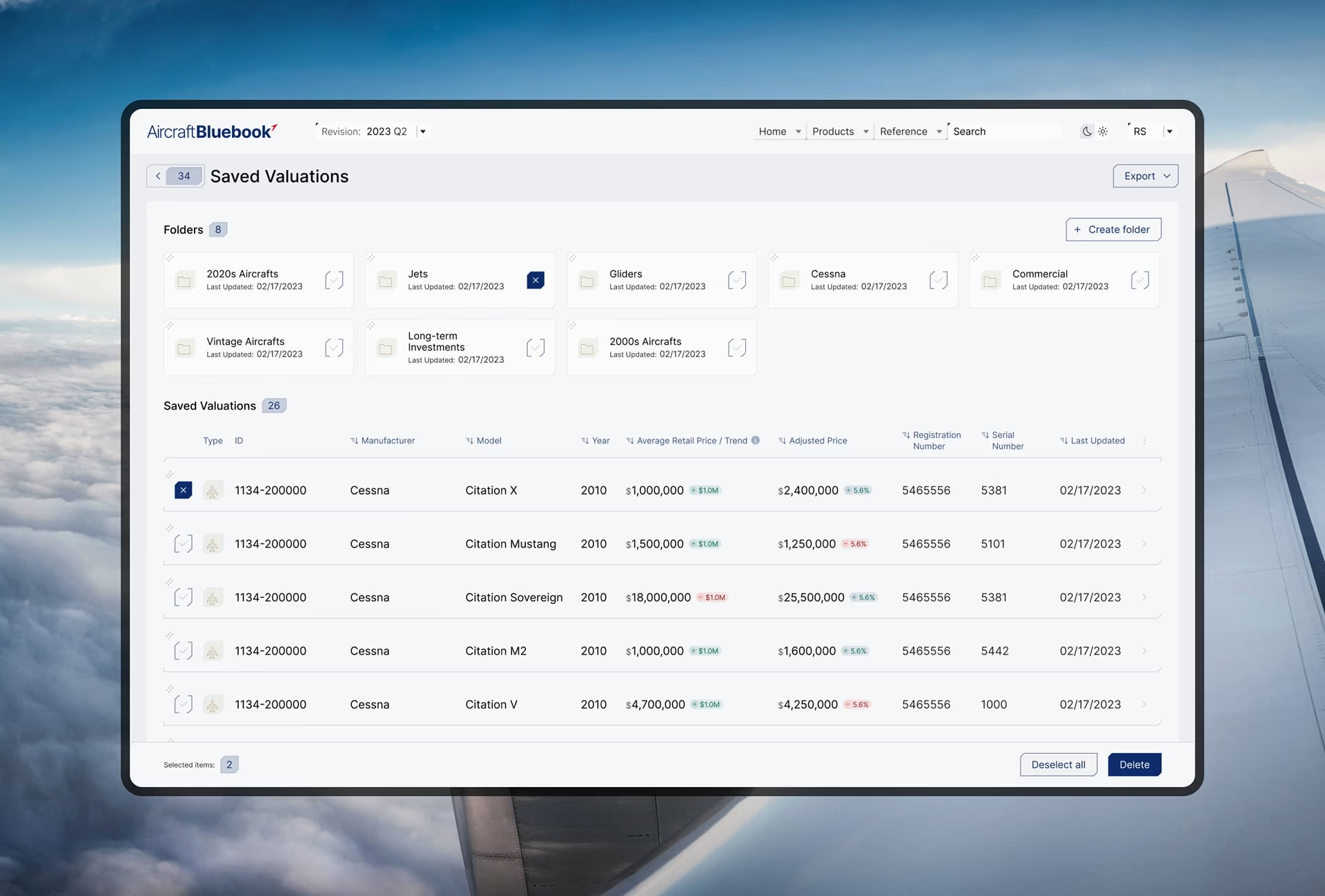
The requirement that surfaced was continuity. Every previously generated valuation is saved to the user’s account and reopens as it was left, and the platform returns users to the exact page and filters of their previous visit. The same attention to context produced a dark and light display toggle, because users read valuations in low light and in intense sunlight. Both came from studying how valuations actually get done.
Moving users to the new system
Most cutover dates are set before anyone knows whether users can work in the new system. Set the old system’s retirement date the other way round. Fix it once the people who own each critical workflow can finish it in the new one, exceptions included, then publish it so any parallel run has a defined end.
Pilot critical workflows first. Pick a representative group, and include the people who handle the awkward cases, because they own the workarounds most likely to break. Have them complete whole tasks in the new system: exceptions, approvals, and handoffs to other teams. Watch for the moment someone reaches for the old system or a spreadsheet. That moment is a missing requirement, and the rollout waits until it is fixed.
Choose the cutover method deliberately. A single cutover suits a small application with few dependencies, where running 2 systems costs more than a short outage. A phased rollout, by user group or by workflow, limits the damage when something breaks across a large organization. The price is keeping data, permissions, and integrations in sync across old and new environments for the whole phase.
Train on tasks. Teach each role the work it does and exactly what changed, instead of touring the new menus. The “I can’t do X anymore” complaints from the pilot make the best training material, because they are the questions every later group will ask in its first week.
Run a blocker loop. Give users one way to report anything that stops their work, put an owner on every report, and check whether a problem hits one person or a whole workflow. Critical blockers get fixed before the next group goes live, because each new group inherits every unfixed problem.
Task acceptance is the first of 4 retirement criteria. The others are reconciled data, correct access for every role, and a support team that can resolve issues without the legacy experts. Keeping the legacy application available indefinitely, by contrast, is a separate decision that needs its own budget, security review, and named owner, because nobody maintains a system they were told is going away.
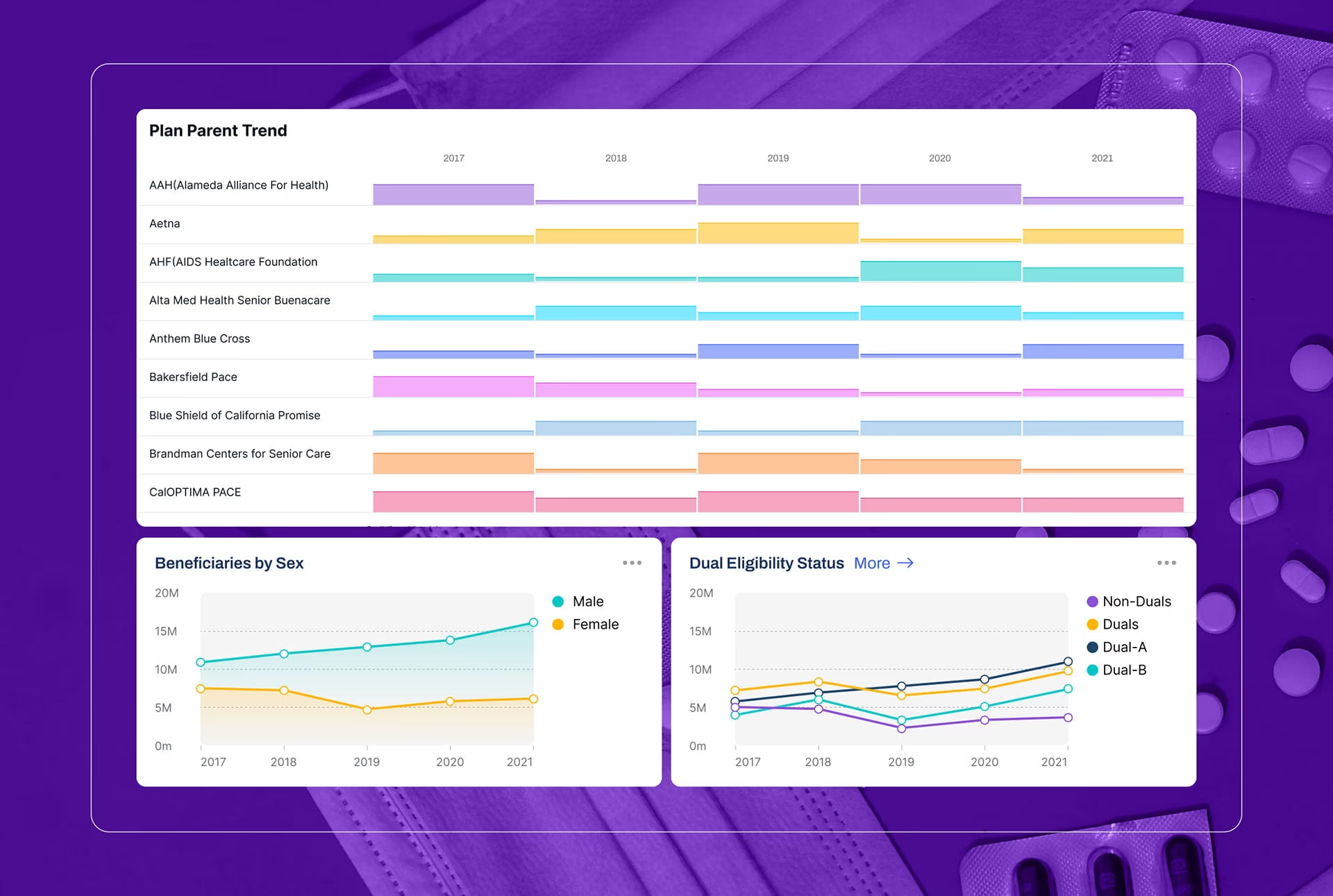
On the DHCS healthcare data visualization program, adoption came from consistency. DHCS had managed beneficiary data in legacy reporting formats before the engagement, so the dashboards were a new way of working for report users. Each new dashboard follows the design language and interaction patterns of those already deployed, so policy staff and program managers learn the pattern once, and the platform grows without a new learning curve.
Our research for DHCS, run through in-person, remote, and group interviews plus online surveys, showed that DHCS users arrive with a question, not a data query. So the interface starts from the question. Smart defaults do the rest: autofill suggestions, simple calendar pickers, and pre-selected dropdowns let people begin working without first understanding how the underlying data is structured.
How to plan a legacy modernization project
A modernization plan needs decision gates as well as a delivery schedule. Each phase ends with evidence the team uses to proceed, change direction, or stop. The user-side evidence, meaning mapped workflows, validated prototypes, and slices accepted by real users, should carry the same weight at each gate as the technical evidence does.
Building in workflow slices is the decision in this table that meets the most pushback from engineering, because layer-by-layer delivery feels more efficient. For the build, it often is. But layer-by-layer delivery means no user can accept anything until the end, when changes cost the most. A workflow slice gives the people who own that work something real to accept or reject months earlier.
Tracking continues after launch, across 3 groups of measures. Technical health covers reliability, performance, security findings, and maintenance effort. Operational performance covers task completion, processing errors, turnaround time, and reliance on manual steps. Adoption covers completion of critical workflows, support requests, and the usability problems that keep coming back after the first fixes.
Of all these measures, continued use of unofficial tools is the most honest. If the shadow spreadsheet is still open months after cutover, the new system is missing something the old workaround supplied, and the workflow map shows where to look. A falling count of those tools is the clearest sign the modernization did what it was funded to do.
Keep the workflow map after launch
Steps that live in workarounds cannot be automated, and the next round of AI work will run into every one the modernization left undocumented. A team with a current workflow map can decide which steps to hand to a model and which to protect. Treat the map as a maintained asset after launch, with an owner and a review date.
Frequently asked questions
What is legacy system modernization?
Legacy system modernization is the process of updating, restructuring, rebuilding, or replacing an aging business application so it stays supportable, secure, and useful. It follows 5 paths: rehost, replatform, refactor, rebuild, and replace. Every path can change something the people using the system rely on, even when the interface looks the same.
How do you modernize a legacy system?
Modernizing a legacy system starts with 2 assessments run in parallel: a technical one covering dependencies, integrations, data, and security gaps, and a workflow one covering how people actually work and which workarounds they use. Together they decide the path for each component, from rehost to replace. Delivery then moves in workflow slices, and the old system retires only when critical tasks work in the new one.
How long does a legacy modernization project take?
A legacy modernization project’s length depends on its path and user base: a rehost is the fastest route, while rebuilding or replacing a core system runs for years. The US Government Accountability Office reported that the longest ongoing modernization of a critical federal system was expected to take 10 years. Workflow mapping and group-by-group cutover add time that code estimates leave out.
What is an example of legacy application modernization?
Aircraft Bluebook is an example of legacy application modernization: a valuation service with more than 100 years of history and data going back more than a century, redesigned around how its users actually work across sessions that can be years apart. Saved valuations reopen as they were left, and the platform returns each user to the exact page and filters of their last visit.
What are the signs a legacy system needs modernization?
Common signs a legacy system needs modernization include a vendor that no longer supports the software, security vulnerabilities that cannot be patched, rising maintenance costs, and difficulty integrating with newer tools. A shrinking pool of people who understand the code is another. Staff building workarounds for routine tasks is a strong signal that the system no longer fits the work.
What is the difference between rehosting, refactoring, and rebuilding?
Rehosting moves an application to new infrastructure without changing its code, refactoring restructures the code while keeping its behavior the same, and rebuilding rewrites the application on a new stack. The 2 remaining paths are replatforming, moving to a new platform with minimal code changes, and replacing, swapping the application for a commercial product. Of the 5, rebuilding and replacing usually change the most for users.
What are the risks of legacy software modernization?
Legacy software modernization carries technical and organizational risks. Technical risks include data loss during migration, broken integrations, and downtime at cutover, while organizational risks include budget overruns, missing features in the new system, and users who cannot do their work after launch. Phased migration, testing, and a rollback plan reduce the first group, and mapping workflows with users early reduces the second.