Will AI replace UX designers? What changes in 2026
AI won’t replace UX designers, but it can handle a solid share of their work, and in record time. Give a model a complete brief, such as a landing page inside an existing design system, and it will return a usable first draft. Designers who spend most of their week on that kind of work have good reason to pay attention.
What a model can’t do is figure out what the brief should say. That still requires someone with a keen eye watching over the job. AI products also offer a kind of design work most teams never have time for: creating screens that show how sure the system is and let people quickly push back when it’s wrong and reconfigure on the fly.
Why AI won’t replace UX designers: the brief test
One simple test explains why AI won’t replace UX designers, and which parts of their work it will take. Ask of any piece of design work: could someone write the brief in full before design starts? If so, a model can increasingly do it. If finding the brief is the job, the model has nothing to start from.
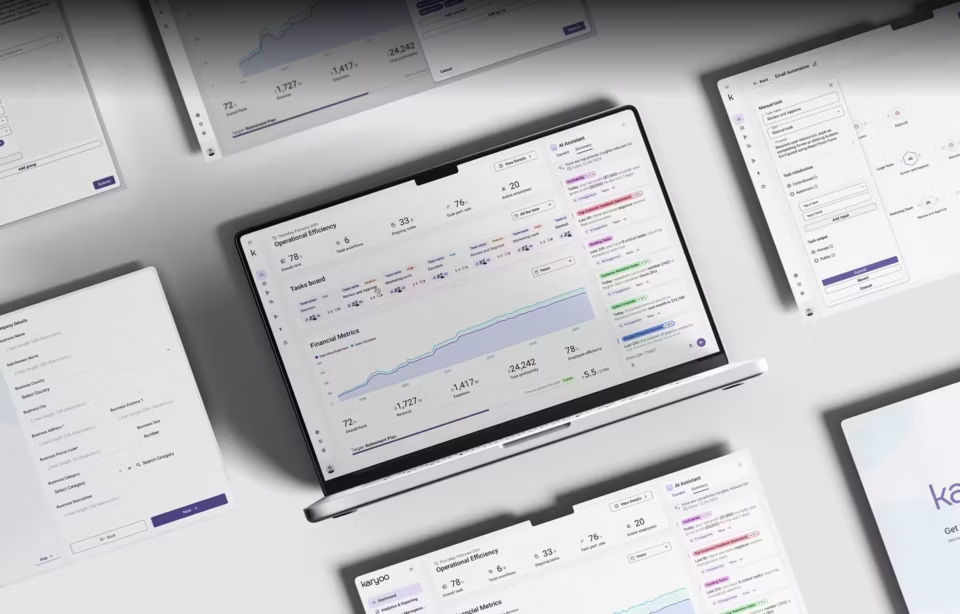
A landing page for a company with a mature design system is a good use case. The type scale, colors, and approved layouts already exist, and the copy is written. The job is to fit that copy into the system, a well-defined task a model can now handle. A designer still reviews the result, but they’re no longer the one drawing it line by line.
Compare that with a dispatch screen for an operations team that currently runs on a spreadsheet, three group chats, and whatever one senior dispatcher remembers. Nobody can write that brief, because nobody has written down the decisions the screen needs to support. Someone has to sit with the dispatchers for a few shifts before anyone knows what the screen should cover.
A common misconception: Moving a complex dashboard onto a new design system looks like senior work because the screen is dense and every mistake is visible. But the hard decisions were made long ago: what the dashboard shows, in what order, and for whom. The reskin is mostly mapping old components onto new ones, and a model can draft most of that mapping.
Now take that same dashboard and ask which three of its twelve metrics an operator should see first. That is one of the hardest decisions made on dashboard screen. The answer depends on what the operator does with each number and what happens when they miss one. You find it by watching someone open the screen at the start of a shift and noticing which number they look for first. In other words, this requires a veteran human eye with this kind experience in spades.
Even when the brief can be written in full, the designer stays in the loop. Someone reviewing ten generated screens still has to catch the missing error state, or the component that follows the system perfectly and still breaks the workflow. For well-defined work, the designer’s job shifts from producing screens to deciding which ones are right, and that is a different skill to hire for.
What AI already does in UI/UX design work
AI tools already do real production work on well-defined design tasks: first-draft screens from a written prompt, layout variations, design-to-code handoff, and sorting research notes into themes. Each of those starts from inputs someone needs to define before the tool runs, which is why teams have are able to hand them off.
The change shows up in the middle of a project. A team can go from a written requirement to several plausible directions without a designer building each one by hand, then spend the time it saved deciding which direction fits the workflow. A separate guide to AI-generated UI design goes through which parts of that stage a model can handle today and where it still needs a person.
Accessibility review is where this is easiest to see. On the DHCS and ClyHealth projects, automated audits caught issues that manual review missed across three consecutive sprints. The accessibility standards represent a kind of brief that needs to be written down and stable, so a tool can meticulously check every screen against it more consistently than a tired human reviewer might.
What comes back from the scan is a flag, and someone still has to decide what to do with it. The tool can report that a contrast ratio fails or that a form field has no label. A person has to work out what that means for the people using the screen, and whether the fix is a color change or an entirely different layout.
Too few stops or too many: how review breaks down
Clinician review of an agent fails in two opposite ways: too few stops invite rubber-stamping, and too many teach people to click through. In the referral example, the dangerous version is a polished draft that hides the missing ultrasound report. The design job is to place a few stops only where medical judgment is actually needed.
The first failure is called automation bias. FDA’s 2026 guidance describes it as “the propensity of humans to over-rely on a suggestion from an automated system.” Between patients, a doctor is thinking about the person just seen, the person waiting and an unfinished note. A referral that looks complete but silently lacks the heart ultrasound is easy to sign.
Alert fatigue is the second failure. AHRQ’s Patient Safety Network describes it as busy clinicians becoming desensitized to safety alerts, and notes that most alerts from the systems doctors use to place orders do not matter clinically. An agent that asks for confirmation at every step would teach doctors to ignore it, which defeats the purpose of the extra stops.
Administrative steps should still pause when the agent is unsure, below a confidence level that the workflow’s owner has set and tested on real cases. Showing that confidence clearly is its own design problem, covered in Fuselab’s article on AI transparency in UX.
Which design roles are shrinking
AI won’t replace UX designers wholesale, but some roles are shrinking fast. The ones going first are built on production from a finished spec: turning someone else’s direction into UI, template web design, asset production, handoff documentation, and first-pass wireframes. Each needs fewer hours once a model drafts the first version, because the brief was settled before the designer started.
Job titles will mostly stay the same, and what changes is the staffing ratio. A team that used to keep several production designers behind each senior designer will run leaner. When it hires, it will look for a sharp eye for what’s wrong in generated work more than for fast design hands.
Those production tasks were also how designers learned their job. A junior designer might spend a year turning a senior designer’s sketches into finished screens, fixing spacing, building component variants, and watching which of their choices survived review. It was repetitive work, and it was also the apprenticeship that prepared them for problems that come with no brief at all.
If AI takes over that layer, the way into the profession gets narrower. Junior designers feel it first, in fewer openings, and design leaders feel it a few years later, when nobody is ready to step up. Senior designers have to come from somewhere, so the junior role has to change, from producing screens to testing assumptions with users and checking generated work against what those users do.
What AI cannot own: discovery and accountability
AI can’t replace UX designers outright, because two parts of the job stay with people: discovery and accountability. A model trained on aggregate behavior designs for an average user who doesn’t exist. The real person using your product is a dispatcher near the end of a long shift, or a caseworker with four minutes between calls.
NNGroup’s guidance on getting started with AI for UX is blunt about it: “AI cannot replace user research with real users.” A generated screen can look finished and still get the important questions wrong. Does the caseworker need the newest event at the top, or the oldest? Can a suggested action be approved on sight, or does it need checking against the case file first? Nobody learns that from a prompt.
Accountability is the second limit, and it applies even to work that passes the brief test. Government products make it easy to see. Federal solicitations that include technology spell out accessibility requirements, and Section508.gov recommends that vendors prepare an Accessibility Conformance Report, which is the vendor’s own statement of how its product meets the Revised 508 Standards.
A scanner can check the screens, but it can’t make that statement. If a generated screen fails someone who relies on a screen reader, “the tool made it” is not an answer any federal buyer will accept. Someone chose to ship that output, and the vendor that delivered the product answers for it.
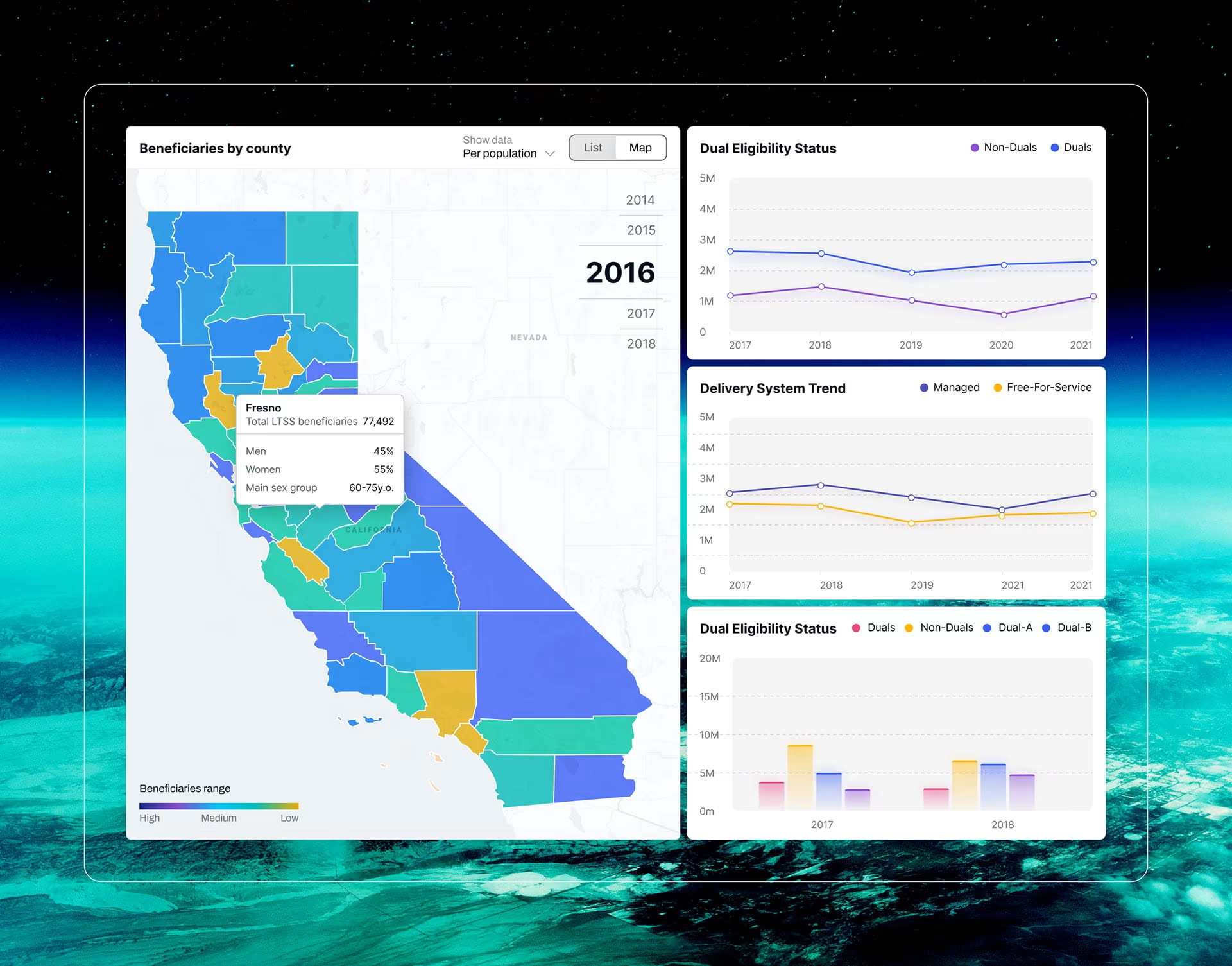
On the DHCS dashboards we designed, the readers were policy staff and public health administrators with no technical training, and the dashboards had to work for them on desktop and mobile without a walkthrough. Choosing what that audience could read at a glance was our call: county data became a choropleth map, the age-group breakdown a Sankey diagram, and ethnicity and language data a bubble plot.
Why AI products need more design work
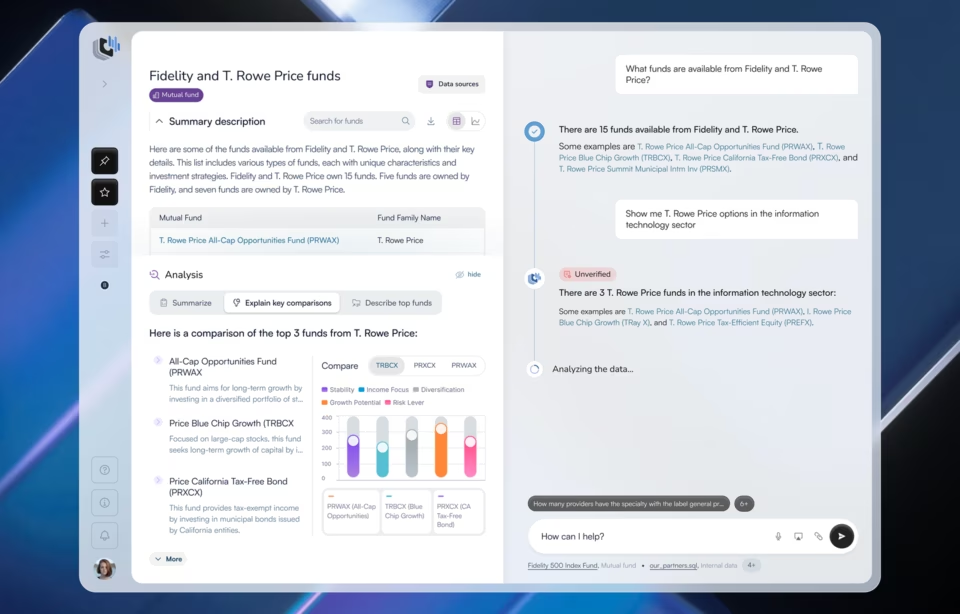
Fuselab’s design for Stardog Voicebox, a conversational AI product built on enterprise knowledge graphs, starts from a problem ordinary software rarely faced. When a financial analyst asks a question, the answer comes back fluent and plausible, and it may still be wrong. The analyst can’t skip checking it, so the design keeps the source data in the same view as the answer and puts a verification marker on every AI response.
That one screen shows what the new work looks like. Every AI feature needs states most traditional features never required: a signal for how much to trust this particular answer, a way to check where it came from, and a way to override it. Where those states should kick in can’t be written into a brief ahead of time, because nobody knows a model’s failure modes until real users have pushed on it.
Behind that design is a rule for any AI screen: keep measured data and generated content visibly different. Every answer carries the marker, and the hard part is deciding when it escalates to a warning. Warn on most answers and analysts learn to ignore it. Warn rarely, and the one answer that needed a second look slips through. The right threshold comes from watching the people who act on the output and finding the right balance with real users.
No interface fixes the model itself. A verification marker is only as honest as the signal behind it, so an overconfident model produces an overconfident marker. Design can make doubt visible before someone acts on an answer. Improving model calibration is engineering work, and a design team that promises it through the interface is overselling.
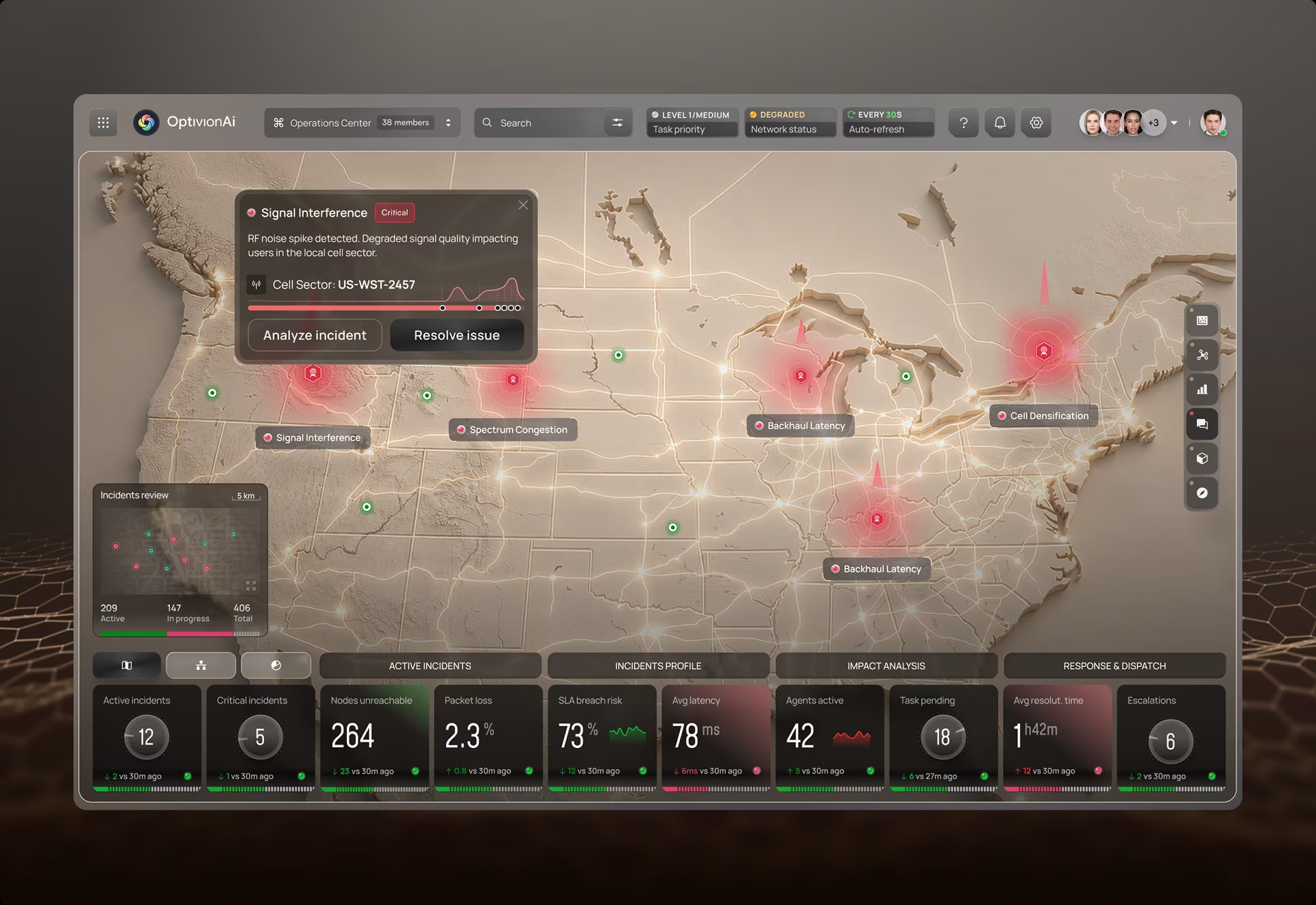
The evidence also has to travel with the answer. OptivionAI, an AI-assisted telecom operations platform Fuselab designed, handles this with a single incident record. An alert on the national map opens it, and the same record follows the problem down to the failing component and out to the technician on the roof. The engineer at the operations desk and the technician in the field see the same severity and the same event trail.
An alert is a claim, and whoever acts on it needs the evidence behind it. The components panel scores each module separately, so a failing radio unit stands out from the healthy one next to it on the same mast. Every incident also carries two actions, Fix Steps and Wire Plan, so an engineer who doubts the diagnosis can trace the affected circuit before sending anyone out.
Every AI feature eventually meets a user who says the output is wrong. The interface owes that person a next move, such as editing an assumption or tracing the evidence, and that path deserves design time from the first sprint. It matters even more in interfaces for AI systems that act on their own, because by the time a person disagrees, the system may already have acted.
Is UX design dying? What employment data shows
Federal projections say UX design isn’t dying. The U.S. Bureau of Labor Statistics projects employment of web and digital interface designers, the category closest to UX, to grow by 6 percent from 2025 to 2035, faster than the 4 percent it projects for web developers. BLS puts their median annual wage at $104,000 as of May 2025.
That category is narrower than UX. BLS defines it around the layout and usability of websites and interfaces, which overlaps with UX but leaves out research and product strategy. A ten-year projection is also a forecast rather than a count of jobs that exist today.
What the data can’t show is how the work inside the job is changing. It does show a field that is still growing, and a growing field can still see its production work shrink, its entry path narrow, and the bar for experienced designers rise. The data is consistent with the brief test, although it can’t prove it.
For a hiring plan, asking whether AI will replace UX designers is too broad. The more useful question is which parts of your team’s work are getting cheaper, and which parts are turning into the reason you hire at all.
What this means when you build or hire a design team
When you build or hire a design team, pay for decisions rather than screen counts. AI is most likely to cut production hours when the workflow and components are already defined. Discovery doesn’t compress in the same way, because its evidence still has to come from real users and the product context.
An agency that still quotes by the number of screens is pricing the part of the work most likely to get cheaper. Scope with the brief test instead. If a project starts with a defined workflow and an approved visual direction, production will likely take less time than it used to. Then decide whether the time saved goes into research or simply comes off the budget.
When you evaluate an agency, ask where AI sits in its process and who reviews what it produces before you see it. A team that has thought about this will name specific screens that start in a model and the person who signs off on them. A general answer about using AI everywhere usually means nobody owns the review.
Some things in a proposal should make you pause. The most telling is high-fidelity screens in week one with no research behind them, because it means the team skipped the part of the job a model can’t do. Personas built without interviews point the same way, and so does a full design system delivered before anyone has mapped the workflows it has to serve.
In each case the brief was assumed rather than discovered, and you may be paying agency rates for work a model could have drafted. A better first deliverable is a map of what happens when the model is wrong and when a user needs to override it, drawn before any screen exists.
Try the brief test on your own team
Pull up the last ten screens your designers shipped and sort them into two piles. In one, put the screens whose brief could have been written in full before design started. In the other, put the ones that depended on something a designer found out along the way. Most screens are a mix, so file each one where most of the effort went.
The balance between those piles tells you more about how AI will change your team than any forecast about whether AI will replace UX designers.
Frequently asked questions
Will AI replace UX designers?
AI won’t replace UX designers, but those whose work is mostly production from a finished spec will feel it first. The skills worth building now are running research, framing a problem before a brief exists, and judging generated work, because a model can’t do any of them on its own.
What design tasks can AI do today?
Current AI design tools handle first drafts, layout variations, and design-to-code handoff well, and they still struggle with the parts of a screen that depend on real data. Empty states, error messages, very long names, dense tables, and views that change with user permissions are where generated screens most often break, so that is where a reviewer should look first.
Is UX design dying as a career?
UX design isn’t dying as a career: the Bureau of Labor Statistics projects 6 percent growth from 2025 to 2035 for web and digital interface designers, the closest federal category to UX. What is changing is the way in. New designers stand out when their portfolio shows research they ran and decisions they defended, rather than screens a model could have produced.
Will UX design be replaced by AI in government and regulated products?
AI is unlikely to replace UX designers in government and regulated products, because accessibility, privacy, and workflow decisions have to be documented and defended. A useful procurement question is which parts of an interface were AI-generated and how they were tested before the vendor wrote its Section 508 Accessibility Conformance Report.
How does AI change the cost of a UX design project?
AI is more likely to reduce production hours on a UX design project when the workflow and components are already defined. Discovery doesn’t compress in the same way, because the underlying evidence still has to come from real users and the product context. Research and review remain significant parts of the work, while AI-specific states such as confidence and override add work that traditional interfaces did not require.
How should a company choose a design agency that uses AI?
A company choosing a design agency that uses AI should ask who reviews AI-drafted screens before delivery and how research recordings are handled inside AI tools. It should also ask whether any of that data can end up training a vendor’s model, and put the answers in the contract next to the IP and confidentiality terms.
What should an agency's portfolio show now that AI can generate screens?
An agency portfolio should include at least one case study where research changed a decision, such as a screen that was cut or reordered after watching users. Polished final screens prove little now that a model can produce them, so ask the agency to walk you through one decision it reversed and the evidence that changed their minds.